8
LISTENING TO THE RADIO (1/2)
“Radio”
From the main menu of the multimedia system,
press “Radio”. If a radio station is already playing,
press the shortcut to area A from some of the
pages on the “Navigation” or “Phone” menus.
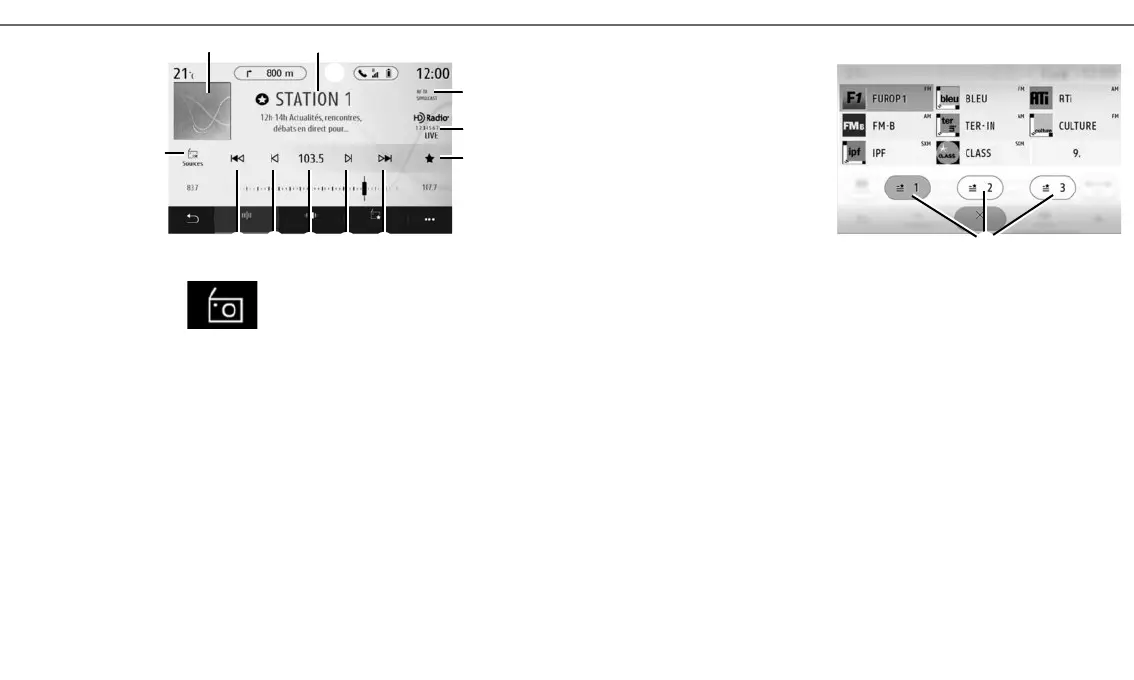
1 Radio station logo.
2 The name of the current station, frequency
and text information.
3 Indication of the activation of traffic and
other information.
4 HD Radio Live.
5 Store a station in “Presets”.
6 Access next or previous station.
7 Access next or previous frequency.
8 Access to manual entry of the desired fre-
quency.
9 Access the audio sources menu
“FREQUENCY” MODE
Use this mode to select radio stations or frequen-
cies in the current radio band. You have two op-
tions:
– search by frequency: scan the frequencies (in
0.05 Hz steps) by repeatedly pressing the 7 but-
tons;
– search by station: move forwards or backwards
to the next station by pressing the 6 buttons.
SELECT A RADIO BAND
Select FM, AM, DR (digital radio) or Bluetooth by
pressing “Sources” 7 on the multimedia screen.
6 8 6
1
2
3
4
7
7
A
9
STORE A RADIO STATION AS A PRESET
Use this function to store the station now playing.
In “Frequency” mode, press the 5 button or press
and hold the current station logo 2.
Select a location on one of the three pages 10 by a
pressing a location until a beep sounds.
10
5
Interval List Presets
Saved presets
Close



 To Next Page