44
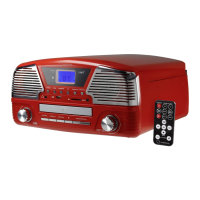
TUNING/SKIP knob (23)
This knob is used to select individual tracks or search for a certain section within one track.
The arrows at the knob indicate the search direction (forwards or backwards).
• Turn the knob only briefly to jump to the next or the previous track.
• Turn the knob longer to search for a certain section within one track.
Folder search
• Press the ALBUM/PRESET F button (19) to jump back one folder.
• Press the ALBUM/PRESET S button (20) to jump one folder forward.
Repeat function
• Press the MODE/CLK button (14) once in order to listen track currently played again.
• Press the MODE/CLK button (14) twice in order to listen to all tracks on the data carrier again.
• To de-activate this function, press the MODE/CLK button (14) again.
Programming a track series
To program a track series, the device must be in stop mode (press the H button (17).
A maximum of 99 tracks can be programmed in a series.
• Press the MODE/CLK button (14). “P01” will flash in the display.
• Select the first track of the desired track series using the TUNING/SKIP button (23).
Also a folder can be searched to select a track using the ALBUM/PRESET F button (19) and
ALBUM/PRESET S (20) as described in “Folder search”.
• Press the MODE/CLK button (14) to save the first track. “P02” will flash in the display.
• Select all other tracks as described above and confirm your selection with the MODE/CLK (14) button
every time.
• To play the programmed track series, press the SCAN button (16) .
• Press the SCAN button (16) again, if you want to interrupt playback.
• Press the H button (17) again, if you want to stop playback.
• If you want to delete the saved track series, press the H (17) again.


 To Next Page