6English5 English
Set up PoE NVR System
A setup wizard will guide you through the NVR system configuration process. Please set a
password for your NVR (for the initial access) and follow the wizard to configure the system.
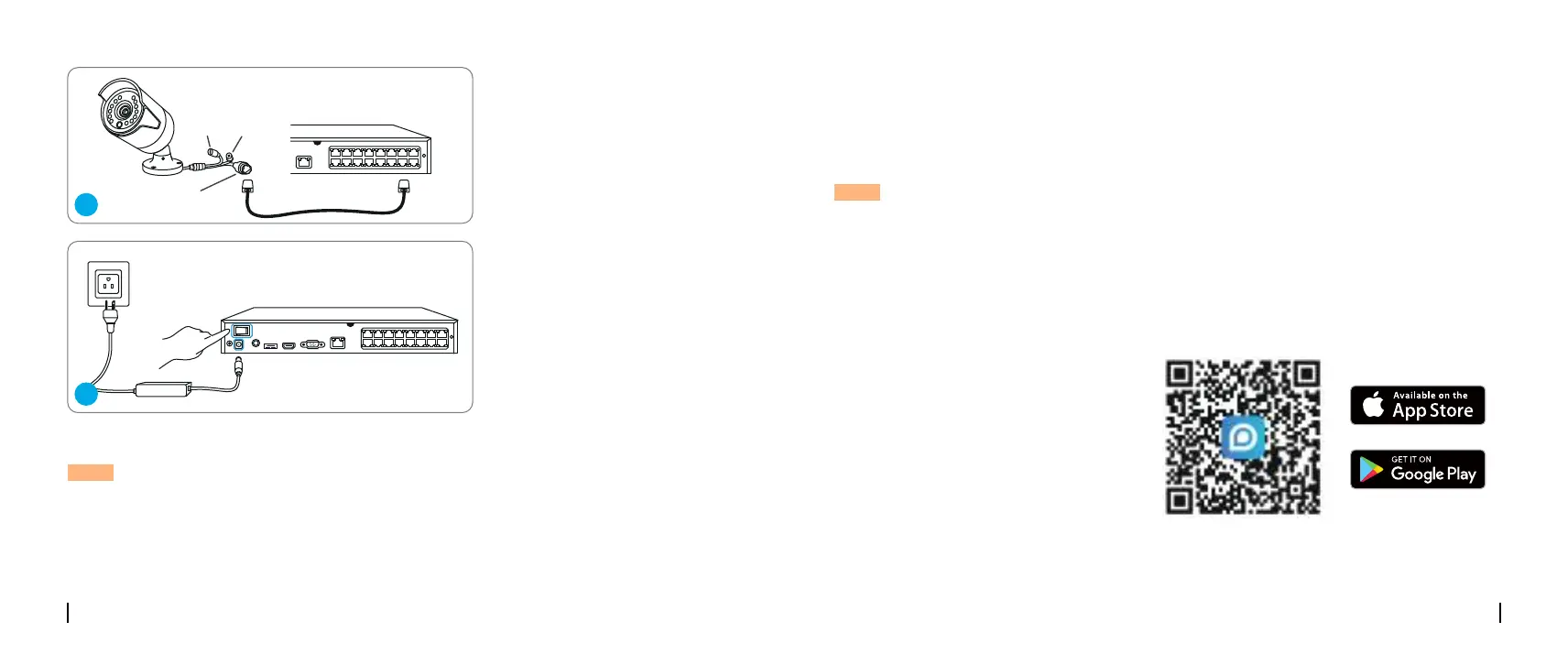
Connect cameras to PoE ports on
the NVR.
Connect the NVR to a power outlet
and turn on power switch.
NOTE: The password should be at least 6 characters. It is recommended that you note down the
password and keep it in a secure place.
NOTE: Some Reolink WiFi cameras also work with Reolink PoE NVR. For more information, visit
https://support.reolink.com and search Make Reolink WiFi Cameras Work with Reolink PoE-NVRs.
Access the NVR via Smartphone or PC
Download and launch the Reolink App or Client software and follow the instructions to access the
NVR.
Reset Button
DC Power
Network (LAN)
3
4
• On PC
Download path: Go to https://reolink.com > Support > App & Client.
• On Smartphone
Scan to download the Reolink App.



 To Next Page
 Loading...

