USB
Bluetooth Connect:
Pairing screen will be shown as below:
Bluetooth Pairing:
USB picture playback:
USB le list:
Plug the USB; the USB icon will be lighted .
Touch the USB icon to enter the USB playback mode.
The source unit will playback the audio in the USB
device.
If the Bluetooth is not connected, press
Reconnect the paired Phone or paring to pair
the new device.
Turn on the Bluetooth of the Mobile phone/
Bluetooth device; you can see the "SOUND-
STREAM V2." Select the "SOUNDSTREAM V2" for
paring and connection.
1
5 6 7 8 9
10 11 12
1
2
2 3 4
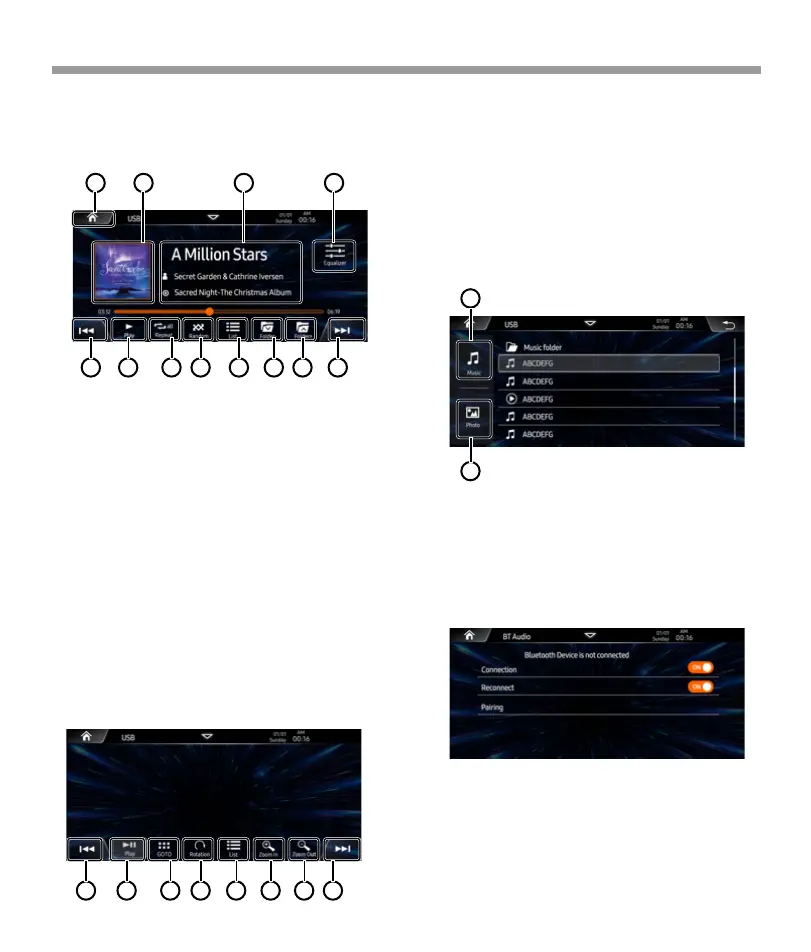
USB
1. Tap to back to home page.
2. Show the song’s album art picture.
3. Show the song’s ID3 information.
4. Tap to access to EQ settings page.
5. Tap to playback previoust track, press
and hold to activate the fast reverse,
press again to select fast reverse speed.
6. Tap to select play/ pause.
7. Tap to select repeat all / repeat 1 /
repeat directory.
8. Tap to select Random is On / Off.
9. Tap to access to file list page.
10. Tap to playback previous folder.
11. Tap to playback next folder.
12. Tap to playback next track, press
and hold to activate the fast forward,
press again to select fast forward speed.
1. Tap to playback previoust picture.
2. Tap to select play/ pause.
3. Tap to pop-up keyboard then input the
desired number.
4. Tap to select Random is On / Off.
5. Tap to access to file list page.
6. Tap to zoom in the picture.
7. Tap to zoom out the picture.
8. Tap to playback next picture
1. Tap to show the music list.
2. Tap to show the pictue list.
1 2 3 4 5 6
7 8
24


 To Next Page
 Loading...