Bluetooth Phone:
After the mobile Phone is connected with the
source unit via Bluetooth(HFP), the user can go
through the source unit.
Make a phone call. Touch the Phone icon in Main
Menu to go to BT Phone mode. Please note it needs
to connect the microphone for phone calls.
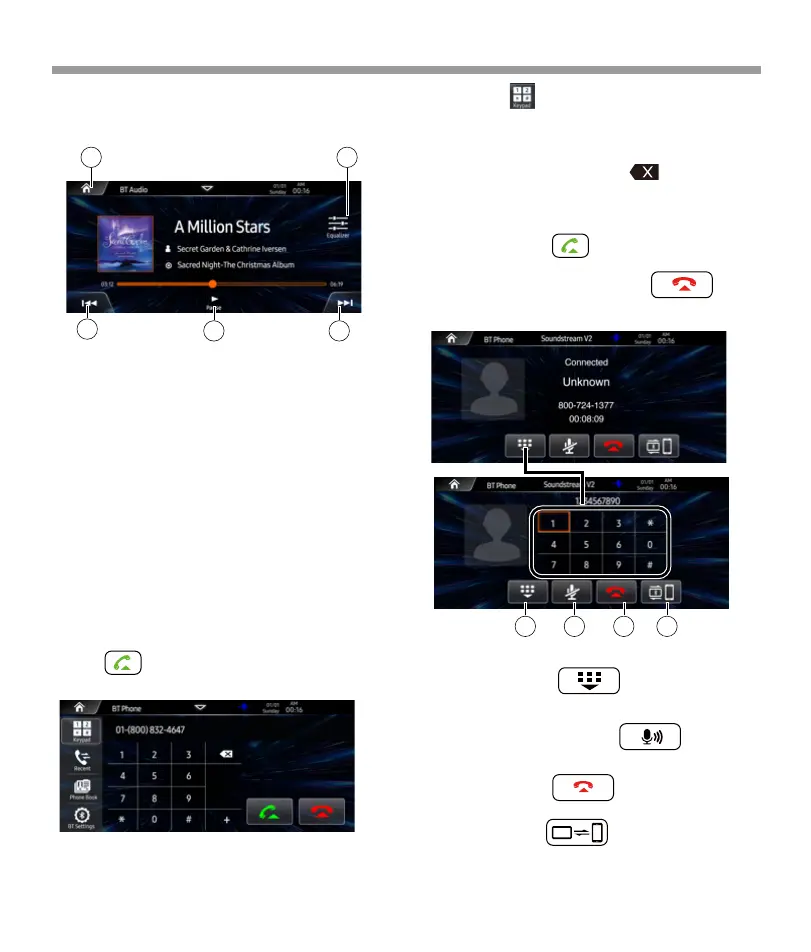
Bluetooth Audio
Touch BT Audio icon to enter music
5. Play Next song.
Bluetooth Music Playback
1. Tap to back home page.
2. Tap to access to EQ settings page.
4. Tap to Play/Pause current song.
3. Play Previous song.
1 2
3
54
Once the phone and unit are connected successfully,
you’ll be able to make calls from the unit.
Touch to make a call.
1. Touch the icon to enter keypad screen.
2. Using the keypad, touch 0-9,*,#, enter the phone
number you wish to dial. If you input
an incorrect number, touch the icon on the
keypad to delete the incorrect number.
3. Once the correct number appears on the
screen, touch the icon. To go to dialing
interface.
4. To end the call, touch the icon
on the screen.
•Press to
switch call audio to phone or AV
receiver.
Switch Button
Keypad Button
4
Mute Microphone Button2
•Press to
show the keyboard.
•Press to
Microphone Mute or Un-Mute.
Hang-up Button3
•Press to
hang-up the calling.
1
1 2 3 4
25


 To Next Page
 Loading...