Rally Mode
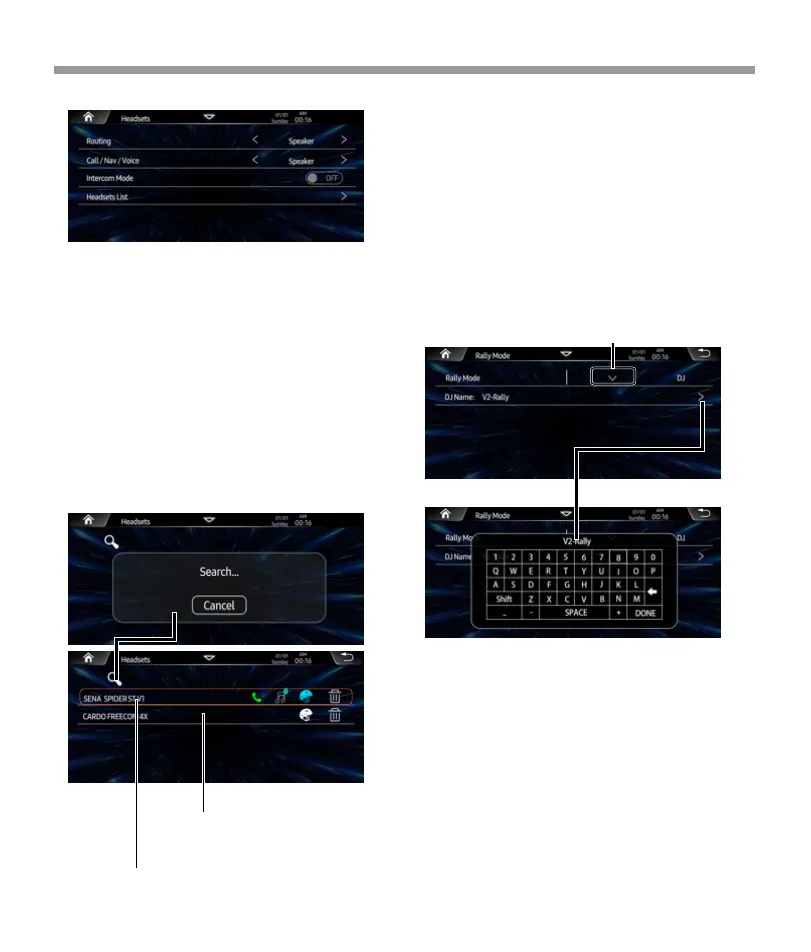
Headsets List:
Routing: Switch the media sound routing
is Speaker or Headset.
Call/Nav/Voice, Set Call/ Navigation/Voice
promotion routing is Speaker or
Headset.
Intercom Mode: When connect 2 headsets
device , user can switch the intercom
mode is On, then the rider and passenger
can start to intercom.
Headsets List: Tap to access headsets list page,
then can start search the device to connect.
Rally Mode™ Music Sharing
Rally Mode™ Music Sharing allows you to broad-
cast your playlists to group riders. You can pair
with riders who have Rally Mode equipped head
units and accessories. An unlimited number of
users can pair with a principal broadcaster’s
stream.
V2 headunit indentify is DJ
User can broadcast your playlists to group rider or
other accessories.
GPS Navigation Powered by iGo
Primo®
The NNG iGO Primo® GPS Navigation system
comes with maps and points of interest (P.O.I.) for
the USA and Canada included. You can update
maps and P.O.I. information annually through
Naviextras.com. Uses OEM GPS Antenna if
Equipped, Aftermarket Antenna Available.
Tap to select identify is DJ or Listener.
Tap DJ name item to pop-up the keypad, then
you can rename the device name for broad-
casting.
Tap the connected device the disconnect it, tap
again to reconnect it.
Tap to delete the disconnect
device.
27


 To Next Page
 Loading...