28
The navigation system helps you find your way
to your destination with the built-in GPS receiver.
Soundstream V2 does not transmit your GPS
position; others cannot track you.
It is important to look at the display only when it is
safe to do so. If you are the driver of the vehicle, we
recommend that you plan and review your route
before you start your journey. Plan the route
before your departure and stop if you need to
change the route. You must follow the traffic rules.
If you deviate from the planned route,
Soundstream V2 changes the instructions accord-
ingly.
Soundstream V2 is optimized for in-car use. You
can use it easily by tapping the screen buttons
and the map with your fingertips.
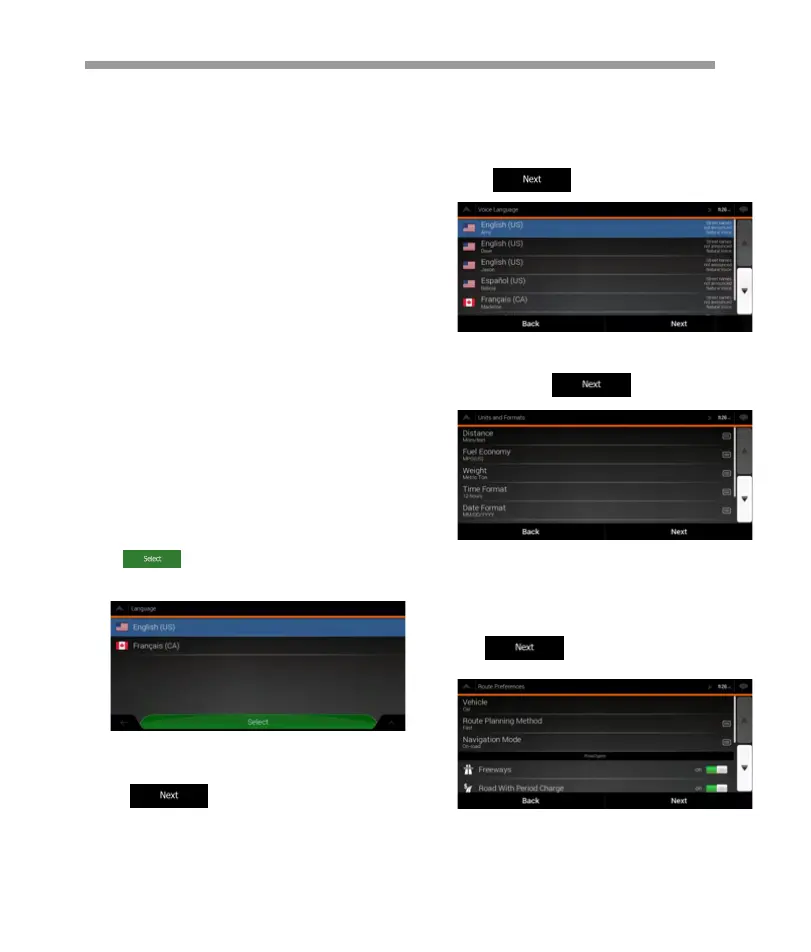
When using the navigation software for the
first time, an initial set-up process starts
automatically.
1. Select your preferred language, then
tap to confirm your selection. Later
you can change it in Regional settings .
2.The Configuration Wizard starts.
Tap to continue.
3.Select the language and speaker used for
voice guidance messages.Later you can
change it in Regional settings.
Tap to continue.
4. If needed, modify the time format and unit
settings. Later you can change them in Region-
al settings . Tap to continue.
iGo map Operation
1 Warnings and safety information
2 Getting started
2.1 Initial set-up
5.If needed, modify the default route planning
options. Later you can change them in Route
Preferences.
Tap to continue.


 To Next Page
 Loading...