iGo map Operation
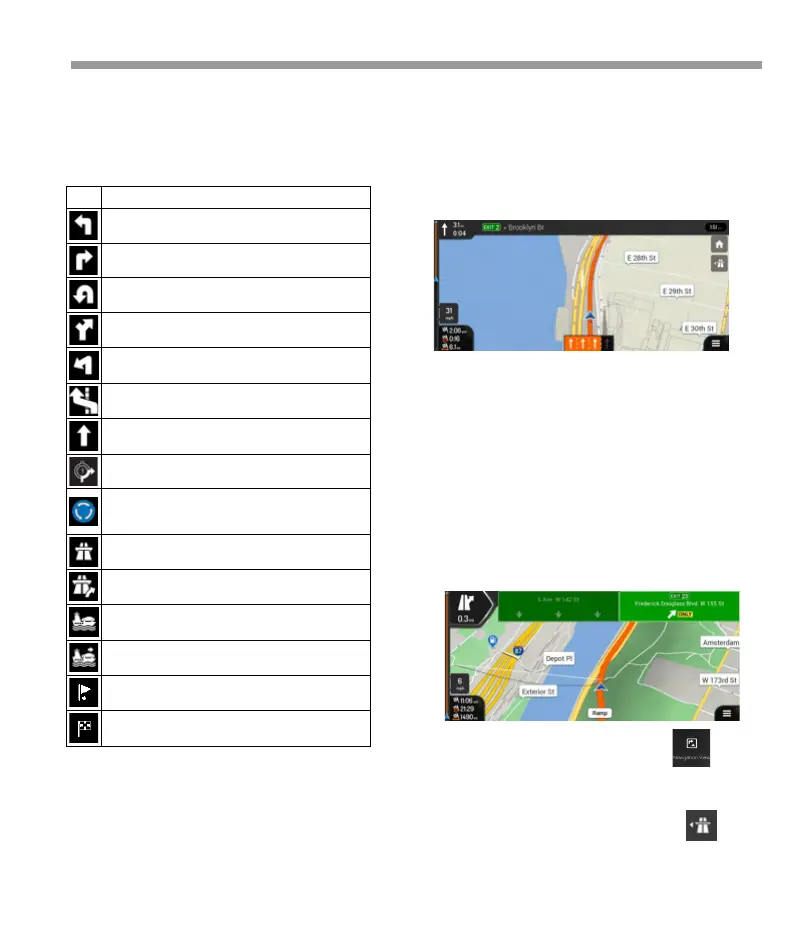
2.3.5 Maneuver icons
During navigation the next maneuver is displayed in
the top left corner. Most of the maneuver icons are
intuitive. The following table lists some of the
frequently shown route events:
2.3.6 Lane information
When navigating on multi-lane roads, it is important
to take the appropriate lane in order to follow the
planned route. If lane information is available in the
map data, Epsilon Linux device displays the lanes and
their directions using small arrows at the bottom of
the map. Highlighted arrows represent the lanes and
the direction you need to take.
2.3.8 Freeway services
When you are driving on a freeway, the button
appears at the top right corner of the Navigation
view. Tap it to open a panel with the details of the
next few service stations (gas stations, restaurants).
You can modify the signpost settings .
2.3.7 Signposts
If necessary information is available, Epsilon Linux
device displays signposts at the top of the map. The
color and style of the signposts are similar to the real
ones you can see above roads or by roadsides. They
show the available destinations and the road
numbers. All signposts look similar when cruising
(when there is no planned route). During navigation
only the signpost that points to the lane(s) to be
taken is highlighted; all the others are darker.If you
want to hide the currently displayed signposts, tap
any of them and the normal Navigation view returns
until new signpost information is received.
Continue straight in the intersection.
Enter the traffic circle and take the first exit (next
maneuver).
Enter the traffic circle (second next maneuver).
Approaching a waypoint on the right.
Approaching the destination.
35


 To Next Page
 Loading...