iGo map Operation
3.1 Selecting a destination
You can choose your destination by selecting one of
the following options:
* Using combined search to search among different
destination types at once.
* Entering a full address or a part of an address, for
example a street name without a house number
* Selecting a Place as your destination.
*Selecting a previously saved location as your
destination.
*Selecting a location from the History of previously
used destinations.
*Selecting a previously saved route.
*Entering the coordinate of the destination.
*Selecting a location on the map.
*Planning a multipoint route.
3.1.1 Using combined search
There are several ways to select your destination. You
can initiate a separate search for addresses, Places,
saved locations, or recent destinations, but the fastest
way to search for any of these is to use combined
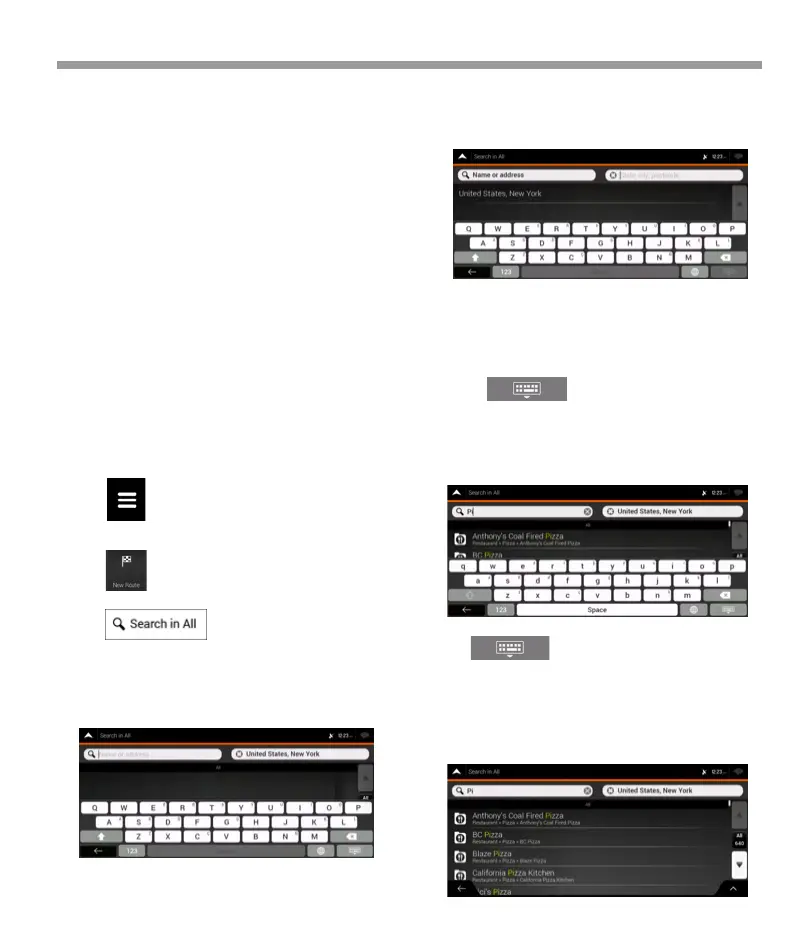
search. Perform the following steps to use combined
search:
3. Tap . You can see the input field
at the top of the screen. Right next to it you can see
the search area, the town around which the search is
carried out. The default search area is the area where
you are located. For a local search, skip the next step.
4. (optional) To search in a different area, tap the
input field with the search area, and start entering the
name of the new search area on the keyboard.
5. With the proper search area displayed, start
entering the name, address, or category of the
destination you are looking for.
6. Tap to switch to the result screen. You
can see all the results in the list, regardless of their
type. Addresses, Places, Place categories, Saved
locations, and recent destinations are mixed in one
list. You can immediately select the result you want to
use as your destination or narrow the list of results for
only one type (for example, Places).
You only need to enter a few letters to get a result.
The most likely result appears below the input field as
you enter new letters.
a. If the new search area is in a different country or
state, start entering the country/state and the town.
b. Tap to see the whole list of the
matching results.
1. Tap on the Navigation view to access the
Navigation menu.
2. Tap .
38


 To Next Page
 Loading...