iGo map Operation
3.1.2 Selecting an address
If you know at least a part of the address, this is the
quickest way to select your destination. Using the
same screen, you can find an address by entering
the following information:
*The exact address, including the house number.
*The address starting with the street name
*The center of a town
*The midpoint of a street,
*An intersection,
*Any of the above, starting the search with the ZIP
code,
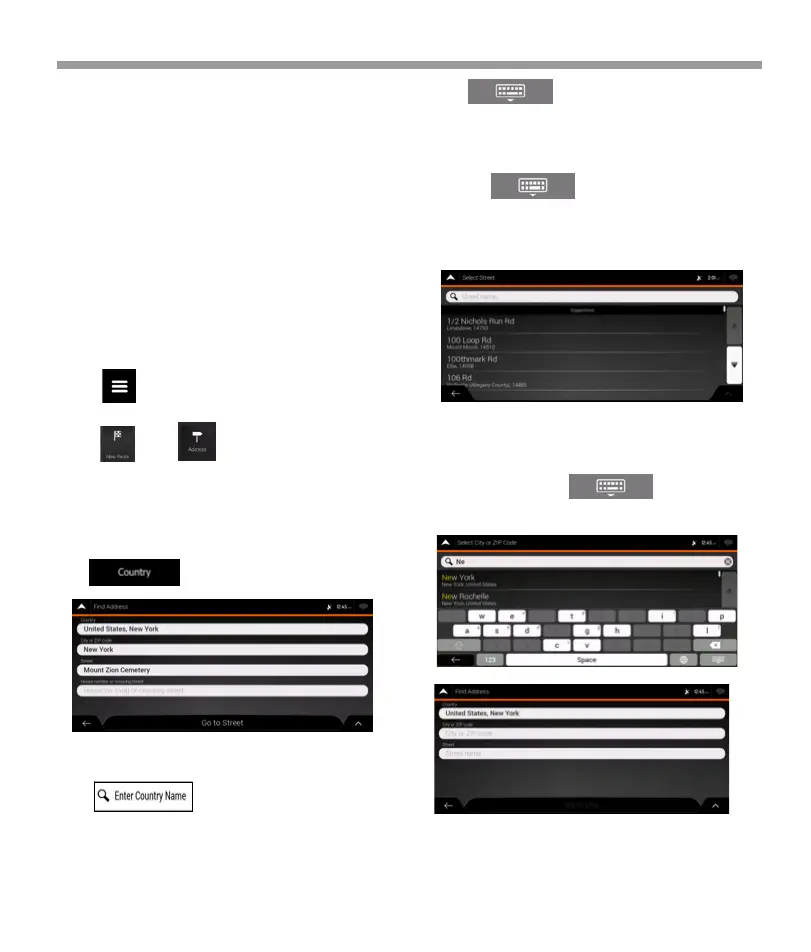
4. If needed, select a new city.
a. Tap the City or ZIP code field.
b. (optional) In the Select City or ZIP code screen,
you can immediately select a city from the list of
suggestions.
To enter an address as the destination, follow these
steps:
1.Tap on the Navigation viewto access the
Navigation menu
b. Tap to open the list of results and
select one country from the list.
d.To open this list, tap and select the
city.
3. By default, the Epsilon Linux device proposes the
country and state where you are or in case there is
no valid GPS position, the country and state of the
last known position. If needed, change the country.
tap
c. Otherwise, start entering the first few letters of the
city on the keyboard. The names that match the
string appear in a list.
a. In the Select Country screen, you can immediately
select a country from the list below the input field or
tap the button and start entering
the first few letters of the country on the keyboard. If
you select a country without a state, you can search
for a town in all its states.
2.Tap and .
3.1.2.1 Entering an address with states
40


 To Next Page
 Loading...