Installation
Installation
Note: Reinstall the OEM bracket after head unit installation
1
3
1
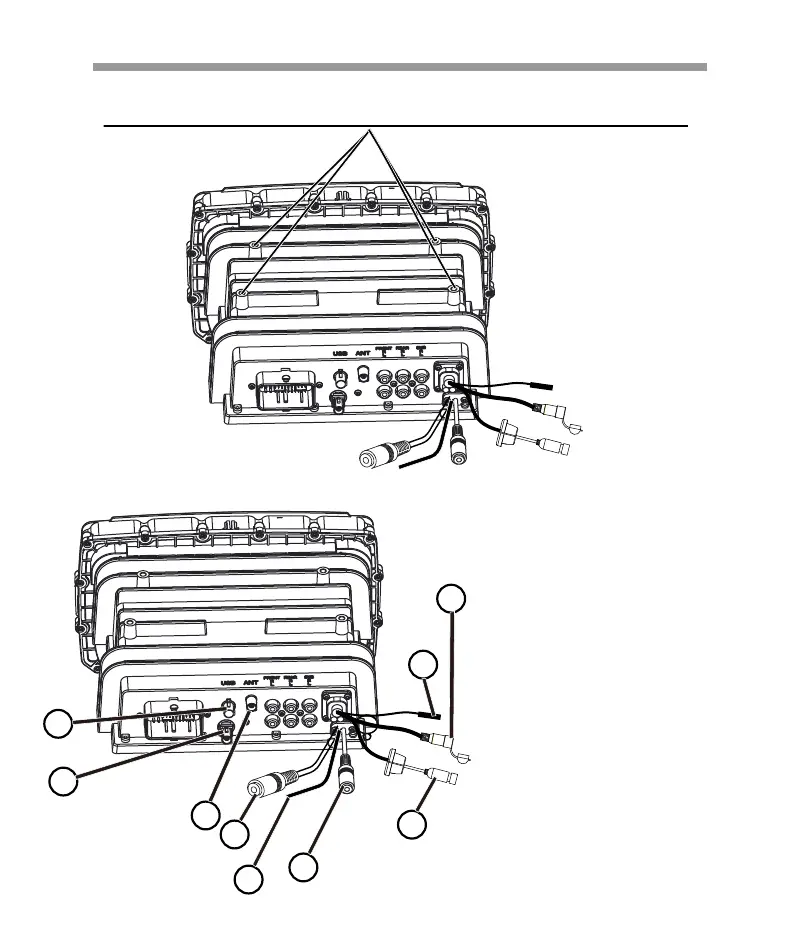
USB Connector
Connect the OEM USB cable for USB
device, Android smart phone, iPhone.
3
Radio Connector
Connect the Radio Antenna.
2
GPS Connector
Connect the GPS Antenna.
4
Camera in
Connect the Camera in.
6
External Microphone Connector
Connect the external Microphone cable.
7
Type-C USB Connector
Connect the external device for charging.
8
Bluetooth Antenna
Bluetooth Antenna for Rally mode.
5
Camera +12 V DC (Max 0.5A)
Connect the Camera power cable.
4
Note: SiriusXM SXV300 Tuner sold separately,
SiriusXM subscription required.
9
SiriusXM Tuner Connector
Connect the SXV300 tuner.
2
5
6
7
8
9
5


 To Next Page
 Loading...