8
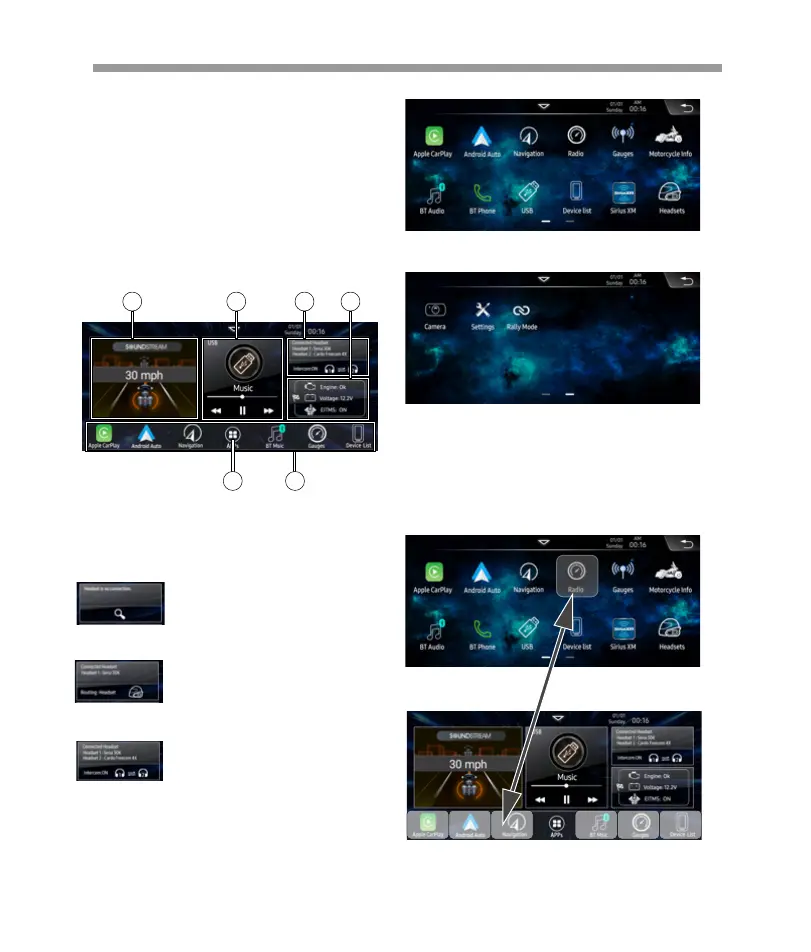
Home Page:
6. Tap to enter APPs Page:
Main Menu
V2 is a headunit for 2014+ Harley-Davidson®
Touring Motorcycles w/ iGo® GPS Navigation,
Wireless Apple® CarPlay®, Wireless Android
Auto®, iDataLink® Maestro® Compatible,Siri-
usXM® Ready®, & 8.3” LCD Touchscreen
Touch the corresponding Mode icon to enter
playing mode. The Mode icon in gray means
the corresponding function is not ready, or
the proper device has not been connected.
How to move the APP icon to the home page :
Page 1
Page 2
No connection
1
1.Display current riding speed.
2.Display the now playing source information.
3.Display headset connected information.
4.Display the motorcycle base information.
5.Shortcut buttons.(These 7 shortcut can be
exchanged with APPs page icon.)
2 3
6 5
4
Press and hold the prefer icon, and drag the icon to
home page.
Press to start search the avaliable
headset to connect.
The home page bottom 6 shortcut icons will be activate .
Select prefer icon to exchange.
Press to select the media sound
routing headset or motorcycle
speaker.
2) When connect 1 headset device
Press to select the intercom is
On or Off.
3) When connect 2 headset devices


 To Next Page
 Loading...