Settings
9
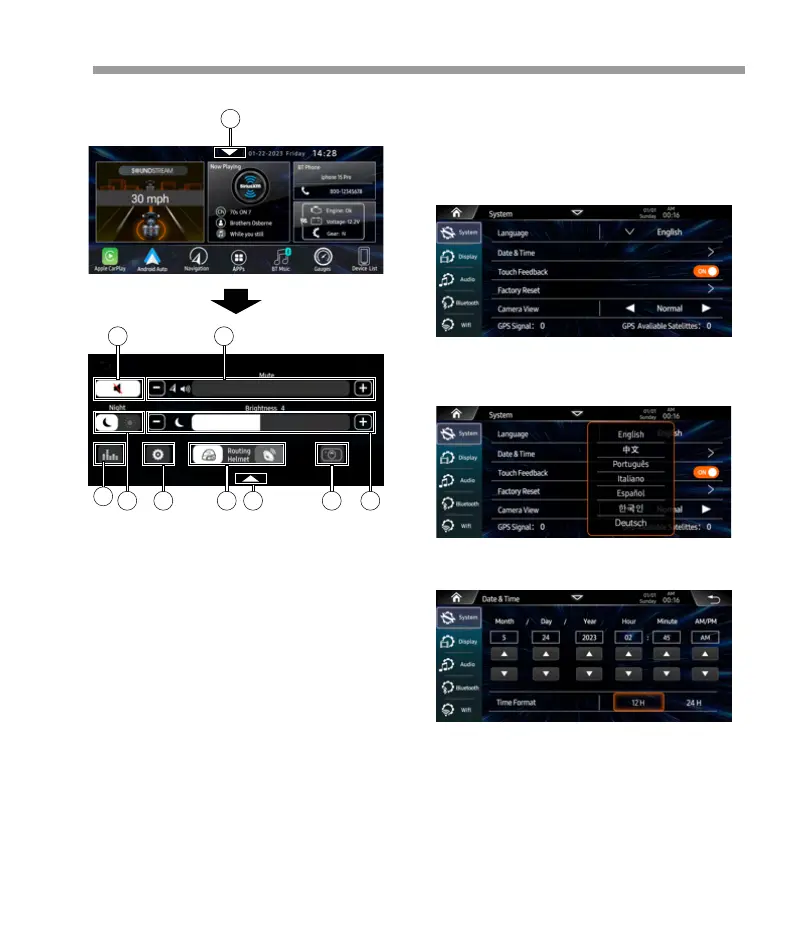
Tap to activate pop-up settings menu:
Language:
1.Press to Mute or Un-Mute.
2.Decrease / Increase now playing source volume.
3.Press to select Daytime or Nighttime.
4.Decrease / Increase the panel brightness.
5.Press to access to Settings page.
6.Press to swith the routing Headset or Speaker.
Note: If the headset is not connected, the button
will be gray color and disable.
7.Press to access the EQ settings page.
8.Press to access to the Camera video in.
9.Press to hide the Pop-up menu.
In APPs page 2, press <Setting> icon to access
to settings page.
System settings as below: Language , Date &
Time, Touch Feedback, Factory Reset,Camera
View, GPS Signal, About.
Select the prefer language for operation.
Date & Time:
Set the time and time format.
1
1
3 45 6
7
89
2
Touch Feedback:
Set the Key Beep is ON or OFF.


 To Next Page
 Loading...