EasyManua.ls Logo

ReSound Unite - User Manual

ReSound Unite
25 pages
Print Icon
To Next Page IconTo Next Page
Loading...
USER GUIDE
ReSound Unite
TM
Mini Microphone

Other manuals for ReSound Unite

Questions and Answers

  • S
    Samantha MyersJul 26, 2025
    How to fix a ReSound Unite Microphone when the sound level is very low?
    • J
      Jeffrey AllenJul 26, 2025
      If the sound level from your ReSound Microphone is very low, consider these solutions: * Make sure the ReSound Microphone is correctly positioned on the speaker's clothing or around their neck, ideally 4 to 8 inches from their mouth. * Increase the volume using the “+” key on the ReSound Microphone. * If an audio device is connected to the Line-in jack, adjust the volume using the “+” and “-” keys on the ReSound Microphone, or the volume control on the external audio device.
  • S
    Samantha GatesAug 2, 2025
    What to do if ReSound Microphone sound is too low or too high?
    • K
      kathrynrobinsonAug 2, 2025
      If the sound from your ReSound Microphone is still too low or too high, try these adjustments: * Adjust the volume on the hearing instruments themselves, if they have a volume control. Alternatively, use the “+” and “-” keys on the Remote Control. * Ensure that the ReSound Microphone and hearing instruments are within wireless range. * Make sure there are no significant obstacles blocking the direct line of sight between the ReSound Microphone and the hearing instruments.
  • M
    Michael BrooksAug 7, 2025
    Why is there no sound from my ReSound Unite Microphone hearing instruments when streaming?
    • A
      Alexandra LewisAug 7, 2025
      If you're not getting any sound from your hearing instruments while streaming, here are a few things to check: * Make sure the ReSound Microphone and hearing instruments are within wireless range. * Ensure the ReSound Microphone is powered on and streaming is activated. * Verify that the ReSound Microphone's battery isn't too low to support streaming; if it is, charge the battery. * If an audio device is connected to the line-in jack, confirm that it's powered on and not muted.
  • M
    Michelle RamosAug 14, 2025
    What to do if ReSound Microphone streaming button doesn't find audio signal?
    • C
      Christopher ChanAug 14, 2025
      If the streaming button on your remote control isn't finding an audio signal from your ReSound Microphone, indicated by an “X” icon on the display, check the following: * Ensure that the ReSound Microphone and hearing instruments are within wireless range, then try activating streaming again. * Make sure the ReSound Microphone is powered on, and then activate streaming again. * Check the battery level of the ReSound Microphone and charge it if it's too low to support streaming. * If an audio device is connected to the line-in jack, verify that the device is powered on and the output isn't muted.
  • A
    Andrew SpencerNov 18, 2025
    Why does my ReSound Microphone hearing instrument drop out of the streaming program?
    • T
      Thomas ShafferNov 18, 2025
      If your hearing instrument unexpectedly drops out of the streaming program, it might be due to these reasons: * One of the causes described for the “no sound” symptom has persisted for more than 5 minutes. Take the necessary corrective action as described for the “no sound” symptom and activate streaming again. * The battery in the hearing instrument is so depleted that it no longer supports audio streaming. Replace the battery in the hearing instrument with a new one, and activate streaming again. * If an audio device is connected to the line-in jack, the audio level from this device may be too high. Adjust the volume using the “+” and “-” keys on the ReSound Microphone, or using the volume control on the external audio device itself, until the best sound level and quality is obtai...

Summary

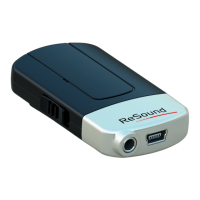
ReSound Unite Mini Microphone Component Description

Getting Started Guide for ReSound Unite Mini Microphone

Charging the ReSound Unite Mini Microphone Battery

Instructions for charging the rechargeable battery, including LED indicators and charging time.

Turning the ReSound Unite Mini Microphone On and Off

Procedure for powering the device ON and OFF, including LED status during operation.

Pairing the Mini Microphone to Hearing Instruments

Pairing the Mini Microphone in Channel 1

Steps to pair the Mini Microphone to hearing instruments in Channel 1.

Pairing the Mini Microphone in Channels 2 and 3

Steps to pair the Mini Microphone to hearing instruments in Channel 2 or 3.

Starting Audio Streaming with Mini Microphone

Starting Streaming from Multiple Unite Devices

Stopping Audio Streaming

Wearing the ReSound Unite Mini Microphone

ReSound Unite Mini Microphone LED Indicator Guide

Using the ReSound Unite Mini Microphone Line-In Input

Adjusting ReSound Unite Mini Microphone Volume

General Safety Warnings for the Device

Safety: Ignition of Flammable Atmospheres

General Device Precautions

ReSound Unite Mini Microphone Battery Care

Battery Warning, Care, and Disposal

ReSound Unite Mini Microphone Charger Care

Charger Safety Warnings

ReSound Unite Mini Microphone Technical Specifications

ReSound Unite Mini Microphone Warranty Information

Warranty Coverage for Device Defects

Specifies what is covered under the limited warranty for electrical components due to defects.

ReSound Unite Mini Microphone Troubleshooting Guide

Troubleshooting: No Sound During Streaming Program

Troubleshoots lack of sound in hearing instruments during a streaming program, covering range, power, and audio source issues.

ReSound Unite Specifications

General IconGeneral
CompatibilityReSound hearing aids
Wireless Technology2.4 GHz wireless technology
Battery LifeUp to 10 hours
Charging TimeApproximately 3 hours
InputBuilt-in microphone
AccessoriesLanyard
Weight30 grams

Related product manuals