18 19
Using the line-in input
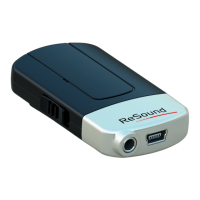
The line-in input (#3 on page 8) can be used to stream audio sig-
nals from most audio devices through the ReSound Unite™ Mini
Microphone’s line-in feature directly to your hearing instrument.
1. Insert one end of the cable included with your ReSound
Unite™ Mini Microphone into the line-in jack on the Mini Mi-
crophone.
2. Plug the other end of the cable into the AUDIO OUT on the
audio device you want to stream from.
Wearing your ReSound Unite™ Mini Microphone
Clip your ReSound Unite™ Mini Microphone on the speaker’s
jacket or other clothing. Place the device within a range of 4 to 8
inches from the speaker’s mouth.
Light indicator (LED)
The Light indicator (#6 on page 9) on your ReSound Unite™ Mini
Microphone serves as a multipurpose user interface, providing
information on the status of your device.



 To Next Page
 Loading...