
EasyManua.ls Logo

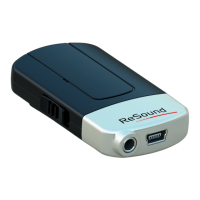
ReSound Mini Microphone - User Manual

ReSound Mini Microphone
25 pages
Print Icon
To Next Page IconTo Next Page
Loading...
ReSound Unite
TM
Mini Microphone
USER GUIDE

Questions and Answers

  • K
    Katherine HillAug 8, 2025
    Why is the sound from my ReSound Mini still too low or too high?
    • M
      Melinda WilliamsAug 8, 2025
      If the sound from your ReSound Microphone remains too low or too high, check these: * The audio volume level of the hearing instruments may not be suitable. Adjust the volume on the hearing instruments or use the “+” and “-“ keys on the Remote Control. * The Microphone and hearing instruments may be on the edge of the wireless range. Ensure they are within wireless range. * The Microphone and hearing instruments may lack sufficient “line-of-sight”. Ensure that there are no significant obstacles obstructing the streaming.
  • J
    Jeanette BergAug 13, 2025
    Why is the sound level from my ReSound Mini very low?
    • J
      justinaustinAug 13, 2025
      If the sound level from your ReSound Microphone is very low, consider the following: * The Microphone may not be worn correctly. Clip the Microphone on the speaker’s clothing or hang it around the speaker’s neck using the lanyard, so that the device is within 10-20 cm from the speaker’s mouth. * The sound received by the microphone may be very low. Increase the volume using the “+” key on the Microphone. * If an audio device is connected to the Line-in plug, the audio level from this device may be too low. Adjust the volume using the “+” and “-“ keys on the Microphone, or using the volume control on the external audio device, until the best sound level and quality is obtained.
  • K
    Kelsey DiazAug 18, 2025
    What to do if ReSound Microphone streamed audio signal is not found?
    • W
      William HooverAug 18, 2025
      If the streaming button on your Remote Control is pressed, but no streamed audio signal is found on your ReSound Microphone, it might be due to several reasons: * The Microphone and hearing instrument might be out of wireless range. Ensure they are within range and try activating streaming again. * The Microphone might not be powered on. Power it on and try again. * The battery level of the Microphone might be too low. Charge the battery. * If an audio device is connected to the Line-in plug, it might be powered off or muted. Power on or unmute the external audio device.
  • L
    Linda SimmonsAug 25, 2025
    Why is there no sound in my ReSound Microphone hearing instruments while streaming?
    • R
      rfischerAug 25, 2025
      If there is no sound in the hearing instruments while in the streaming program with your ReSound Microphone, consider the following possibilities: * The Microphone and hearing instrument may be out of wireless range. Ensure they are within range. * The Microphone may not be powered on. Power it on and activate streaming again. * The battery level of the Microphone may be too low to support streaming. Charge the battery. * If an audio device is connected to the Line-in plug, it may be powered off or muted. Power on or unmute the external audio device.
  • M
    Melissa SmithAug 28, 2025
    How to fix ReSound Microphone streaming button on Remote Control when it has no effect?
    • D
      David MillerAug 28, 2025
      If the streaming button on the Remote Control has no effect when pressed with your ReSound Microphone, it could be due to these reasons: * The Microphone and hearing instruments may not be paired. Perform the pairing process. * The Remote Control and hearing instruments may not be within wireless range. Ensure they are within range and activate streaming again. * If pairing is the issue, repeat the pairing process, ensuring that the battery doors on both hearing instruments are closed within 20 seconds after pressing the pairing button on the Microphone.
  • C
    Courtney GentryDec 3, 2025
    What to do if ReSound Microphone hearing instrument drops out of streaming?

    Summary

    Product Description and Components

    Getting Started with Your Device

    Charging the Battery

    Instructions for fully charging the rechargeable battery before use.

    Turning the Device On and Off

    How to operate the ON/OFF switch for power management.

    Pairing with Hearing Instruments

    Pairing in Channel 1

    Steps to pair the device in the first available channel.

    Pairing in Channel 2 or 3

    Procedure for pairing the device in subsequent channels.

    Starting Audio Streaming

    Methods for Starting Streaming

    Two methods to initiate audio streaming to hearing instruments.

    Stopping Audio Streaming

    Adjusting Volume Levels

    Important Information and Safety

    Maintenance and Care Instructions

    Guidelines for cleaning and preserving the device.

    General Safety Warnings

    Child Safety, Environmental, and Interference Concerns

    Guidance on child safety, avoiding interference, and environmental hazards.

    Built-in Battery Care Guidelines

    Battery Warnings and Precautions

    Charger Care and Usage

    Charger Safety Warnings

    Troubleshooting Guide

    Troubleshooting Streaming and Audio

    ReSound Mini Microphone Specifications

    General IconGeneral
    CompatibilityReSound Hearing Aids
    Wireless Technology2.4 GHz
    Battery LifeUp to 10 hours
    Charging Time3 hours
    Input Connector3.5 mm audio jack
    Microphone TypeOmnidirectional
    DesignCompact

    Related product manuals
