03
1
2
3
4
5
6
7
8
9
10
11
12
13
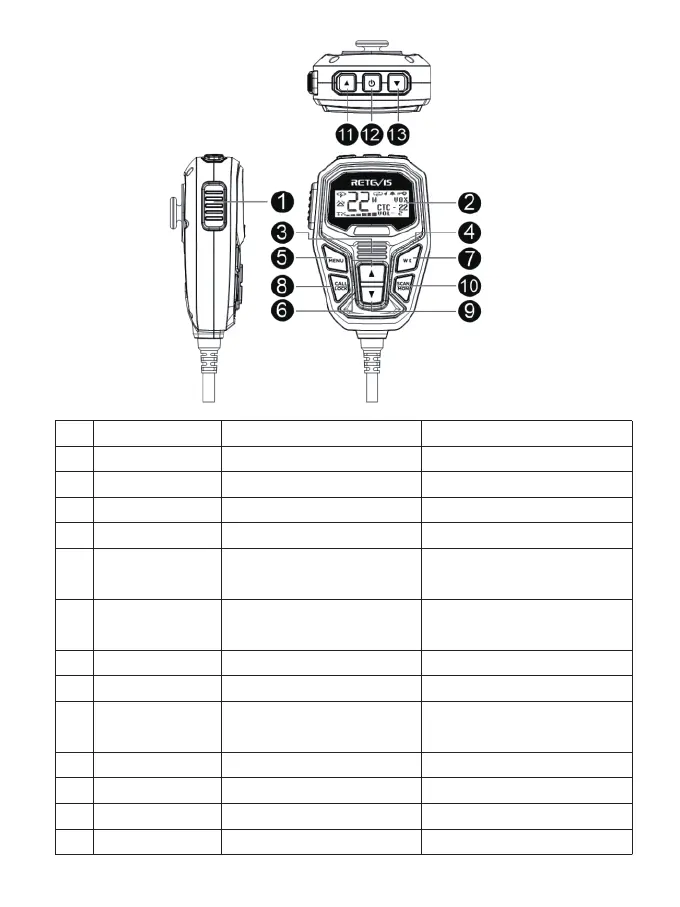
PTT
LCD
Speaker
Speaker Microphone
Menu
Volume+
WX
Call/Lock
Volume-
Scan/Mon
Channel+
Power On/Off Button
Channel-
Enter menu, confirm selection
and exit menu
Raise volume during standby,
Function selection during menu
Enter weather mode
Press to send a call signal
Lower the volume during standby,
Function selection during menu
Enter/exit scan
Increase the channel number
Decrease the channel number
Raise volume during standby,
Function selection during menu
Keypad Lock
Lower the volume during standby,
Function selection during menu
Enable/disable monitor
Rapidly increase the channel number
Turn on/off the radio
Rapidly decrease the channel number
No. Name Short Press Function Long Press Function
Radio Introduction
Speaker Mic



 To Next Page