Note:
If the above methods fail to solve your problem, or you confront different malfunctions, please contact your local
dealer or appointed maintenance station.
Maintenance and Clean
To ensure the best performance and prolong working life, please acquaint yourself with the following for
maintenance and cleaning.
Maintenance
◎Please do not scratch or puncture the device with hard or sharp object.
◎Please do not place the device in an environment which can corrode electronic circuits or under direct solar
radiation.
◎Please do not carry the device by its antenna or headset.
◎Please make sure the SP-MIC plug is covered when not in use.
Clean
◎Please clean your device regularly by using a dry clean cloth or soft brush to wipe the dust on the surface and
on the charger contacts;
◎The keypads, control knob and housing of the device may be dirty from use. Please use nonwoven wipes to
clean them. Do not use chemicals to clean it such as detergent, alcohol, spray or petroleum products, on the
device surface or printed labels. Chemicals can damage the housing, display and remove the printing on the
labels. Before power on the radio, please make sure the device is dry completely.
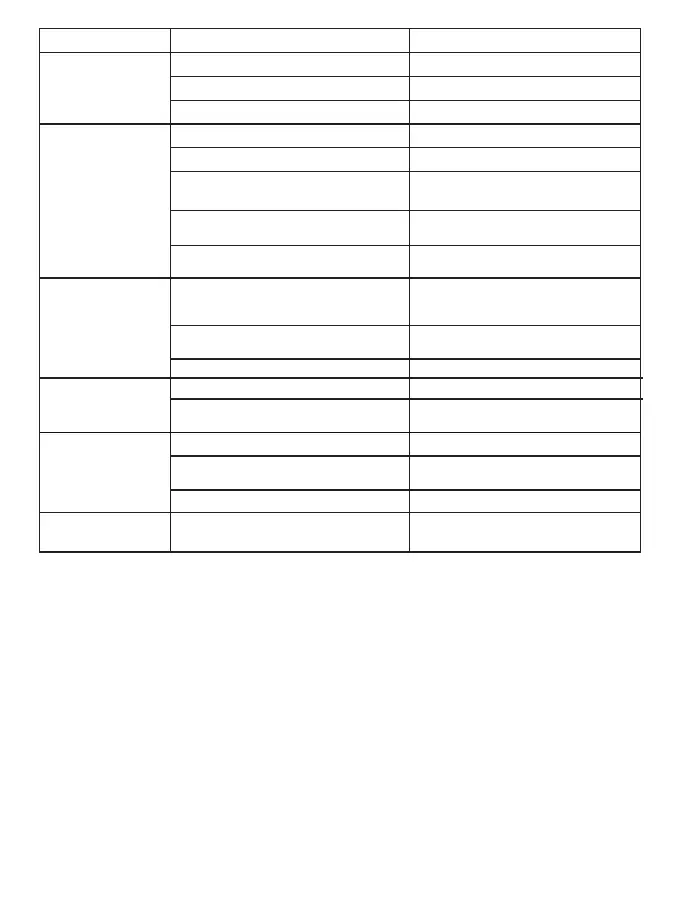
Malfunction Analysis of causes Handling method
Radio fails to power on
Battery is installed incorrectly
Move back within range
Change frequency or channel.
Reduce range between users.
Battery power lower than preset value
Bad battery contacts or contacts in dirty.
Battery power gets lower.
Volume control at low value.
Speaker is blocked or damaged.
Out of range of group members
Co-channel user interference
Channel not programmed with correct
signaling
The communication distance is too great
Strong local environmental interference.
Antenna gets loose or antenna frequency
is incorrect.
Using the radio under poor working enviro-
nment or electromagnetic interference
The current working channel frequency or
signaling value is different.
Signals are blocked during to environment
such as buildings and terrain.
Radio lacks optional GPS feature or
satellite view blocked by environment.
The setting of Digital or Analog channel is
incorrect.
Re-install battery
Please change or charge battery.
Check and clear the battery contacts.
Please change or charge battery.
Adjust the volume to be higher.
Power off radio, and re-install antenna, or
change antenna with right frequency.
Try to clear the outer speaker or contact
your dealer.
Change working environment or shift
antenna direction.
Change channel or reset signaling and
frequency to be same as the group
members
Reprogram the current digital or analog
channel.
Reprogram radio to correct signaling or
change signaling to prevent interference.
Reduce range between users or move to
unimpeded line of sight
Move away from interference source.
Add GPS feature; move to open site with
clear view of sky.
Receive signal
decreases, is unclear
or is interrupted.
Unable to communicate
with group members
Noise or unrelated
communications on
current channel
Weak voice traffic with
noise during
communications
Failure to obtain GPS
position (Optional)
08


 To Next Page
 Loading...