12. Channel Lock
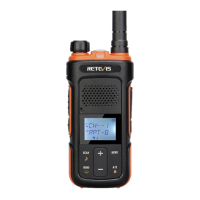
12.1 Press + and - key simultaneously and the speaker makes two beeps. The channel lock is turned on and the
channel is not adjusted.
12.2 Press + and - key simultaneously and the speaker makes a beep. The channel lock is turned off and the
channel is adjusted.
13. Lock Function
13.1 Press the menu key and - key simultaneously, the speaker makes a lock prompt and the lock function is
turned on. In addition to PTT key, other keys can’t be operated. The radio makes a toot failure prompt when
pressing keys.
13.2 Press the menu key and - key simultaneously, the speaker makes an unlock prompt and the lock function is
turned off. All keys can be operated normally.
Note: prompts are effective when the key beep is turned on.
14. Channel Scan
14.1 In the standby state, press the menu key and + key for over 3s to turn on the channel scan function. When
scanning the effective signal, the radio stops to receive. Press + key again to continue scanning.14.2 Press the
menu key and + key again for over 3s to turn off the channel scan function.
15. Companding Function
15.1 Companding function on/off can be set through CPS ( Checked is on, checked by default).
15.2 The programmable key can be preset as companding function through CPS. Long press the programmable
key to turn on or off the companding function.
16. Monitor Function
16.1 Monitor function on/off can be set through CPS ( Checked is on, not checked by default).
16.2 The programmable key can be preset as monitor function through CPS.
• In the standby state, long press the programmable key to turn on the monitor function.
• In the monitored mode, long press the programmable key to turn off the monitor function.
17.TOT
To prevent some users from occupying the same channel for a long time, the user can turn on the TOT
function. When the user continuously transmits on the current channel to the set time, the radio will stop
transmitting and speaker makes a TOT prompt.
TOT time can be set through CPS. Selectable time: 6
0-180s (default: 60s).
18. Busy Channel Lockout
18.1 Busy channel lockout ON or OFF can be set through CPS.
18.2 When choosing ON and receiving the channel signal of other radios, transmission can’t be proceed by
pressing PTT key and the radio makes a beep prompt.
18.3 When choosing OFF, the above situations don’t appear.
19. Battery Save
To extend battery use time, the user can turn on the save mode. After the function is turned on, if no effective
signals are received and no keys is operated in 10s, the radio will automatically enter save mode. In the save
mode, the radio can transmit by pressing PTT key or receive the detected signal.
20. Low Battery Alert
20.1 When the battery power is lower than 25%, the radio will make low battery alert prompt and the prompt
will ring once every 30s. Please recharge the battery. The transmission operation is banned and the radio is
in the standby and receiving mode. Please replace the new battery or recharge the battery.
20.2 When the battery power is lower than 5%, the radio will automatically turn off.
21. Restore Default Setting
In the off state, press the menu key and power key simultaneously for 5s, the radio will be turned on and the
default setting is restored.
22. Alarm
Press and hold - key for 3s and the alert tone begins to sound. There is no need to continue to hold the - key
or use PTT key to transmit.
The other radios that set the same channel and CTCSS/DCS will receive a steady
tone for 8s followed by the voice transmission for 22s.
04


 To Next Page
 Loading...