EasyManua.ls Logo

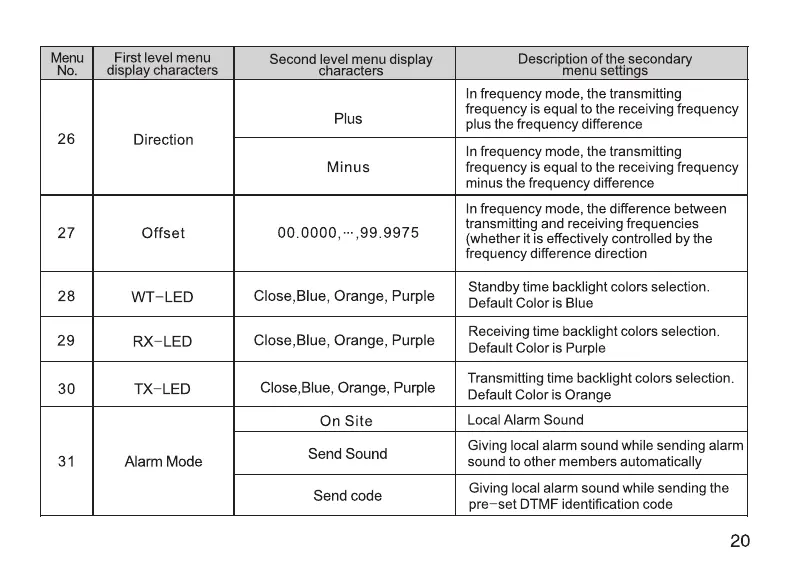
Retevis RT76P - Advanced Operation Settings: Frequency Offset and Indicators; Frequency Offset and Indicator Settings

Retevis RT76P
36 pages
Print Icon
To Next Page IconTo Next Page
To Previous Page IconTo Previous Page
Loading...
Menu
First
level
menu
Second
level
menu
display
Description
of
the
secondary
No.
display
characters
characters
menu
settings
Send
and release
codes
when
you
release
21
PTT-ID
BOTH
and
press
the
PTT
button
Frequency
Channel
mode
is
_in
frequency
mode
Channels
are
displayed
as
channel
names
22
MDF-A
Name
(The
specific
name
is
set
in
the
writing
software)
CH
NUM
Display
by
channel
number
Frequency
Channel
mode
is
in
frequency
mode
Channels
are
displayed
as
channel
names
23
MDF-B
Name
(The
specific
name
is
set
in
the
writing
software)
CH
NUM
Display
by
channel
number
OFF
Channel
occupied
also
allows
transmission
24
Busy
Lockout
ON
Channel
is
occupied
and
transmission
is
prohibited
25
Key
Auto
OFF
Turn
off
button
auto
lock
Lock
ON
Turn
on
button
auto
lock
In
frequency
mode,
there
is
no
frequency
26
Direction
None
difference
between
the
transmitting
frequency
and
the
receiving
frequency
19
Menu
First
level
menu
Second
level
menu
display
Description
of
the
secondary
No.
display
characters characters
menu
settings
In
frequency
mode,
the
transmitting
frequency
is
equal
to
the
receiving
frequency
Plus
plus
the
frequency
difference
26
Direction
_
In
frequency
mode,
the
transmitting
Minus
frequency
is
equal
to
the
receiving
frequency
minus
the
frequency
difference
In
frequency
mode,
the
difference
between
transmitting
and
receiving
frequencies
27
Offset
00.0000,
-,99.9975
(whether
it
is
effectively
controlled
by
the
frequency
difference
direction
Standby
time
backlight
colors
selection.
28
WT-LED
Close,Blue,
Orange,
Purple
Default
Color
is
Blue
Receiving
time
backlight
colors
selection.
29
RX-LED
Close,Blue,
Orange,
Purple
Default
Color
is
Purple
Transmitting
time
backlight
colors
selection.
30
TX-LED
Close,Blue,
Orange,
Purple
Default
Color
is
Orange
On
Site
Local
Alarm
Sound
Send
Sound
Giving
local
alarm
sound
while
sending
alarm
31
Alarm
Mode
sound
to
other
members
automatically
Send
code
Giving
local
alarm
sound
while
sending
the
pre-set
DTMF
identification
code
20

Related product manuals