EasyManua.ls Logo

Retevis RT76P - Advanced Operation Settings: Tail, Language, and Reset; Tail, Language, and Reset Procedures

Retevis RT76P
36 pages
Print Icon
To Next Page IconTo Next Page
To Previous Page IconTo Previous Page
Loading...
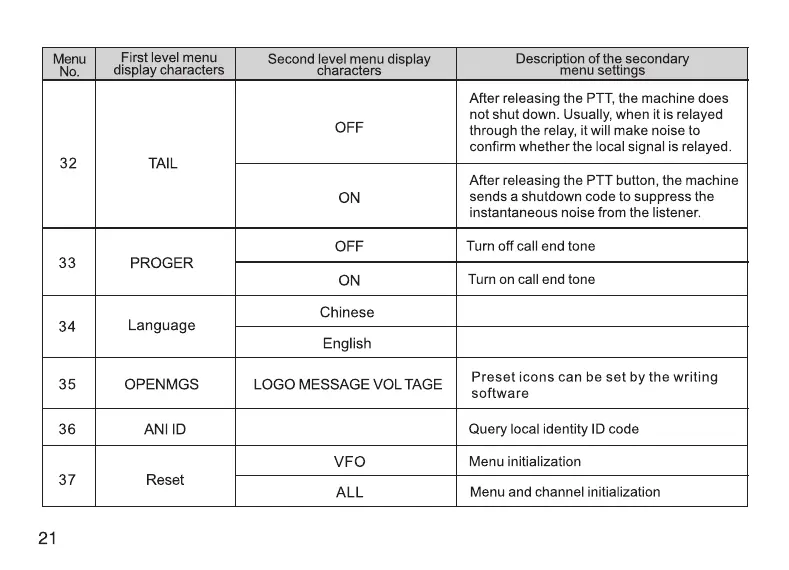
Menu
First
level
menu
Second
level
menu
display
Description
of
the
secondary
No.
display
characters
characters
menu
settings
After
releasing
the
PTT,
the
machine
does
not
shut
down.
Usually,
when
it
is
relayed
OFF
through
the
relay,
it
will
make
noise
to
confirm
whether
the
local
signal
is
relayed.
32
TAIL
After
releasing
the
PTT
button,
the
machine
ON
sends
a
shutdown
code
to
suppress
the
instantaneous
noise
from
the
listener.
OFF
Turn
off
call
end
tone
33
PROGER
ON
Turn
on
call
end
tone
Chinese
34
Language
English
35
OPENMGS
LOGO
MESSAGE
VOL
TAGE
Preset
icons
can
be
set
by
the
writing
software
36
ANI
ID
Query
local
identity
ID
code
VFO
Menu
initialization
37
Reset
ALL
Menu
and
channel
initialization
21
@
Automatic
FM
radio
channel
search
Under
FM
radio
mode,
press
[
&))
button
shortly
to
turn on the
automatic
FM
radio
channel
search.
@
Current
voltage
inquiry
Under
standby
mode,
press
[
EB)
button
to
query
the
current
battery
voltage.
@
Launch
DTMF
Press
the
[PTT]
button
and
the
number
button,
launching
the
relevant
DTMF
number,
or
through
the
PTT-ID
function
to
launch
DTMF
number.
PTT-ID
will
send
the
selected
signaling
code
group.
Tip:
(Ga)
/
(
)
/
(BR)
/
|
B®)
buttons
are
corresponding
to
DIMF
[A] [B]
[C]
[D].
22

Related product manuals