EasyManua.ls Logo

Retevis RT85 - Page 11

Retevis RT85
20 pages
Print Icon
To Next Page IconTo Next Page
To Previous Page IconTo Previous Page
Loading...
Item
No.
Item
Name
Enter
item
Screen
Display
Parameter
Explanation
Confirm Return
Standby
Select
parameter
+
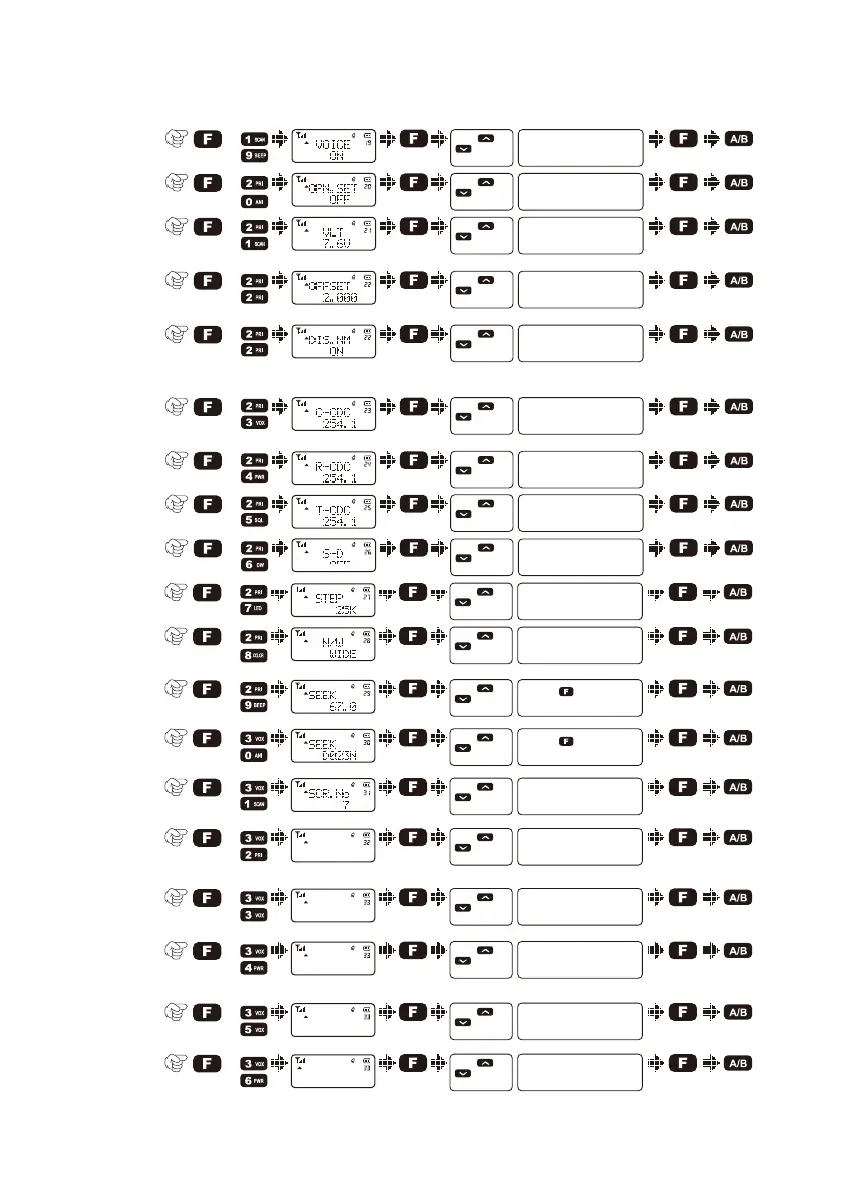
Voice
prompt
19)
+
Power-on
display
20)
+
Battery
power
voltage
21)
Press [ ] or
[ ] to select
available values
ON / OFF
Press [ ] or
[ ] to select
available values
OFF / DC / MSG
Press [ ] or
[ ] to select
available values
Show current voltage
+
A.
Repeater
shift
22)
+
B.
Display
channel
name
Press [ ] or
[ ] to select
available values
0.000-99.995MHz
Press [ ] or
[ ] to select
available values
ON / OFF
+
TX/RX
tone
coder
23)
Press [ ] or
[ ] to select
available values
OFF / QT / DCS
+
TX tone
coder
25)
Press [ ] or
[ ] to select
available values
OFF / QT / DCS
+
RX tone
coder
24)
Press [ ] or
[ ] to select
available values
OFF / QT / DCS
+
Shift
direction
26)
Press [ ] or
[ ] to select
available values
+ / -
+
VFO step27)
+
Wide/
Narrow
band
28)
+
CTCSS
scan
29)
+
DCS
scan
30)
+
Voice
scrambler
31)
+
Lock MD32)
Press [ ] or
[ ] to select
available values
5K / 6.25K / 10K...100K
Press [ ] or
[ ] to select
available values
Wide/Narrow
Press [ ] or
[ ] to change
scan direction
Press [ ] key to start
scan
Press [ ] or
[ ] to change
scan direction
Press [ ] key to start
scan
Press [ ] or
[ ] to select
available values
1~8
Press [ ] or
[ ] to select
available values
ALL/PTT/KEY/KEY+S
+
DIS Mode33)
Press [ ] or
[ ] to select
available values
CH/FRE/MR
Lock MD
KEY
DIS Mode
CH
+
34)
Press [ ] or
[ ] to select
available values
ON/OFF
CW
OFF
Dual
watch/
monitor
+
Reset35)
Press [ ] or
[ ] to select
available values
ALL/VFO/FULL
Reset
All
+
36)
Press [ ] or
[ ] to select
available values
MCU B1.07/Time
RADIO VER
MCU B1.07
Radio
Version
8

Related product manuals