EasyManua.ls Logo

Reveal PRO3 - User Manual

Reveal PRO3
19 pages
Print Icon
To Next Page IconTo Next Page
Loading...
INSTRUCTION MANUAL
REVEALCELLCAM.COM
TACTACAM.COM
DEER MANAGEMENT SYSTEMS, LLC
INSTRUCTION MANUAL
PRO3
Question and Answer IconNeed help?

Do you have a question about the Reveal PRO3 and is the answer not in the manual?

Overview

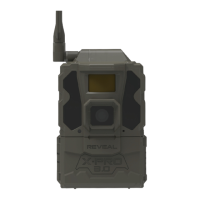
This document is an instruction manual for the Tactacam Reveal Pro3 Cellular Camera, a device designed for deer management systems.

Function Description:

The Tactacam Reveal Pro3 is a cellular trail camera that captures photos and videos, and sends them to a connected mobile application. It is designed for outdoor use, particularly in wildlife monitoring and deer management. The camera allows for remote control of settings via the app and can send thumbnail images and, in supported locations, HD photos and videos via 4G LTE wireless communication.

Important Technical Specifications:

  • Camera Mode: Photo; Photo+Video
  • Day/Night Mode: Daytime: Color, Nighttime: B+W
  • IR Range: 80+ Feet
  • PIR Angle: 45°
  • Flash: No Glow IR Technology, effectively eliminating all visible flash.
  • Operating Keys: 1x Power button; Navigation arrows
  • Lens: F=6mm; F/No=2.0; FOV=60°; Auto IR-Cut-Remove (at night)
  • SD Card: Class 10, U3, 16GB-32GB, minimum 90MB/Sec. Recommended brands: Tactacam, Lexar, SanDisk.
  • Status Indicator: 1 LED
  • Picture Format: JPEG
  • Video: Optional
  • Trigger Speed: 0.5 seconds
  • SD Card Loop: Optional
  • Operation Power: 9-12V
  • Battery: X = 12xAA Cartridge. Lithium batteries are recommended for colder temperatures and better performance. Optional external power source (12V external battery pack or solar panel) with a barrel plug reducer size 4x1.7mm.
  • External DC: 12V-2A
  • Transfer Picture via 4G: Thumbnail images sent to app (additional data charges may apply).
  • Request HD Photo and Video via 4G: Only in supported locations (additional data charges may apply).
  • Upload Frequency/Send Type: Instantly (Timely), 4 hours, 12 hours, or 24 hours.
  • 4G Communication: LTE wireless
  • 4G Antenna: 1 Antenna
  • Device Serial No.: Yes
  • Interface: LTE, USB, and SD Card
  • Mounting: Strap; Tripod (not included)
  • Operating Temperature: -25°C to 60°C (-13°F to 140°F)
  • Operation Humidity: 5% to 90%
  • Waterproof Rating: IP66
  • Dimensions: 3.62"x4.13"x5.47"
  • Weight: About 0.95lb
  • Certification: FCC RoHs

Usage Features:

  • App Download: The Tactacam Reveal app is available on Google Play Store and Apple App Store.
  • Account Setup: First-time users need to visit the Reveal Web Portal (https://account.revealcellcam.com/activation) to set up an account. Existing users can log in and add cameras.
  • Adding a Camera: Cameras are added through the app by clicking the camera icon, then the '+' symbol, selecting "Reveal Pro3," and scanning the QR code displayed on the camera's screen.
  • On-Screen Settings: The Pro3 allows direct control of camera settings using the keypad for navigation.
  • Remote Settings Change: Camera settings can be changed remotely via the app. Users must select "Apply Settings" to save changes.
  • Settings Check Modes:
    • Daily mode: Checks settings every 24 hours (battery saving).
    • Hybrid mode: Combines battery saving of Daily mode with rapid updates of Instant mode.
    • Instant mode: Receives settings instantly but consumes more battery.
  • Sending a Test Picture: After activation and connection to a 4G signal, pressing the power/enter button sends a test photograph. Signal strength is displayed on the screen.
  • Work Mode: To activate the camera's full functionality and begin sending photos, the left navigation arrow must be pressed to enter "work mode."
  • Battery Recommendations: Energizer Lithium, Duracell Max Alkaline, or Rayovac UltraPro Alkaline batteries are recommended. Lithium batteries are preferred in cold weather for optimal performance. Expected picture counts are 4,000+ for Lithium and 2,500+ for Alkaline in above-freezing temperatures.
  • Solar Panel Compatibility: The camera can be connected to a Tactacam External Solar Panel (sold separately), with lithium batteries acting as a backup power source.

Maintenance Features:

  • Proper Camera Placement:
    • Avoid hanging on small, wind-prone trees.
    • Place at waist height on a tree or post.
    • Point the camera down 7-15 degrees, using shims if necessary.
    • Face the camera north to achieve the best lighting conditions and avoid facing the sun.
    • For food plots, ensure camera height and angle provide the widest field of view; avoid placing too high.
    • For trails, place the camera at an angle looking up or down the trail, not perpendicular.
  • Troubleshooting - Pictures of Nothing:
    • Clear low-hanging branches, brush, and weeds 5-10 yards in front of the camera.
    • Adjust motion sensitivity: start at High, then decrease if too many false triggers occur (9 is highest, 1 is lowest).
  • Troubleshooting - Night Vision Flash Range:
    • Ensure batteries are fully charged.
    • Set Night Mode to "Max Range" for better IR flash range.
    • High-quality 1.2V NiMH rechargeable AA batteries can improve IR flash range (lithium recommended for cold weather).
    • Aim the camera towards surroundings (trees, walls, ground) to reflect IR flash back; avoid open fields.
  • Troubleshooting - Camera Stops Taking Images:
    • Check if the SD card is full; enable "SD Loop" to overwrite older images.
    • Ensure alkaline or NiMH-AA batteries have sufficient power.
    • Format the SD card with the camera before use or if it stops taking images.
  • Troubleshooting - Internal Condensation:
    • If the antenna is not screwed in or if dirt/debris is on the seal, condensation can occur.
    • Remove the SD card and let the camera sit open for 3-4 days in an area with circulating air (fan or vent).
    • Alternatively, place the camera in a sealed container with rice for 24 hours to draw out moisture.
    • Clean the seal well and tighten the antenna.
  • Troubleshooting - Submerged in Water:
    • Do not open the camera immediately.
    • Dry the outer housing to prevent water from entering and causing internal damage.
  • Theft Prevention: Use a protective security box (available at www.revealcellcam.com).
  • Warranty: One year from the date of purchase. Register the camera at www.tactacam.com/warranty. Covers manufacturer defects (defective buttons, cracked/chipped glass lens, broken SD/SIM card spring mechanism, broken USB port). Does not cover damage caused by owner modification, attempts to fix, or alterations, nor damage caused by people or animals (antenna, strap, Fresnel lens, glass lens, camera housing). For animal/owner-caused damage, contact customer support for repair options.

Reveal PRO3 Specifications

General IconGeneral
BrandReveal
ModelPRO3
CategoryDigital Camera
LanguageEnglish