Additional information from this row can be found in the following forms:
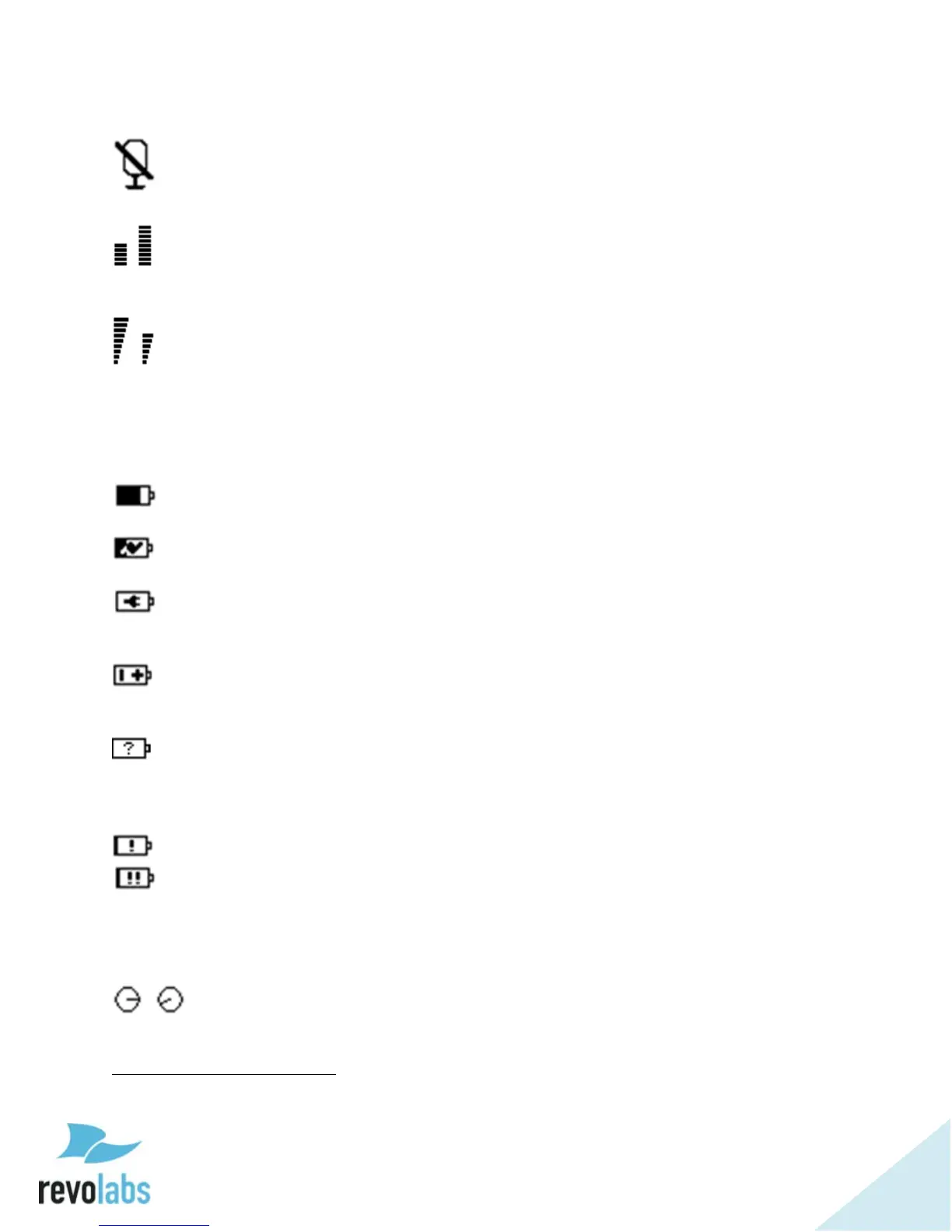
- Mute Symbol. Will show on the VU screen for a linked, muted
microphone.
- VU or Gain Meters. VU screen shows a VU meter for a linked, unmuted
microphone, while the Gain screen meters look the same, but do not change
unless set, and appear for all linked microphones.
- RF Meters. The RF screen will display the strength of the transmission
from any linked microphone as it is received by the base. Microphones
experiencing interference or far away will have a lower RF.
The second row displays battery information when seen on the VU and RF
screens, using the following icons:
- For a linked microphone, the battery level icon will show the charge level
by the amount of black in the battery.
- While in the charger, the battery symbol also shows a charging symbol
overlaid over the battery-charge icon
2
.
- A microphone using a permanent cross-over adapter will be shown with
a power connector battery symbol. A permanent cross-over adapter is one
where the microphone does not use batteries.
- A battery symbol with a +/- indicates a non-rechargeable battery or
wrong battery type. Such a battery will not charge when placed in the charger
tray.
- The type of a battery is only determined when the microphone is placed
in a charger after inserting a new battery. Up until this time the battery
symbol will show a battery with a question mark in it, indicating that the
battery type is unknown.
- Low battery, under 10% remaining.
- Very low battery, under 5% remaining.
On the gain screen, this row will not show battery information, instead having
a row of digital gain “knobs” that will match the gain shown in the meters
above them.
- Gain knob
2
It might take a few minutes for the charge symbol to appear after a microphone was placed in
the charger.


 To Next Page