The Elite Wearable Wireless Microphones
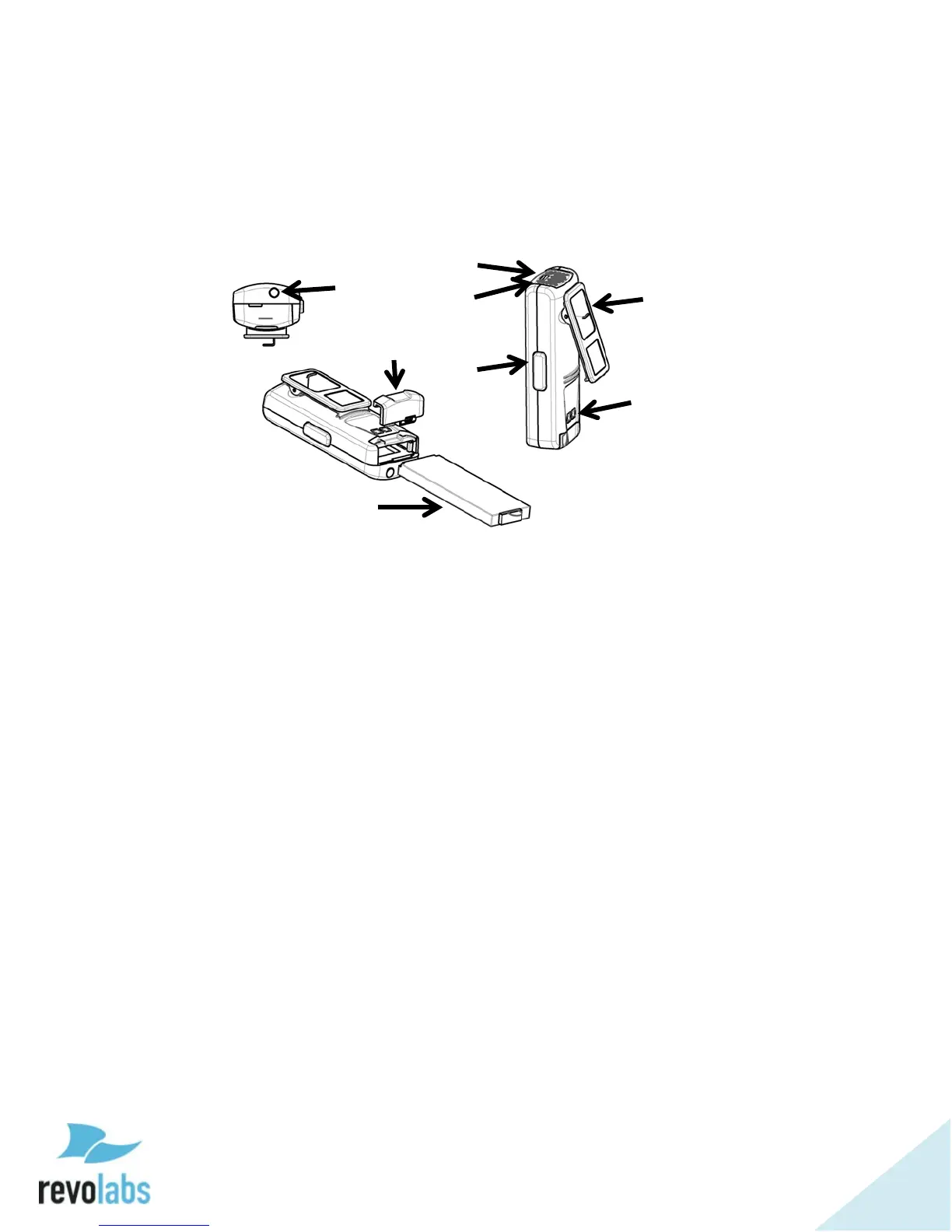
The Revolabs Elite Wearable Microphones, shown in the following figure, can
be worn on the user’s shirt, lapel, blouse, or on a lanyard. They provide high
quality full duplex audio between the users and the conferencing or audio
system.
1. Earpiece jack — accepts the 2.5mm plug of the earpiece.
2. Battery door — push towards the back of the microphone to open
the battery compartment.
3. Li-Ion rechargeable battery — can be taken out and replaced after
opening the battery door.
4. Mute LED — visual status for mute, un-mute, and pairing.
5. Battery charge status LED — under the screen, warns for low
battery. When there is approximately 2 hours of talk time
remaining, this LED will turn yellow. When the LED turns red,
there is approximately 1 hour of charge remaining.
6. Mute button — press to mute, un-mute, and pair microphone.
7. Clip — used to attach microphone to a shirt, lapel, blouse or
lanyard.
8. Charging connector — connects to the charging pins of the Elite
charging tray.
Revolabs Elite Wearable Microphones turn on when removed from Charger
Base. To reduce noise while they are being attached, we recommend muting
the microphone when attaching and detaching it.


 To Next Page