EasyManua.ls Logo

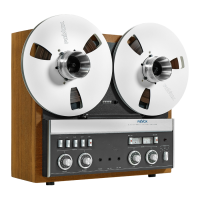
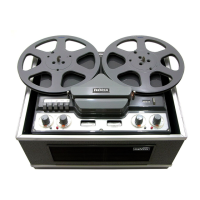
Revox G36 - Service Manual

Revox G36
52 pages
Print Icon
To Next Page IconTo Next Page
Loading...

Questions and Answers

  • J
    Jeffrey BarrAug 17, 2025
    What to do if my Revox G36 Tape Deck has no audio recording?
    • C
      Calvin MerrittAug 17, 2025
      If there is an absence of recording on your Revox Tape Deck, it could be due to a dirty or defective recording-head, requiring you to clean or replace the head. A dirty contact of the recording push-button might also be the cause; in this case, clean and adjust the contact. Other potential causes include incorrect bias adjustment (adjust bias), a defective bias-oscillator (check bias-oscillator tube, coil and erase head), or insufficient erasure (clean heads).
  • Y
    yvonnegarciaAug 20, 2025
    What to do if my Revox G36's capstan motor does not run?
    • M
      Michelle SheltonAug 20, 2025
      If the capstan motor on your Revox Tape Deck does not run at either speed, first ensure the speed switch is not in a mid-position; switch to 3 3/4 or 7 1/2 speed. If the switch is defective, replace the wafer. A jamming motor requires cleaning and lubricating the bearings. If the capstan bearing is jamming, replace the capstan assembly.
  • M
    Michael HillAug 22, 2025
    What to do if the pinch roller arm on my Revox G36 does not operate?
    • K
      Kathleen LiuAug 23, 2025
      If the pinch roller arm on your Revox Tape Deck does not operate, the solenoid may be dirty, requiring cleaning and adjustment. Another cause could be dirty contacts in the push-button assembly, which also necessitates cleaning and adjustment. Also, ensure that the dummy-plug of remote control is connected to pin 1, 2 and 3 of the remote control socket.
  • M
    Martin MartinezAug 25, 2025
    What causes a noisy capstan in a Revox G36 and how to fix it?
    • I
      Isabella GeorgeAug 26, 2025
      A noisy capstan in your Revox Tape Deck can be attributed to several issues: damaged felt on the lower bearing (replace felt and lubricate with SAE 20 oil), a loose flywheel (tighten fastening nut), a damaged capstan-bearing (replace capstan assembly), or a damaged motor bearing (replace motor).
  • R
    Robert CareyAug 27, 2025
    Why is the tape speed too low on my Revox G36?
    • C
      Charles RiceAug 27, 2025
      If the tape speed is too low on your Revox Tape Deck, it could be due to an open-circuit motor-winding, which requires replacing the capstan motor. Another potential cause is a faulty motor condenser, which should also be replaced. A jamming capstan could also be the issue, and you should replace the capstan assembly in this case.
  • C
    Charles ParsonsAug 30, 2025
    Why is my Revox G36's fast rewind or forward too slow?
    • A
      Ashley StarkAug 30, 2025
      The fast rewind or forward function might be slow due to several reasons. The brake might be maladjusted, in which case you should adjust the brakes. Another cause could be a dirty brake solenoid, requiring you to clean the solenoid. An open-circuit winding in the Turn-table-motor or a defective motor-condenser could also be responsible; in these cases, replace the turntable-motor or the motor-condenser, respectively.
  • M
    martindeborahSep 1, 2025
    How to fix bad treble response on my Revox G36?
    • J
      jeremygarciaSep 2, 2025
      A bad treble response on your Revox Tape Deck can be caused by several factors. The head might be dirty, so cleaning the heads is recommended. Alternatively, the heads could be out of alignment, requiring adjustment. Worn out heads should be replaced. Ensure the tape is correctly threaded, or adjust the bias if it is incorrect.
  • E
    Eric WashingtonSep 4, 2025
    Why is my Revox Tape Deck producing playback hiss?
    • N
      Nathan MooreSep 4, 2025
      Playback hiss in your Revox Tape Deck may stem from a faulty tube in the playback amplifier, which would require replacing the tube. Alternatively, the playback head might be magnetized, necessitating de-magnetizing the head.
  • E
    Elizabeth JonesSep 6, 2025
    What causes the push-button on my Revox Tape Deck to not remain pressed?
    • M
      Michelle DuarteSep 6, 2025
      If the push-button on your Revox Tape Deck will not remain in the pressed position, it could be because the end of tape switch does not operate, and you should adjust it. Another possibility is that the tape is incorrectly threaded; in this case, thread the tape as explained in the instruction manual.
  • A
    Amy HoltSep 9, 2025
    What causes no indication on the VU-meter of my Revox Tape Deck?
    • A
      April HammondSep 9, 2025
      If there is no indication on the VU-meter of your Revox Tape Deck, the VU-meter itself may be defective and require replacement. Alternatively, the indicator amplifier valve could be defective, necessitating replacement of the valve. A maladjusted potentiometer could also be the cause, so adjust the level control. Also, check for a short circuit in the power supply and replace the wafer if necessary.

Summary

General Information

General

Overview of the REVOX Series 36 tape recorder and its key features.

Mechanical Description and Maintenance

Mechanical Description

Details the three-motor system, capstan motor, and tape transport elements.

Mechanical Checks and Adjustments

Procedures for checking and adjusting mechanical components.

Tape Path

Explains the tape path level and guide adjustments.

Brakes

Describes the brake system, its electrical operation, and mounting.

Tape Tension

Details back tension application and potential causes of inaccuracy.

Pinch Roller

How to measure and adjust pinch roller pressure.

End of Tape Switch

Explains photoelectric and mechanical end-of-tape switch operation and adjustment.

Wow and Flutter

Discusses causes and measurement of wow and flutter.

Tape Speed

Methods for checking and issues related to tape speed accuracy.

Routine Maintenance

Procedures for cleaning and lubricating the tape recorder.

Cleaning

Instructions for cleaning heads, capstan shaft, and other parts.

Lubrication

Guidance on bearing lubrication and motor maintenance.

Servicing of Solenoids

Steps for dismantling and cleaning sticky or erratic solenoids.

Servicing of Push Button Assembly

How to clean and maintain the push button assembly contacts.

Removal of Capstan Assembly

Detailed steps for removing the capstan assembly for maintenance or modification.

Electronic Systems and Calibration

Electronic Description

Overview of the recorder's electronic circuits, channels, and monitoring features.

Circuit Checks and Adjustments

Procedures for verifying and adjusting electronic circuits.

Measuring Instruments

Lists essential and desirable instruments for testing.

De-magnetising

Explains how to de-magnetise tape heads and parts.

Head Alignment

Detailed procedures for aligning playback and record heads.

Playback Amplifier

Testing and adjustment of the playback amplifier stages.

Bias Adjustment

Method for adjusting the bias current for optimal performance.

Measurement of Overall Frequency Response

How to measure and verify the recorder's frequency response.

VU-Meter Adjustment

Procedures for calibrating the VU meters.

Adjustment of Head Shielding

Steps to adjust head shielding for minimizing hum.

Channel to Channel Crosstalk

How to measure and minimize crosstalk between channels.

Tuning the Bias Traps

Procedure for tuning bias filters in the playback amplifier circuits.

Troubleshooting and Technical Data

Mechanical Troubleshooting

Lists common mechanical problems, their causes, and repair methods.

Electronic Troubleshooting

Lists common electronic issues, causes, and repair solutions.

Technical Data

Specifications and performance data for the REVOX G36.

Diagrams and Parts

Circuit Diagrams

Schematic diagrams illustrating the recorder's electrical circuits.

Spare Parts List

Comprehensive list of replacement parts with order numbers and details.

Revox G36 Specifications

General IconGeneral
Signal to Noise Ratio60dB
Heads3 (Erase, Record, Playback)
InputsMicrophone, Line
OutputsLine
TypeReel-to-reel
Track System2-track
Frequency Response30Hz to 20kHz
Reel SizeUp to 10.5 inch
Tape Speed3.75, 7.5, 15 ips

Related product manuals