6
a. Find a blank frequency in your car radio (to ensure the sound quality of the device,
please first select a blank channel with no local broadcast programs)
Bluetooth Hands-Free Function
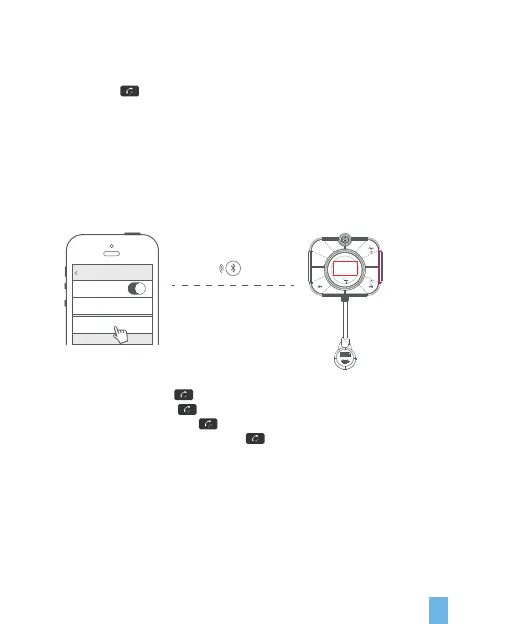
• Answer the call: Click the button.
• Hang up the call: Click the button.
• Reject the call: Long press the button for 2 seconds.
• Switch private calls: Press and hold the button for 2 seconds during the call.
b. Long press to enter FM mode
In FM mode: Left-hand knob button CH-
Turn the knob to the right key CH+
In music mode: Left-hand knob button volume V-
Turn the knob to the right button volume V+
c. Enter Bluetooth pairing mode
Turn on the phone’s Bluetooth, search for the Bluetooth name: FMT2, click connect,
open the music player, and click play to play Bluetooth music in the car.
d.
106.2
QC3.0
PD20W
/CH
Setting Bluetooth
Bluetooth
Now discoverable as “iPhone”
DEVICES
FMT2
< 3.25 FT


 To Next Page