EasyManua.ls Logo

Rexing FMVC2 - User Manual

Rexing FMVC2
13 pages
Print Icon
To Next Page IconTo Next Page
Loading...
User Manual
FMVC2
FM Transmitter
The information in this manual is subject to change without notice.
Rexing All Rights Reserved
www.rexingusa.com
Question and Answer IconNeed help?

Do you have a question about the Rexing FMVC2 and is the answer not in the manual?

Summary

Product Information

Device Features

Lists the key functionalities, capabilities, and unique selling points of the FMVC2 FM Transmitter.

Technical Specifications

Details the technical parameters including frequency ranges, power input/output, dimensions, and materials.

LED Status Indications

Power On and Pairing Status

Describes the LED indicator behavior when the device is powered on and ready for Bluetooth pairing.

Bluetooth Connected Status

Explains the LED indicator when the device is successfully connected to a phone via Bluetooth.

Voice Assistant Active Status

Details the LED pattern when the voice assistant feature is activated and listening for commands.

Incoming Call Indicator

Shows the LED indicator status during an incoming phone call.

Call In Progress Indicator

Describes the LED status while a phone call is actively in progress.

Call End or Reject Indicator

Details the LED behavior after a call has been ended or rejected.

Getting Started

Initial Device Placement

Instructions for plugging the FMVC2 into the vehicle's cigarette lighter socket and starting the engine.

Audio Streaming Setup

Guides on connecting a mobile phone for audio streaming via Bluetooth or an AUX cable.

AI Voice Assistant Operation

Voice Command Activation

Explains how to activate the offline voice command feature using specific wake words for hands-free control.

Device Charging Capabilities

Dual USB Charging Ports

Details the dual USB charging ports and their maximum output for charging multiple devices simultaneously.

Safety Instructions

General Safety Precautions

Covers essential precautions like reading instructions, avoiding moisture, and proper handling of the device.

Device Handling and Maintenance

Instructions on preventing damage, avoiding disassembly, cleaning procedures, and electrical shock risks.

Operational and Environmental Safety

Guidelines for safe operation in traffic, avoiding direct sunlight, open flames, and strong magnetic fields.

Fuse and Traffic Law Adherence

Specific advice on fuse replacement ratings and the importance of obeying traffic laws while driving.

Warranty and Support

Product Warranty Information

Details the 12-month warranty for the FMVC2 and options for extending it.

Customer Support Contact

Provides contact information (email, phone) for product inquiries and expected response times.

User Feedback Channel

Encourages users to submit feedback and suggestions for product and service improvements.

Overview

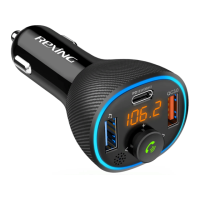
The Rexing FMVC2 is an FM Transmitter designed to enhance your in-car audio and communication experience. It functions as an AI Voice Assistant Hands-free Car Kit, allowing for audio streaming, hands-free calling, and voice command interaction within your vehicle.

Function Description:

The primary function of the FMVC2 is to transmit audio from your mobile phone to your car stereo via FM transmission or an AUX jack connection. This enables you to play music, podcasts, or other audio content from your phone through your car's speakers. A key feature is its integrated AI Voice Assistant, which supports offline voice commands for various tasks, eliminating the need for a data connection. This includes answering/rejecting calls, controlling music playback (play, pause, next, previous), and adjusting volume, all through voice commands. The device also serves as a dual USB charging hub, providing power to other devices while in use. It includes dual internal microphones for echo canceling and voice pickup, ensuring clear communication during calls and accurate voice command recognition.

Important Technical Specifications:

  • Radio Sources: FM
  • Frequency Ranges: 87.5MHz-108MHz
  • Power Input: 12-24V
  • Power Output: DC 5V/2.4A; QC3.0 (Dual USB Charging Ports)
  • Bluetooth Version: 5.0
  • Bluetooth Protocol: AVRCP, A2DP, HFP, HSP
  • Transmit Distance: 10FT
  • Product Weight: 3 oz
  • Product Dimension: 9"x3"x2.75"
  • LED Display Dimension: 1.1"
  • Product Color: Black
  • Material: ABS
  • Default Language: English
  • Fuse Rating: 250V DC/3A (for replacement)

Usage Features:

The FMVC2 offers a range of features designed for ease of use and safe driving:

  • Connectivity:
    • Bluetooth: Connects to your mobile phone for audio streaming and hands-free calling.
    • FM Transmission: Transmits audio to your car stereo on a selected FM frequency.
    • AUX Jack: Provides an alternative wired connection for audio streaming to your car stereo.
  • AI Voice Assistant:
    • Activation: Activated by pressing the Hands-Free Button (blue and green light blinks alternately).
    • Deactivation: Deactivated by pressing the Hands-Free Button again (blue light stays on).
    • Offline Voice Commands: Supports 100% sensitive and accurate recognition for commands like:
      • "answer the phone"
      • "reject the call"
      • "play music"
      • "stop playing"
      • "play next"
      • "play previous"
      • "volume up"
      • "volume down"
      • "FMVC2 will respond instantly"
    • Hands-free Calling: Enables answering, rejecting, and hanging up phone calls using voice commands or the Hands-Free Button.
  • Button Controls:
    • Hands-Free Button (Press once): Activates Siri/Google assistant, pauses/plays music, picks up/hangs up phone calls.
    • Hands-Free Button (Press once again): Deactivates Siri/Google assistant.
    • Hands-Free Button (Press and hold): Rejects phone calls, switches to Private Call, enters frequency tuning mode.
    • Hands-Free Button (Press twice): Redials the last caller from the call log.
    • Previous Button (Press once): Selects the last track or last frequency.
    • Previous Button (Press and hold): Increases volume or frequency.
    • Next Button (Press once): Selects the next track or next frequency.
    • Next Button (Press and hold): Decreases volume or frequency.
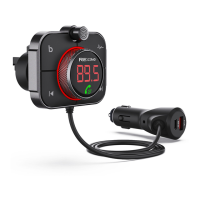
  • LED Display: A large yellow LED display (1.1") shows the current FM frequency.
  • Flexible Goose-Neck: Allows for adjustment to find the best viewing angle.
  • Car Battery Voltage Detection: Detects the voltage of the car battery when powered on.
  • Low Battery Alert: Provides an alert when the car battery voltage is low.
  • Dual USB Charging Ports: Includes a 5V/2.4A port and a QC3.0 port for fast charging of two devices simultaneously.
  • Safety Features: Includes short-circuit, over-voltage, over-current, and over-temperature protection.

Maintenance Features:

  • Fuse Replacement: For continued protection against the risk of fire, replace the fuse only with the same type and ratings (250V DC/3A).
  • Cleaning: Use a dry, soft, lint-free cloth to clean the device. Avoid using corrosive cleaners or oil.
  • General Care:
    • Do not expose to rain, moisture, or snow.
    • Avoid long exposure to direct sunlight.
    • Do not use in strong magnetic fields.
    • Do not disassemble the device; refer to a qualified service person for service or repair.
    • Unplug the device before attempting any maintenance or cleaning to reduce the risk of electric shock.

The Rexing FMVC2 is designed to be a comprehensive and user-friendly solution for in-car connectivity, communication, and charging, prioritizing safety and convenience for drivers.

Rexing FMVC2 Specifications

General IconGeneral
BrandRexing
ModelFMVC2
CategoryTransmitter
LanguageEnglish

Related product manuals