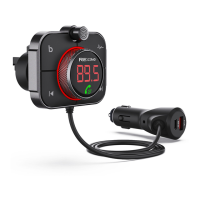
The Rexing FM3 is an FM transmitter designed to enhance your in-car audio experience by allowing you to play music from a USB Flash Drive or a wirelessly connected mobile phone through your car's stereo system. It also supports hands-free Bluetooth calls.
Function Description:
The primary function of the FM3 is to transmit audio from various sources to your car radio. It achieves this by matching its FM frequency to a blank channel on your car's radio. Once connected, you can stream music wirelessly from your smartphone or play audio files directly from a USB Flash Drive. The device also integrates hands-free calling capabilities, allowing you to answer, hang up, reject, or switch private calls with dedicated buttons. For an enhanced audio experience, it features a BASS sound enhancement button. Additionally, the FM3 serves as a multi-port charger for your devices, offering QC3.0 fast charging and PD18W Type-C fast charging.
Important Technical Specifications:
- Product Name: FM3
- Effective Distance: 16FT (approximately 4.8 meters)
- USB Flash Drive Format and Capacity: FAT32 format, maximum support 64GB
- FM Frequency Range: 87.5MHz-108.0MHz
- Compatible Audio Formats: MP3, WMA, WAV, FLAC
- Compatible Wireless Protocol: A2DP/AVRCP/HSP/HFP
- QC3.0 Fast Charging Port Output: DC 3.6-6.5V/3A, 6.5-9V/2A, 9-12V/1.5A (supports QC3.0 protocol)
- Type-C Fast Charging Port Output: DC5V/3A, 9V/2A, 12V/1.5A (supports PD18W fast charging protocol)
- USB Charging Output (Standard): 5V-1A (maximum 64G for USB Flash Drive)
- Display: Yellow LED display
- Microphone: Integrated for hands-free calls
Usage Features:
- Power On/Off: Insert the FM3 into the car's cigarette lighter hole to power on automatically when the car starts. If off, long press the phone button for 2 seconds to turn it on. To turn off, cut power or long press the switch button for 3 seconds. The charging ports remain active even when the FM3 is off.
- FM and Wireless Pairing:
- Tune your car radio to a blank frequency (clear rustling indicates a blank channel).
- Long press the phone button for 2 seconds to enter FM mode (the frequency number will flash).
- Use the left/right dial to adjust the FM3's frequency to match your car radio's blank channel (e.g., FM 88.8).
- Click the phone button again or wait 3 seconds to exit FM mode.
- For Wireless connection, turn on your smart device's Wireless, search for "FM3," and connect. The screen will display "bt" when connected. If prompted, the initial password is "0000." The FM3 will automatically connect to the last paired device on subsequent uses.
- Music Playback:
- Audio Source Selection: The device defaults to the last connected source (Wireless or USB Flash Drive). You can plug in a USB Flash Drive for auto-play. After power off or restart, it will play music automatically in USB Flash Drive mode and manually in Wireless mode.
- Switching Audio Sources: In music mode, click the switch button to toggle between USB Flash Drive and Wireless audio sources.
- Play/Pause: Click the phone button.
- Previous/Next Song: Left dial the phone key for the previous song, right dial for the next song.
- Volume Control: Dial up the phone key for volume V+, dial down for volume V-.
- BASS Enhancement: Click the 'b' button (red) during music playback to activate the b1 bass surround enhancement effect, suitable for dance, DJ, and heavy bass music. Click again to restore the original sound effect (b0).
- Hands-Free Calling:
- Answer Call: Click the phone button.
- Hang Up Call: Click the phone button.
- Last Replay: Double-click the phone button.
- Reject Call: Long press the phone button for 2 seconds.
- Switch Private Calls: Press and hold the phone button for 2 seconds during a call.
- Voice Assistant: Double-click the switch button to start or exit the Siri/Google voice assistant.
- Charging: The device features a QC3.0 fast charging port and a PD18W Type-C fast charging port. For devices not supporting fast charging, the maximum output is 5V/2.4A. Use a C to C or C to Lighting data cable for Type-C charging.
Maintenance Features:
- Troubleshooting Noise: If you experience noise, reduce the car speaker volume by one-third and increase the smart device volume. If interference persists, switch to another empty FM frequency point.
- Troubleshooting Call Audio:
- If the other party cannot hear you, ensure you answer calls via the FM3 phone button or activate your phone's speaker.
- If call volume is low, increase your phone's volume or ask the other party to increase theirs.
- For microphone issues, contact customer service.
- Environmental Responsibility: The product should not be disposed of with household waste at the end of its useful life. Recycle it to promote sustainable development.
- Initial Setup Recommendation: When first using the product, after starting the car, patiently find a blank FM channel on your car radio (indicated by a slight rustle). Then, insert the FM3 into the cigarette lighter jack and adjust its FM frequency to match the car's blank channel. This ensures a quiet, static-free connection before pairing with your phone wirelessly.
The Rexing FM3 aims to provide a versatile and convenient solution for in-car entertainment and communication, combining audio transmission, hands-free calling, and fast charging capabilities in one device.

 Need help?
 General

 To Next Page