2
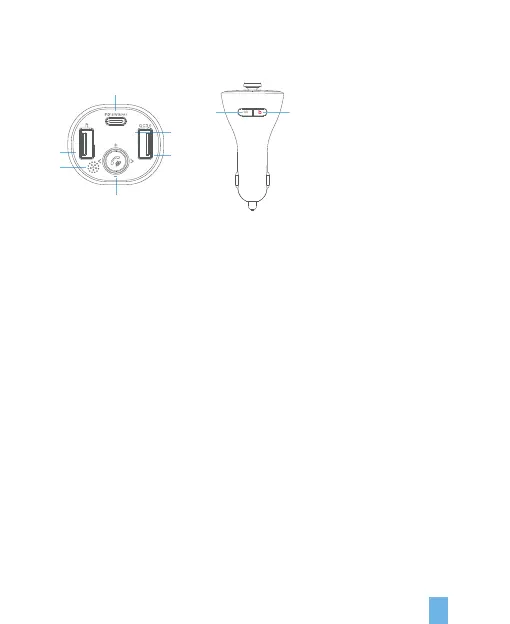
Product details
1. Microphone.
2. QC3.0 fast charge (DC 3.6-6.5V/3A, 6.5-9V/2A, 9-12V/1.5A).
3. USB (maximum 64G)/5V-1A charging output.
4. Type-C fast charge PD 18W fast charge protocol (DC5V/3A, 9V/2A/12V/1.5A).
5. Yellow LED display.
6. Phone button:
Long press for 2 seconds to enter FM mode. In the off state, long press for 3
seconds to turn on. In the power on state, long press for 3 seconds to turn off.
Five-way button:
• Click pause/play/hands-free (answer/hang up/reject).
• Left dial the previous song.
• Right dial next song.
• Up dial volume plus V+
• Dial down volume to reduce V-
7. Switch button:
• In music mode, click to switch audio source mode (USB Flash Drive/Wireless
mutual switching).
• In working state, double tap to wake up Siri / Google voice assistant.
• In working status, long press for 3 seconds to turn off.
• FM, screen, Wireless, and keep charging.
8. BASS sound enhancement button.
8
7
2
5
1
6
3
4
89.5


 To Next Page