4
Assembly Assembly
WARNING! Never connect the plug to power soucre
outlet until all installations and adjustments are
completed and you have read and understood the safety
and operational instructions.
Note:
Move all parts to the desired work site before assembling
them together. Follow the assembly instruction and carefully
assemble the tool with the help of a second person. The head
assembly is heavy, use care when lifting onto the column.
Note:
The loose parts can be found in the pulley cover.
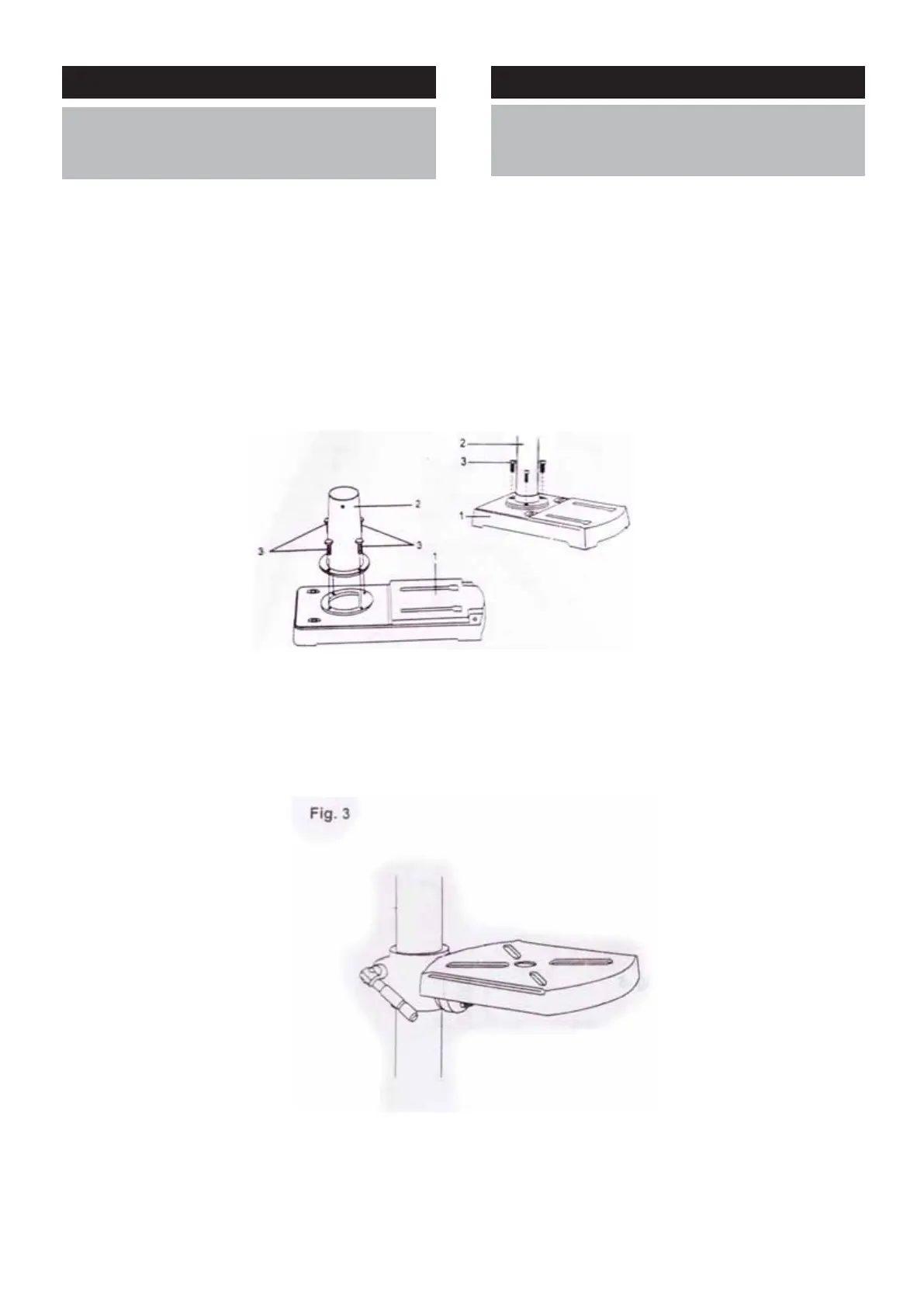
Installing the column to base (Fig. 2)
Assemble the column(1) to the base(2) with bolts(3).
Fig. 2
Installing the table to column
FOR THE TABLE WITHOUT TABLE BRACKET (FIG.3)
1. Slide the table assembly onto the column assembly.
2. Install the table lock handle from left hand side into the
table assembly, then tighten it.
주의! 안전을 위해, 조립이 완료될 때까지 절대로 전원를
연결해서는 안되며 설명서를 읽고 안전하게 이해한 후
작동해야 합니다.
알림:
모든 부품을 조립하기 편한 위치에 놓으세요. 조력자의 도움
과 함께 공구의 조립을 지침에 따르세요. 머리 부분 부품은
무겁습니다. 기둥을 들 때 조심하세요.
알림:
느슨해진 파트는 풀리 커버에서 찾을 수 있습니다.
베이스(그림. 2)의 기둥을 설치하세요.
기둥(1)을 베이스(2)에 놓고 볼트(3)를 체결하세요.
테이블 기둥 설치하기
테이블 브래킷(그림.3)이 없는 테이블을 위해서
1. 기둥에 테이블 부품을 밀어 내리세요.
2. 테이블 부품의 왼쪽에 테이블 고정 핸들을 설치하고,
조여주세요.



 To Next Page