2. Getting Started
2.1. Launch Programming
From the windows system, on the menu “Start” select
“Programs”, from Menu “RHP530” select “Launch Program”.
2.2. Open Saved File
On the menu “File”, select “Open”, the open window will
appear.
Select existed default setting in the appropriate box (file name
usually), then click on “Open”
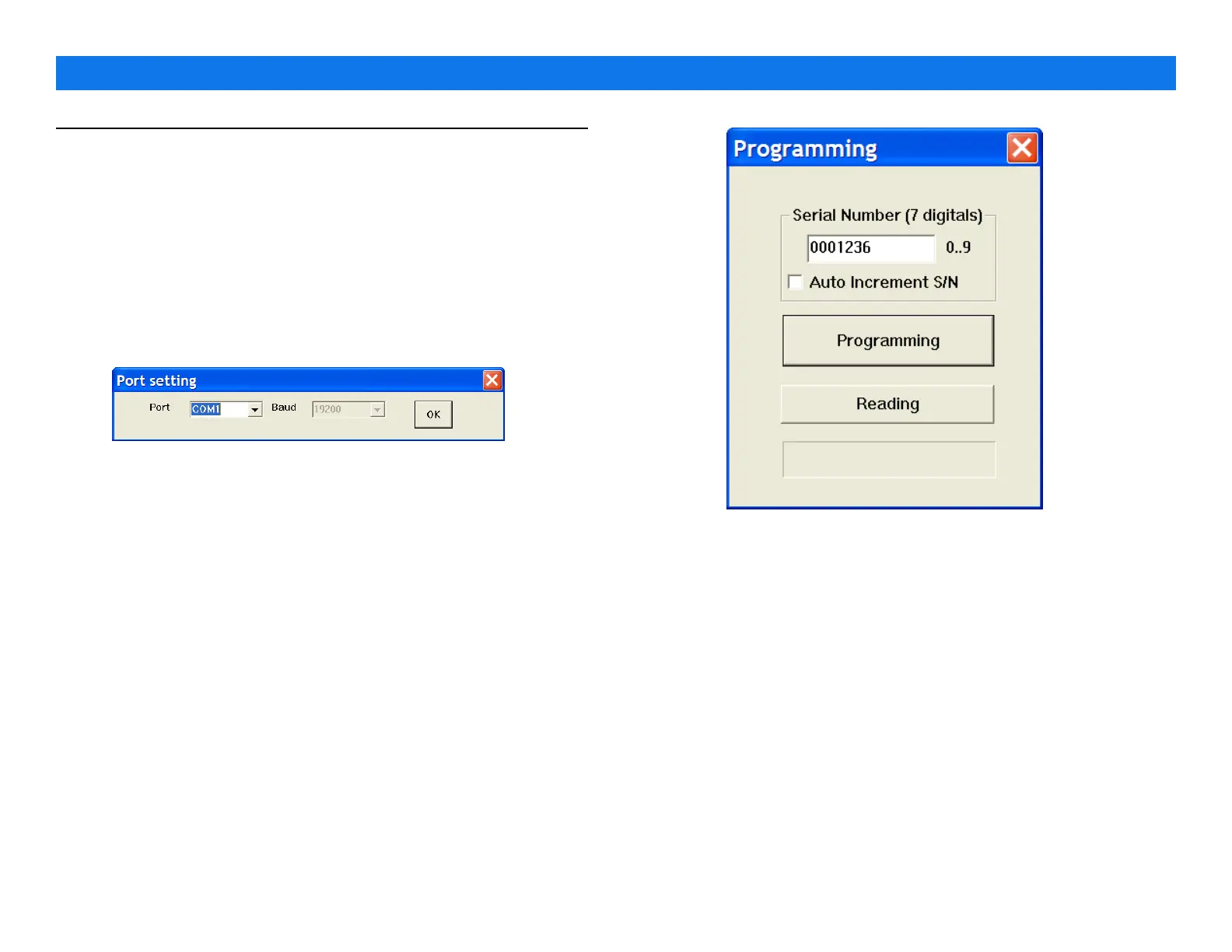
2.3. Port Setting
On the “port” menu, click on “port”, tick sign show
on default Com 1. Select appropriate serial port
and click on “OK” .
2.4. Programming
•
Serial Number – set serial number to manage all RHP530 you
had. Type serial number on field as well as set auto number
increase if desired.
•
Program the RHP530 – click on “Programming” parameters
you set will write to RHP530.
•
Read the RHP530 – click on “Reading” to get parameters
from RHP530, serial number appears on filed after reading.
PROGRAMMING GUIDE V1.31
Page 2


 To Next Page