Point-to-Point/SIK Firmware User Manual
4 Configuration of Settings
The RFD x and ux series modems can be configured in two main ways. The use of a GUI tool and
using AT modem commands by serial terminal.
4.1 GUI
There are a number of graphical ways to modify the settings of x series modems using the peer to
peer firmware including the SiK Radio tab under Optional Hardware in Mission Planner and the
RFD900 Tools available from the RFD website (see useful links). This section will provide a very brief
outline of the use of the RFD900 Tools for more information please read the user manual (see useful
links).
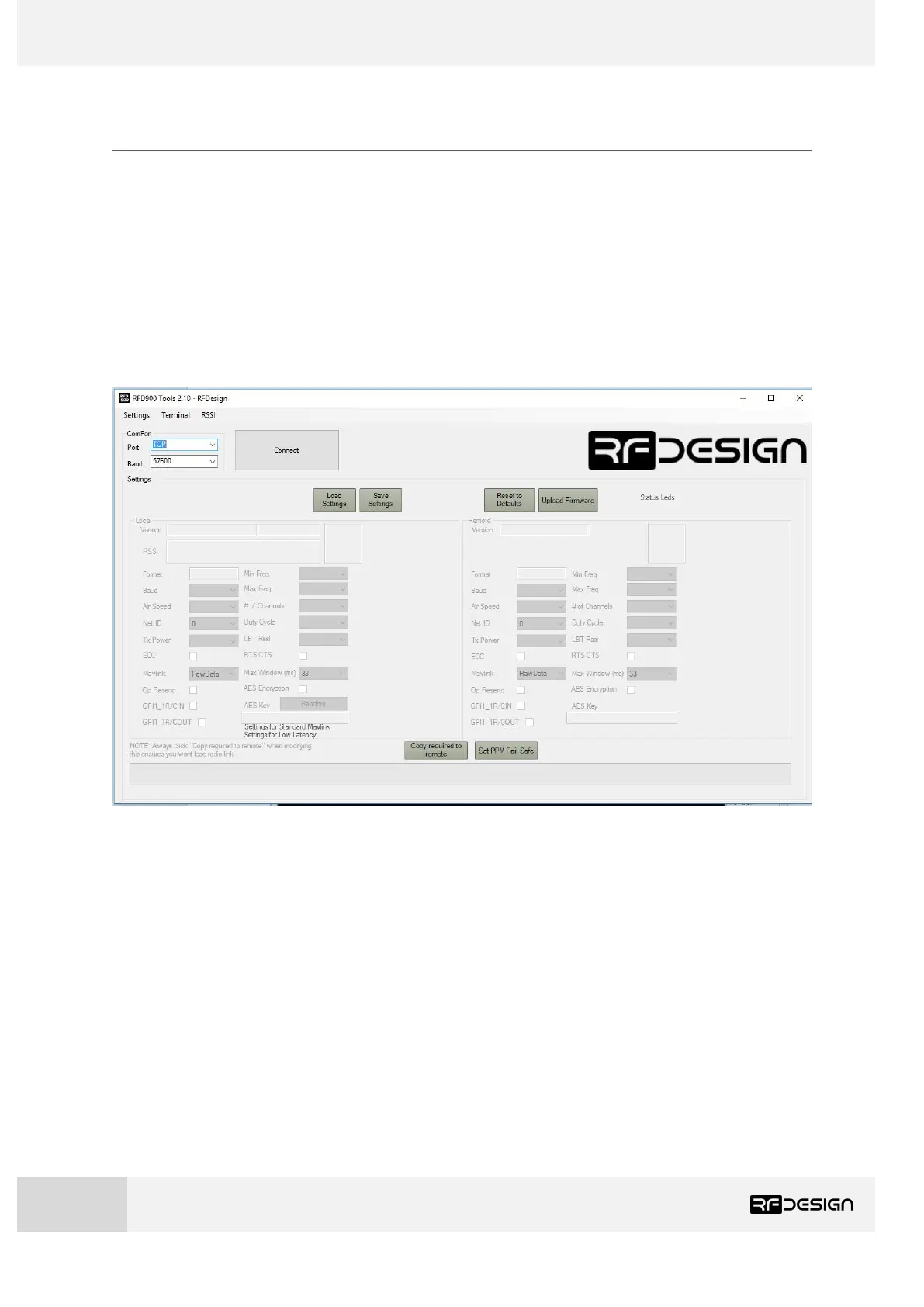
Figure 3-1 RFD900 Tools main screen
The COM or network port that the modem is connected to along with the connection rate can be set
in the top right of the screen.
Pressing connect opens the port.
Pressing load settings will connect to the modem and populate the screen with the current settings
of the modem/s.
Settings can be changed using the check and drop-down boxes.
Save settings saves changes made to the modem/s.
Reset to default will apply default settings to the modem/s.
Upload firmware provides a way for the user to update firmware or load an alternative firmware type.


 To Next Page