x1
2
x1
4 x1
5 x1
Tools Requried
(Not included)
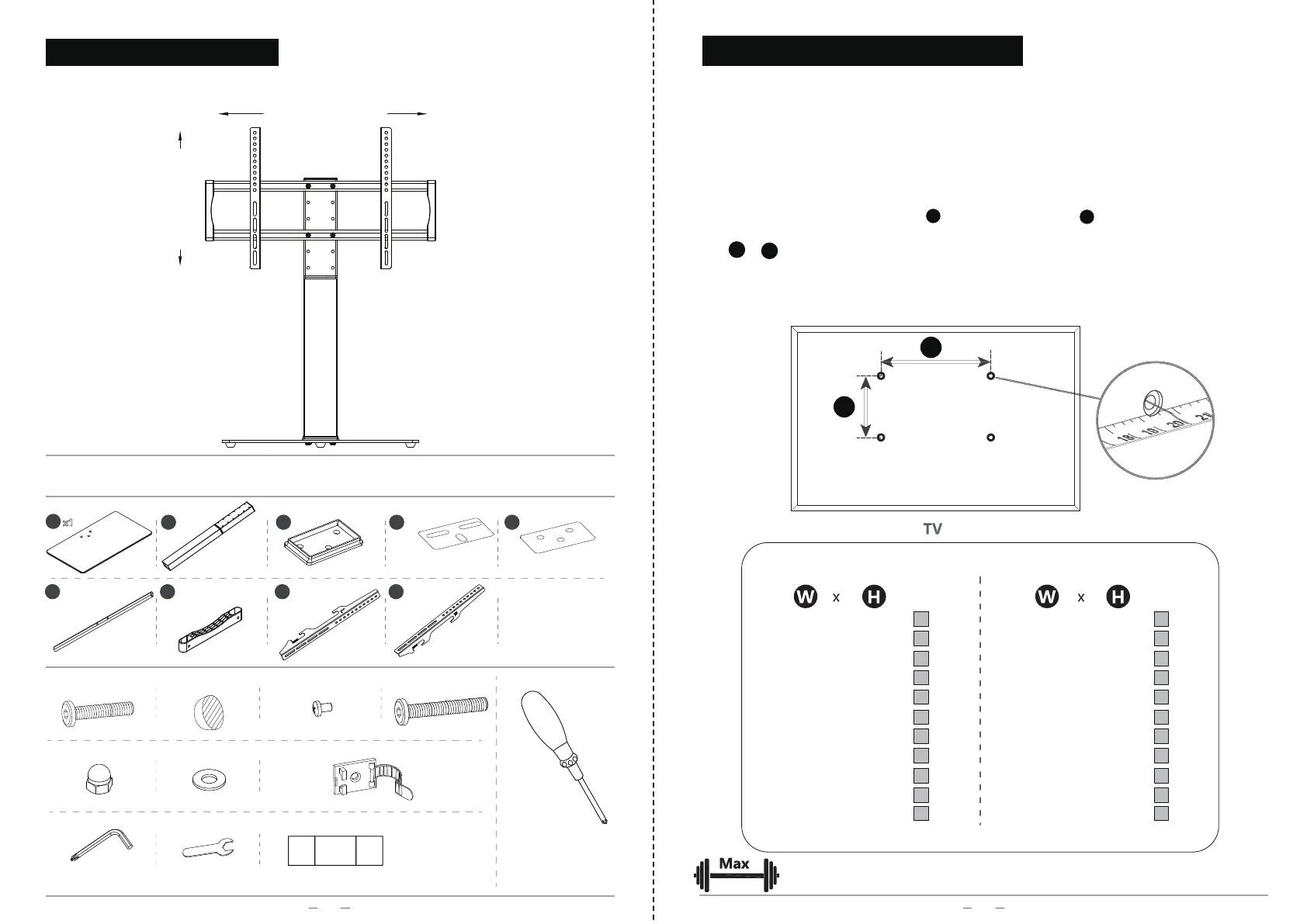
PARTS LIST
6
x2
7
x2
8
x1
9
x1
E
1
x4 E
2
x4 F x2
G
2
x1
S
Screws for TV
(5mm)
S1 S6
...
3
x1
C x4 D x4
G
1
x1
B x5A x3
02
PRODUCT DESCRIPTION
1
VESA:100-660mm
VESA:100-400mm
(steel washer)
(paper washer)
( plastic )
(13#)
Please check the weight of your display, it should be less than 133bs/ 60kgs.
Units: mm Units: inch
W
H
100
200
200
300
300
400
400
400
600
600
100
100
200
200
300
300
200
400
200
400
x
x
x
x
x
x
x
x
x
x
4.0
7.9
7.9
11.8
11.8
15.7
15.7
15.7
23.6
23.6
x
x
x
x
x
x
x
x
x
x
4.0
4.0
7.9
7.9
11.8
11.8
7.9
15.7
7.9
15.7
√
√
√
√
√
√
√
√
√
√
√
√
√
√
√
√
√
√
660
400
x
25.9
x
15.7
√ √
√
√
VESA standard of TV STAND
MEASURE VESA FOR YOUR TV
03
133lbs/60kgs
What does the VESA standard mean?
The VESA standard is a standard for attaching flat screens / LCD / monitors / televisions
to monitor mounts or TV mounts.
Prerequisite is that both the monitor / TV and the monitor mount have the same VESA
standard.
1、
2、
Look at the back of your TV/monitor for threaded holes.
Measure the horizontal distance W and vertical distance H of the screw holes (center
to center).
W x H should comply with the VESA standard of TV stand listed in below sheet.
Notice: If the TV/monitor is not compatible with VESA, it can still be attached to the desired
bracket by using VESA Adapters(not included and should extra buy).


 To Next Page