Section I :: User
11
I SECTION I :: USER
I.1 FEATURES
KWPCI – Wired control panel with liquid crystal display, 9 keys, to -
manually regulate all of the device functions connected in a serial
network (max 63 units), based on the pre-set room temperature. The
centralised wired panel does not have an air sensor, therefore each
device works based on its own temperature reading. The panel is set up
for wall installation, and the panel colour is white (RAL 9003).
I.1.1 DECLARED CONDITIONS OF USE
The electronic control referred to herein is intended for use with
Idrowall-I/V3 21-31-41 terminal units.
These terminal units are not designed to be installed in rooms used for
laundry purposes (IEC standard EN 60335-2-40).
Operating temperature: -10°C ÷ 40°C
Admissible humidity: 20% ÷ 75%
DANGER!
It is only possible to install the control panel in
domestic and similar environments.
I.1.2 SPARE PARTS AND ACCESSORIES
IMPORTANT!
Only Use original spare parts and accessories.
RHOSS
S.p.a. shall not be held liable for damage
caused by tampering with or work carried out by
unauthorised personnel or malfunctions caused by
the use of non-original spare parts or accessories.
I.2 INSTRUCTIONS FOR USE
I.2.1 USING THE CONTROL PANEL
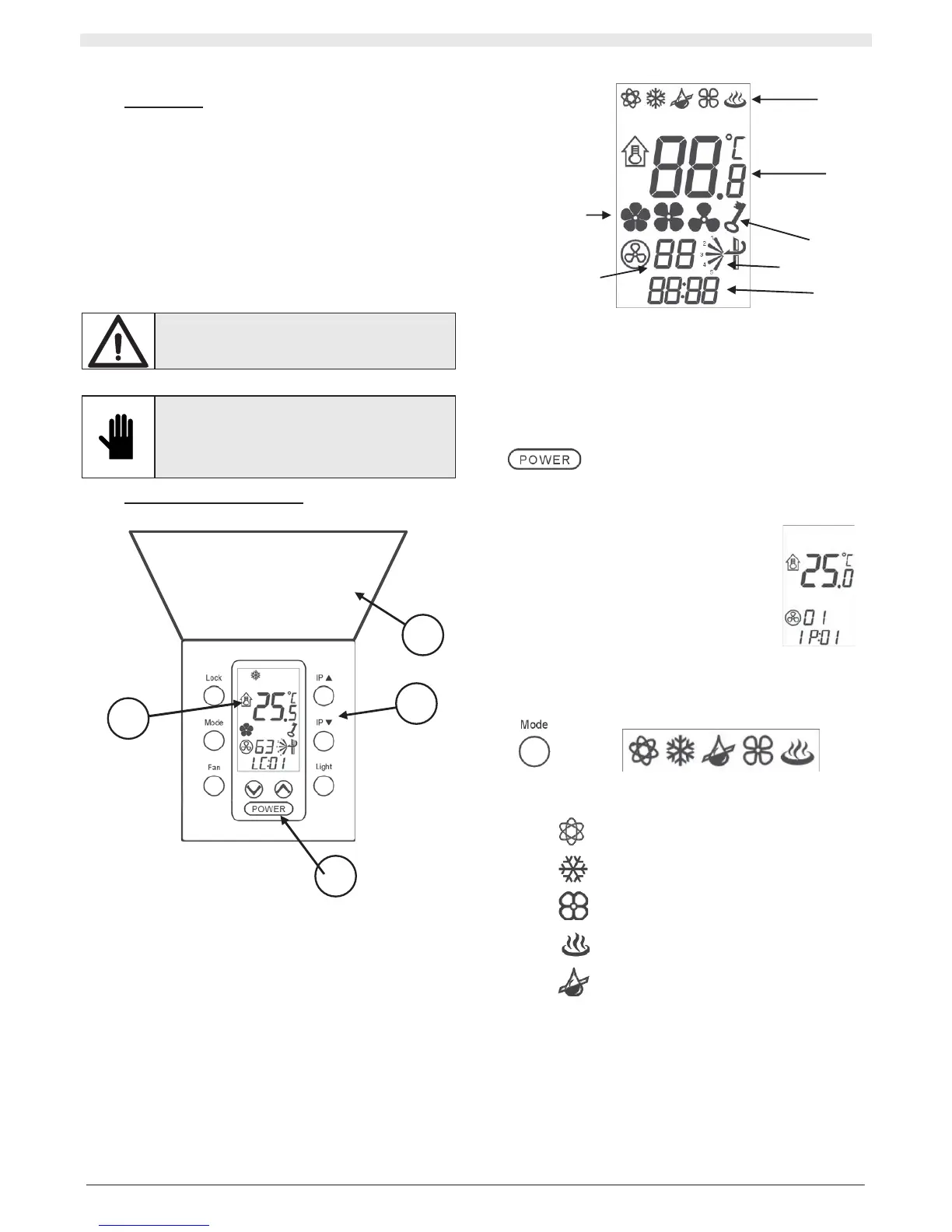
1. Display;
2. Keyboard;
3. ON/OFF button;
4. Closing door.
I.2.1.1 Description of the display
1. Unit operating mode;
2. Ambient temperature/set temperature;
3. Unit address;
4. KWPCI address;
5. Fan speed;
6. Swing Function.
7. Lock Function
I.2.1.2 Switching the unit on and off
The unit may be switched on or off by pressing the
POWER key.
When it is switched from OFF to ON, the unit switches on and you will
need to set the required parameters on the panel (unit operating mode,
fan speed, temperature value).
When it is switched from ON to OFF, any operating
mode of the unit is interrupted. Since the panel is
equipped with memory, all of the settings that have
been entered (unit operating mode, fan speed
setting, temperature value) will be maintained.
I.2.1.3 Setting the operating mode
By pressing the MODE key several times, it is
possible to change the operating mode of the unit.
The operating mode selected appears on the display:
AUTO
Fully automatic operation
COOL
Cooling mode
FAN
Ventilation only mode
HEAT
Heating mode
DRY
Dehumidification mode
1
2
3
4
1
2
3
4
5
6
7


 To Next Page