52
cod.AC08003
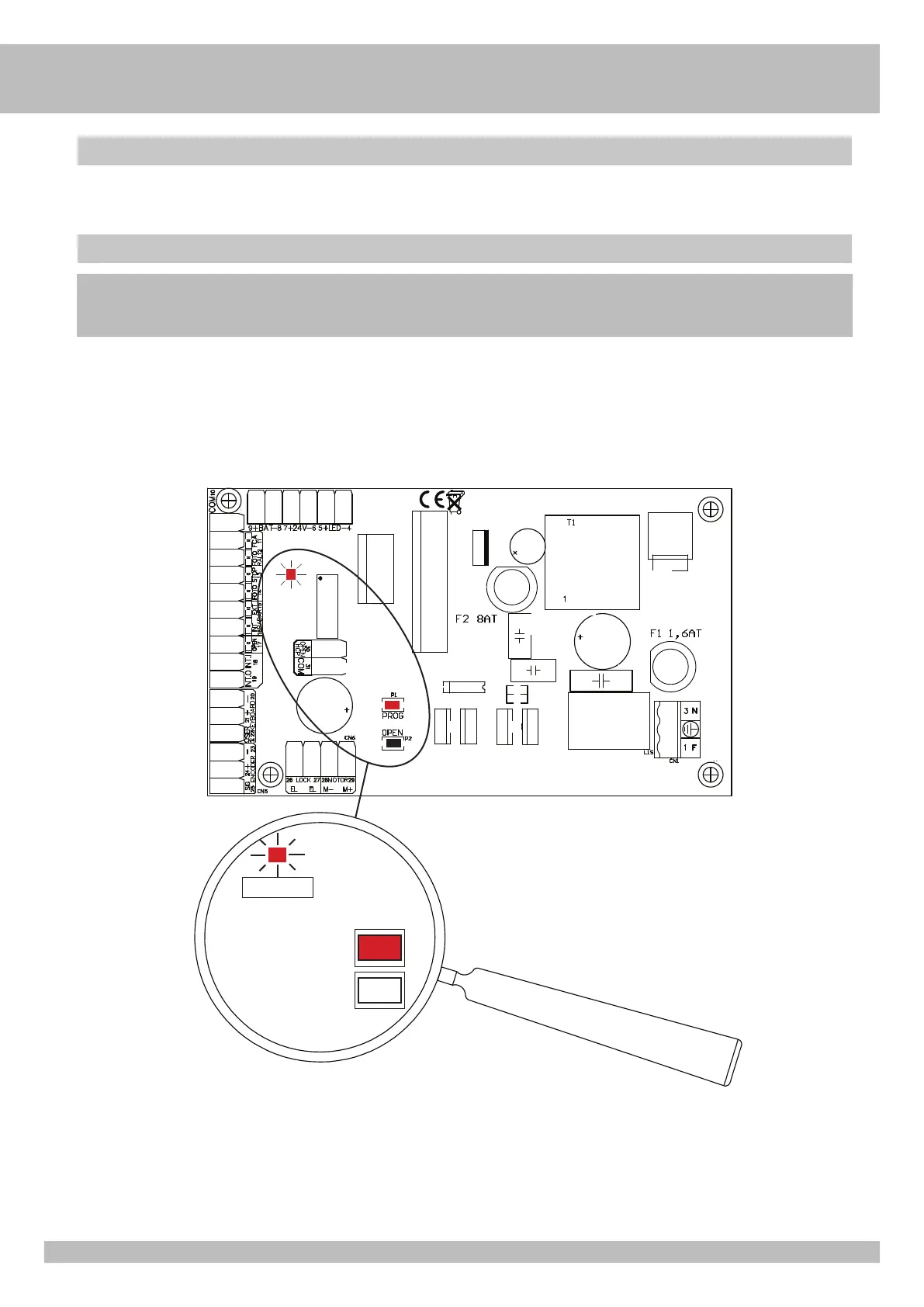
Press PROG botton.
The red LED will start to blink and the leaf will completely close up automatically to its closure mechanical stopper.
After 2 seconds the leaf will open up to the opening mechanical stopper and the red LED will turn off (the whole acquisition process will be operated at low speed).
After the complete opening operation, it will start automatically the counting (in seconds) for the automatic closure pause time.
Once the desired closure pause time is passed, press OPEN button.
The leaf will close quitting automatically from the set-up feature, setting the speed and the slow down needed to operate the door.
ATTENTION : The automatic closure pause time will be counted by the installer and it goes from 0 to 90 seconds, or it can be displayed on the LCD PROGRAMMER (optional).
Auto-set and automatic closure time regulation
Operating
The control panel is designed to operate an auto-set feature and to be ready for the use from the instant it is connected to the power supply.
WARNING: the auto-set process needs all the safeties to be wired; if one or more safeties are not used, close the relative input
terminal with Com 10 or COM 31 terminals.
LED PROG
PROG
OPEN
COM10
G
B


 To Next Page
 Loading...