EasyManua.ls Logo

Richard Wolf ENDOLIGHT LED 2.2 - User Manual

Richard Wolf ENDOLIGHT LED 2.2
33 pages
Print Icon
To Next Page IconTo Next Page
Loading...
GA-A
GA-AGA-A
GA-A 307
307307
307
/
en
/
//
/
2015-06 V1.0
/ PDG 00-0000
ENDOLIGHT LED 2.2
51640x1
Instruction
InstructionInstruction
Instruction Manual
ManualManual
Manual
Question and Answer IconNeed help?

Do you have a question about the Richard Wolf ENDOLIGHT LED 2.2 and is the answer not in the manual?

Overview

The ENDOLIGHT LED 2.2 is a light source designed for illuminating the operating field in the patient's body, specifically for diagnostic and therapeutic applications in particular in endoscopy. It is intended for use by specialized medical personnel and may only be applied by medically qualified and adequately trained persons. The device provides a light output in the visible spectrum for endoscopy.

Important Safety Information:

The manual emphasizes several critical safety warnings and notes. A general warning symbol indicates important general notes and instructions that must be read and understood. A caution symbol alerts users to potential hazards that could result in death or serious injuries, while a specific caution symbol warns about minor or moderate injuries. An "important" symbol highlights information crucial for proper device use, and a "note" symbol provides tips for optimum device use and other useful information.

Functional Description:

The ENDOLIGHT LED 2.2 light source supplies light for examinations, as well as for diagnostic and therapeutic applications in particular in endoscopy. The device operates with a color temperature of approximately 6500 K, offering optimum ventilation and adherence to operating notes and instructions. The LED service life is approximately 30,000 hours.

The device features a "dialog" function for communication between the light source and an "interactive" (i.e., dialog-capable) camera controller. This function allows the camera controller to adapt the image brightness while also automatically controlling the brightness of the light source. The brightness setting of the light source is controlled automatically via the camera controller, making it unnecessary to control the brightness manually at the light source.

For connectivity, the device must be connected via a LAN (Ethernet) connection cable (see wiring schematic in section 1). In both devices, the setting for the "core nova LAN" or integration interface must be selected. The device can also connect to the endoscope via an illustration-based connection.

Technical Specifications:

  • Model: 516401 (International), 5164011 (USA)
  • Voltage: 100 - 240 V~ (International), 100 - 120 V~ (USA)
  • Frequency: 50 / 60 Hz
  • Power Consumption: 150 VA (International), 110 VA (USA)
  • Current Rating: 1.1 - 0.6 A (International), 1.1 - 0.9 A (USA)
  • Fuse: T 2 AH 250 V
  • Electromagnetic Compatibility (EMC): IEC / EN 60601-1-2, Class I
  • Safety Class: IEC / EN 60601-1; (UL 60601-1 / CSA C22.2 No.60601-1 - for USA)
  • Protection against electric shock: Type CF applied part
  • Noise Level: < 25 dB(A) at 20°C
  • Duty Factor: Continuous operation
  • Degree of protection against ingress of liquids: IP 20 (not protected)
  • Degree of protection in the presence of flammable mixtures: This device is not protected against explosions (Do not operate this device in ignitable atmosphere)
  • Weight: 10.5 kg (23 lbs)
  • Dimensions (WxHxD): 300 mm x 160 mm x 421 mm
  • Light Source Output: 80 W LED (equivalent to a 300 W xenon light source)
  • Color Temperature: 6500 K
  • Service Life: Approximately 30,000 hours
  • Interfaces: LAN (Ethernet) network connector RJ45 (10/100/1000 Ethernet)

Usage Features:

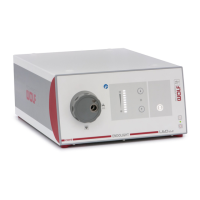
The device is equipped with a rotary selector wheel (4) with 4 light sockets for connecting light cables of other manufacturers. Users can turn the light socket for the light cable to be used to the 3-o'clock position (4.1). The manufacturer's code is displayed in the window (4.2).

Operation:

  • Power On/Off: The device is switched on and off using the power switch. An indicator light for line voltage (mains) ON/OFF is present.
  • Light On/Off: A dedicated button controls the light on/off function.
  • Manual Brightness Adjustment: Brightness can be adjusted using "increase/decrease brightness" buttons. The corresponding LEDs of the bar indicator light up. The "dialog" function must not be active for manual adjustment. When the upper or lower range limit is reached, a signal is sounded.
  • Automatic Brightness Adjustment (Dialog Function): This function is active as a default setting (see section 5.2.1). It illuminates an object with white light. The camera controller automatically controls the brightness. Manual brightness control is not possible when this function is active.
  • Temperature Protection Circuit: Blocked vent slots in the device's rear panel or insufficient air circulation can cause increased temperatures inside the device. A temperature protection circuit monitors the device temperature. In the case of overtemperature, the LED brightness is in a first stage continuously reduced and then shut down if the temperature increases any further to avoid additional damage.

Maintenance Features:

  • Reprocessing: The device must be cleaned regularly with a soft cloth moistened with surface disinfectant, alcohol, or spirit. Users must follow the disinfectant manufacturer's instructions. Do not immerse the device in liquids.
  • Maintenance Intervals: To avoid any incidents or damage caused by aging and wear, it is necessary to service the product and the accessories at adequate intervals. Depending on the frequency of use, but at least once a year, an expert must check the functional and operational safety of the equipment.
  • Replacing Device Fuses: The specifications of the device fuses must correspond with the fuse ratings on the identification plate. Only the fuses specified in the spare parts list should be used. To replace, switch off the device and disconnect the power cable from the wall socket and from the power input connector of the device. Unscrew the fuse holder using a screwdriver, take out the fuses, and replace them. Reinsert the fuse holder and push in until it clicks into place.

Troubleshooting:

The manual provides a comprehensive troubleshooting guide for various faults, including device errors, lamp function errors, faults in video mode, and errors within the core nova system. For each fault, possible causes and corrective actions are listed. For example, if the device is not logged in to the core system, possible causes include defective LAN cable, network switch having no power supply, or DHCP not activated. Corrective actions include checking and replacing LAN cables, contacting service department, and activating the dialog function.

Spare Parts and Accessories:

A list of spare parts and accessories is provided, including various fiber light cables, power cables, patch cables, and adapters. Further accessories are available on request.

Richard Wolf ENDOLIGHT LED 2.2 Specifications

General IconGeneral
BrandRichard Wolf
ModelENDOLIGHT LED 2.2
CategoryMedical Equipment
LanguageEnglish

Related product manuals