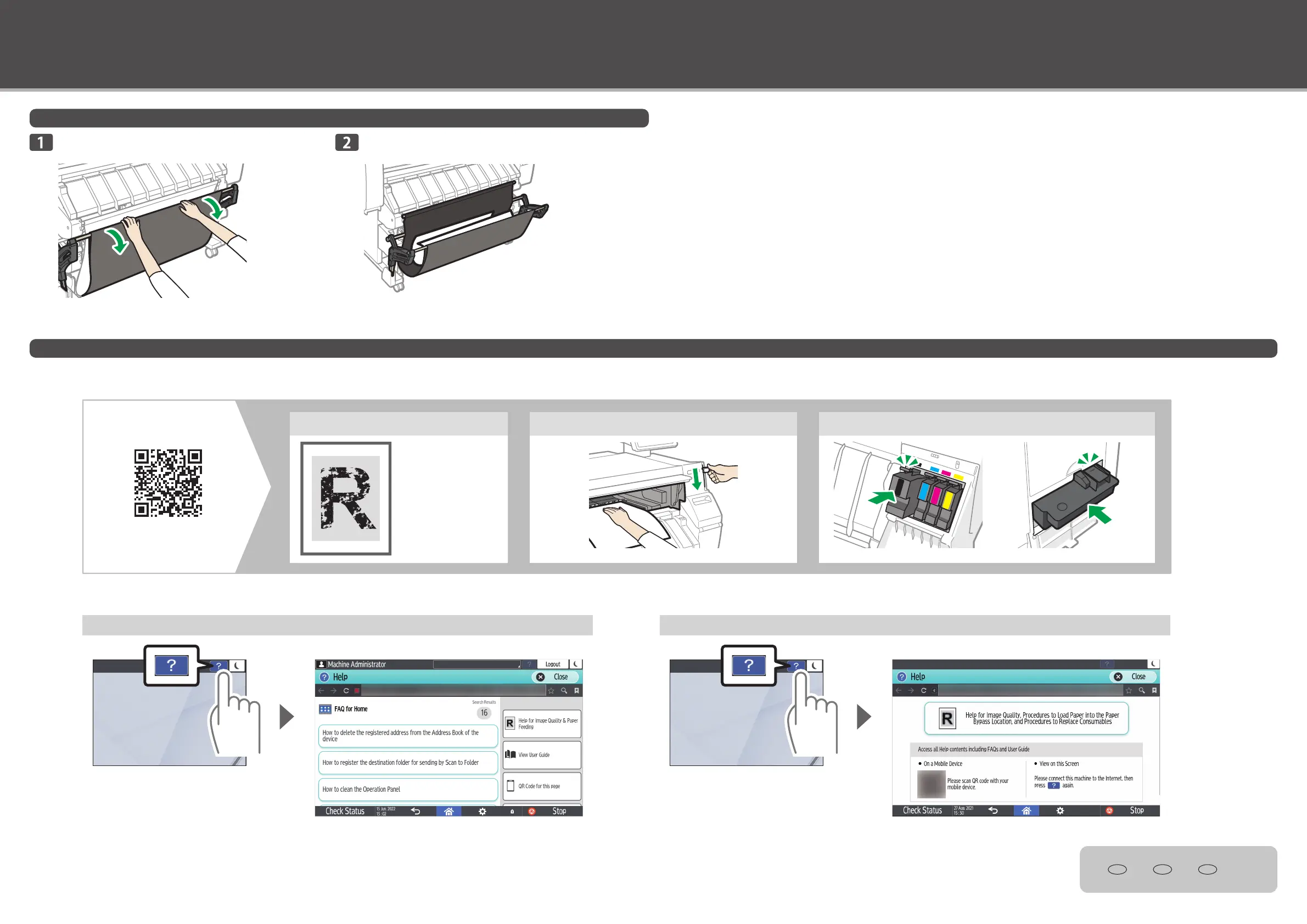
How to Set Up the Output Basket/Troubleshooting
For most printing: Setting Up the Output Basket in Basic Mode
View How to Improve Image Quality, Load the Paper Bypass Location, and Replace Consumables
Make sure the output basket is closed, and then
pull it out.
© 2022
EN GB EN US EN AU
M0F4-7007
Make sure that the output basket is in the basic mode.
Printed paper is output as shown in the illustration.
Viewing on smart device
Scan the QR code to check the procedure on your smart device.
Help for Image Quality Procedures to Load Paper into the Paper Bypass Location Procedures to Replace Consumables
This explains how to
improve image quality if
there is a problem, such as
faint printouts.
Viewing guidance on the control panel
You can conrm the procedures on the control panel of your machine.
When the machine is connected to the Internet When the machine is not connected to the Internet



 To Previous Page