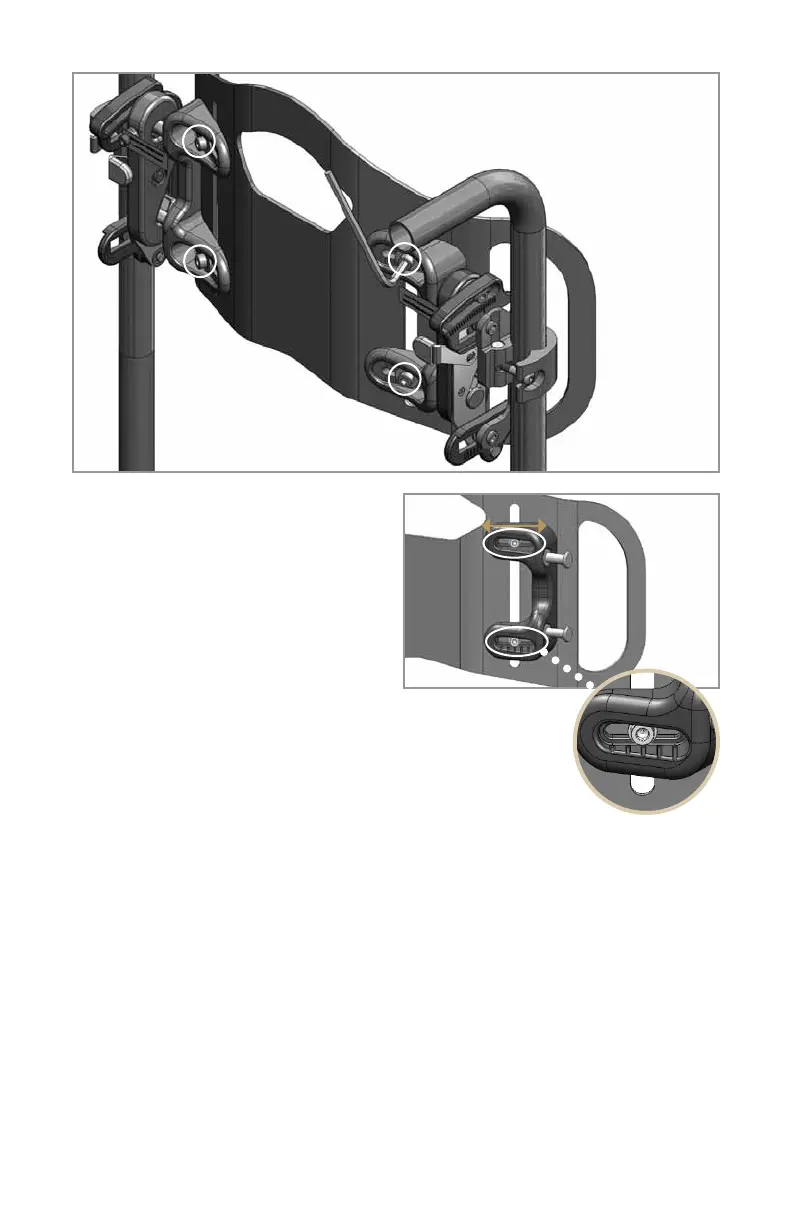
Usethe5mmAllenwrenchtoloosen
the height and width adjustment screws
indicated in Figure 6. Move the pin
brackets on the shell inward/outward
enough to allow all four attachment pins
to align and latch securely into the
mounting hardware. Use the index
marks provided (Figure 7) to center the
back shell on the pin brackets. Tighten
the height and width adjustment screws
securely.
NOTE: The Java Back is assembled at the factory to fit a
wheelchair matching the width of the Java Back. The width
adjustment screws allow for fine tuning of width as outlined
above, and also have sufficient range of movement to permit
installationof15"andwiderJavaBacksonwheelchairs+/-1"from
speciedwidth,e.gthe16"wideJavaBackcanbeadjustedtot15",
16"and17"widewheelchairs.
7. Check to make sure the back shell detaches easily by pushing both latch
release buttons and pulling the back shell upward and forward. Make sure the
back shell reattaches easily and securely by guiding the bottom attachment pins
into the lower receiver slots and then pushing the top attachment pins into the
latch mechanism. Be sure both latch buttons pop back, and tug the back shell
forward to verify that it is secure. If there is any binding or if you have any trouble
removing or replacing the back shell, repeat step 6 as necessary for smooth
operation.
8. Place the appropriate wheelchair cushion on the wheelchair and have the user
transfer to the wheelchair. Ensure the user is correctly positioned on the cushion.
4
Figure 6
Figure 7
Height
and width
adjustment
screws are
circled
Index
marks



 To Next Page