IV. Adjusting the Seat Depth
If you need to adjust the seat depth,
follow the instructions below.
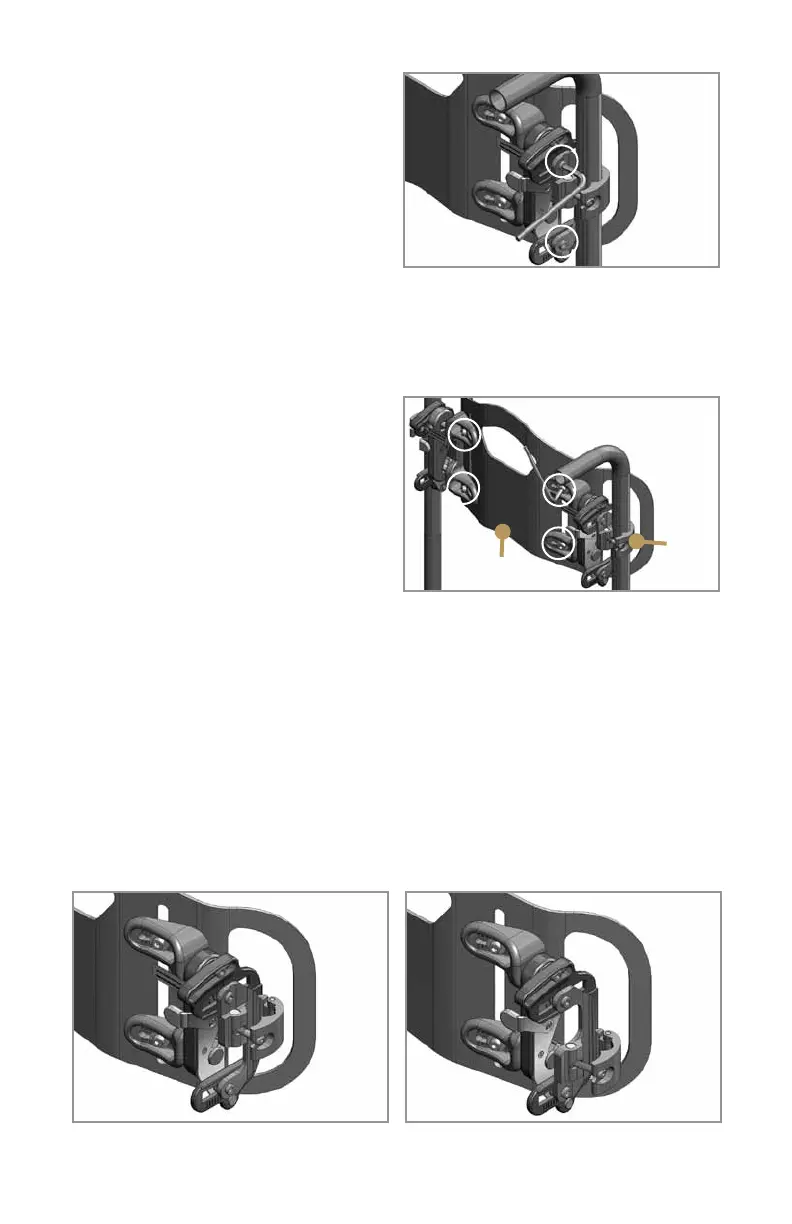
1. Loosen the depth adjustment screws
indicated in Figure 8.
2. Move the back shell to the
appropriate seat depth for the user.
3. Tighten the screws just enough to
hold the back in position, and use the index marks near the adjustment slots to be
sure that both sides of the back are at the same depth.
5.Whenthedepthissetcorrectly,tightenallfourdepthadjustmentscrewssecurely.
V. Adjusting the Back Height
1. Loosen the clamp screws and move
the mounting brackets up or down on
the back canes as necessary to set the
back height so that the PSIS alignment
line labeled near the bottom center of
the JAVA back shell is at the level of the
posterior superior iliac spines (PSIS).
2. Tighten the two clamp screws.
3. If you need to position the mounting brackets to clear armrests, a rigidizer bar,
or other wheelchair hardware, you can adjust the height of the back independently
of the clamps. Begin by positioning the mounting clamps as close as possible to
thedesiredbackheight.Thenusethe5mmAllenwrenchtoloosentheheightand
width screws in the horizontal slots on the back shell brackets (Figure 9), move
the back shell to the desired height, and retighten the screws. Make sure the back
shell is level from left to right, and that you have preserved the width adjustment for
smooth and safe removal and replacement.
NOTE: Java Clamp Reversal Instructions
Clamps can be flipped upside down to achieve a higher backrest or to avoid
interferences. See steps A-D on page 6.
5
Figure 8
Depth
adjustment
screws are
circled
Figure 9
PSIS
Height and width adjustment
screws are circled
Clamp
screw
Java clamp
reversal option
Java clamp
as shipped



 To Next Page