6
VI. Adjusting Seat to Back Angle
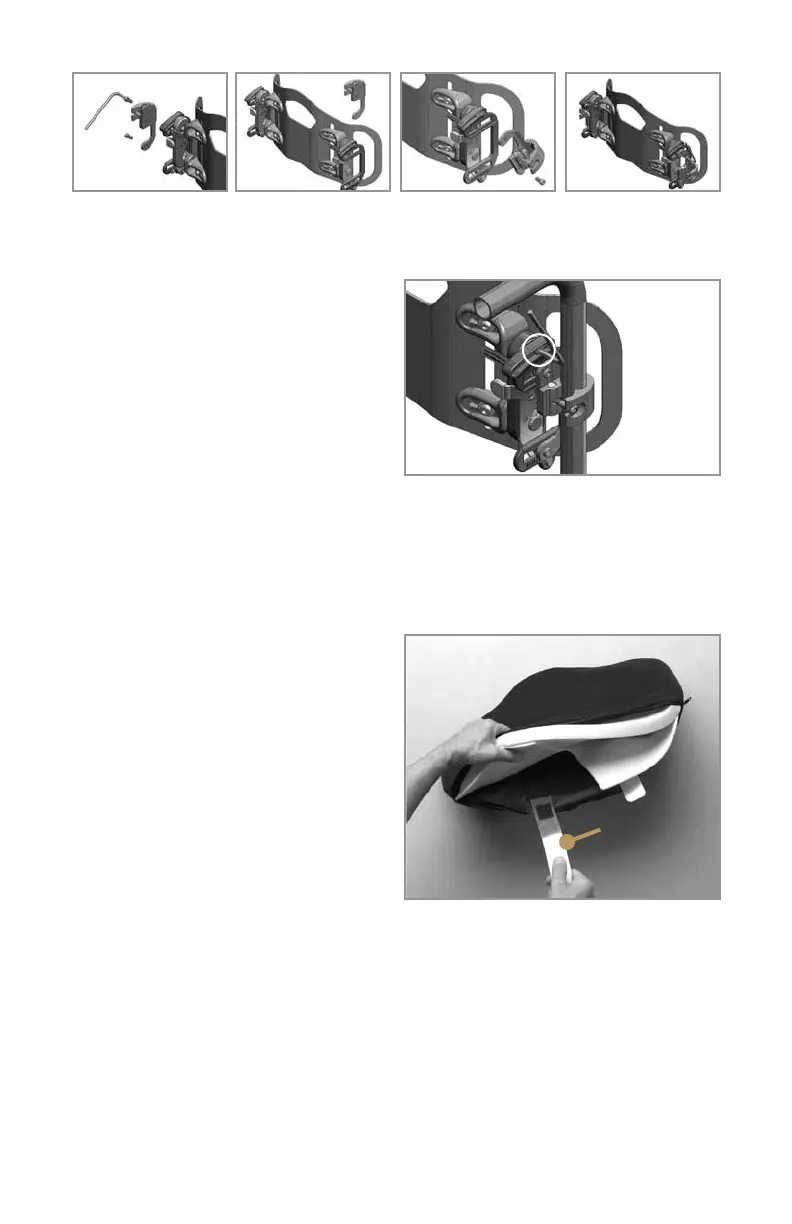
1.Usethe5mmAllenwrenchtoloosen
the back angle adjustment screws
indicated in Figure 10.
2. Adjust the JAVA Back to the desired
seat-to-back angle.
3. Tighten the screws just enough to
hold the back in position, and use the
index marks near the adjustment slots to be sure that both sides of the back are at
the same angle.
4. When the angle is set correctly, tighten the screws securely.
VII. Adjusting the Flexa-just Stays
1. The Flexa-just stays are thin
aluminum strips inserted into pockets
on the inside surface of the back cover,
behind the foam pads. NOTE: The
Flexa-just stays can be bent to provide
comfortable support to the gluteal area
below the level of the back shell.
Depending on the unique needs of the
user, you can easily adjust the stays to
provide the correct amount of support.
The stays are easy to bend using hand
pressure—no tools are required
( F i g u r e 11).
2. The stays can be bent while the user is sitting in the wheelchair. Simply insert
your hand between the foam insert and the sitter, grasp the lower portion of the
stays through the cover and foam insert, and bend in the amount and direction
needed to apply comfortable support.
3. If opening the back angle causes undesirable pressure or discomfort in the
gluteal area, simply bend the Flexa-just stays posteriorly to accommodate and
comfortably support the gluteal soft tissue.
4. If there is insufficient contact with the gluteal soft tissue, bend the stays
anteriorly to provide optimum support.
Figure 10
Back
angle
adjustment
screw is
circled
Figure 11
Flexa-just stays
Remove the two clamp
screws and two slot nuts
from the mounting bracket
and set aside.
A B
Move clamp to opposite
side of back.
Flip clamp upside down. Attach clamp to mounting
bracket using the two clamp
screws and two slot nuts
from A.
C D



 To Next Page