Ridge Tool Company6
Sunshade/Protective Doors
The Monitor
+
VCR doors protect the unit during trans-
portation and storage. When open, the top door provides
a sunshade to reduce glare.
Opening the Top Door
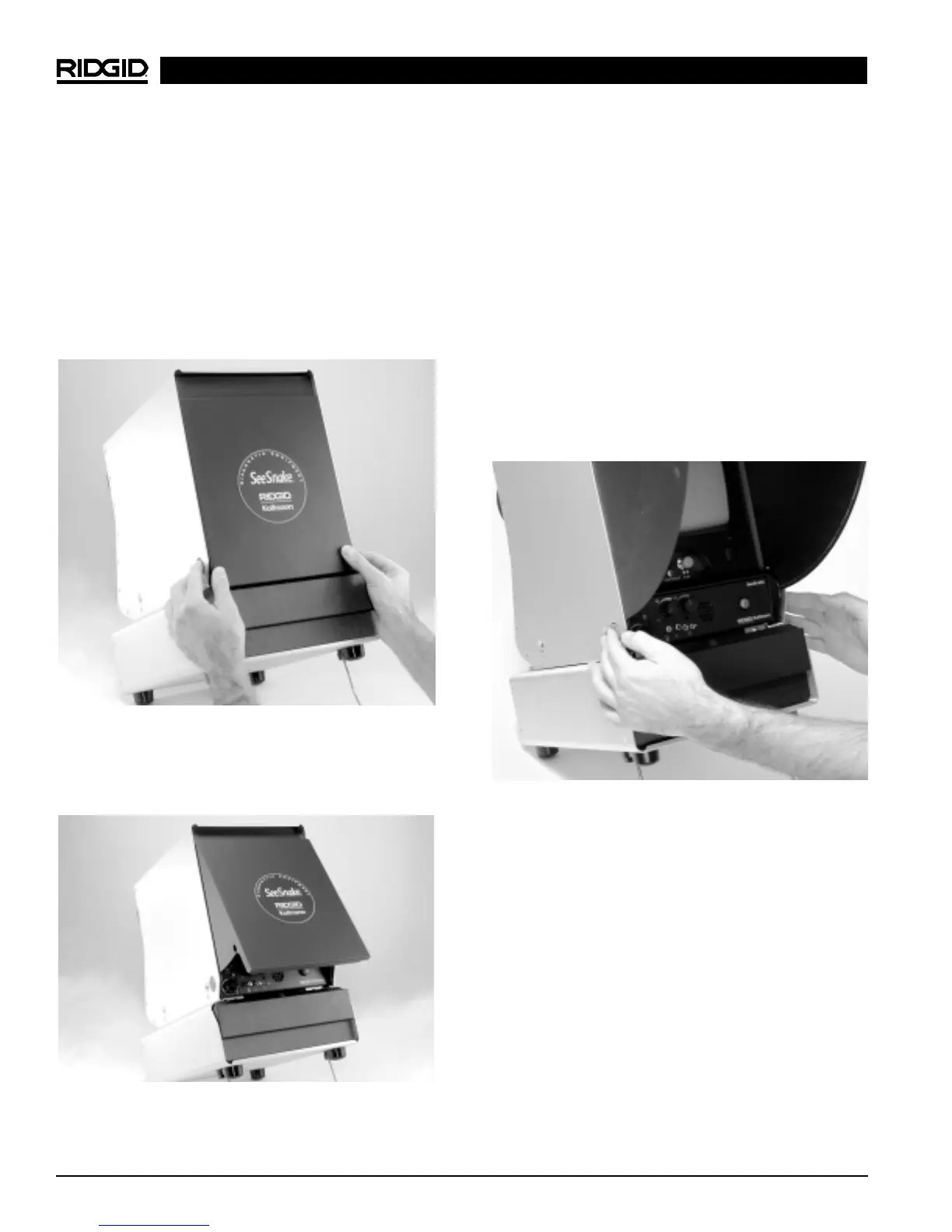
1. Locate the orange release buttons on each side of the
unit. Depress these buttons while gently pressing in on
the lower corners of the door with your thumbs. (Fi-
gure 2)
Figure 2 – Top Door Release Buttons
2. Once you depress the orange buttons, you will feel the
door release. Let the door open by taking your thumbs
away from the door. (Figure 3)
Figure 3 – Top Door Released
3. Raise the top door to its uppermost position. Make
sure the door locks into place on both sides.
Opening the Bottom Door
NOTE! The top door must be opened before the bottom
door can be opened.
1. Gently rotate the bottom door forward until it stops to
completely expose the VCR.
Closing the Doors
1. First, close the bottom door by rotating it up until it
stops and completely covers the VCR.
2. Keeping clear of the top door, gently depress the or-
ange buttons to drop the door to the lower position.
(Figure 4)
Figure 4 – Lowering the Top Door
3. Gently press the door on each lower corner until it
locks into place on each side. (Figure 5)
Black and White Monitor
+
VCR, Color Monitor
+
VCR



 To Next Page