EasyManua.ls Logo

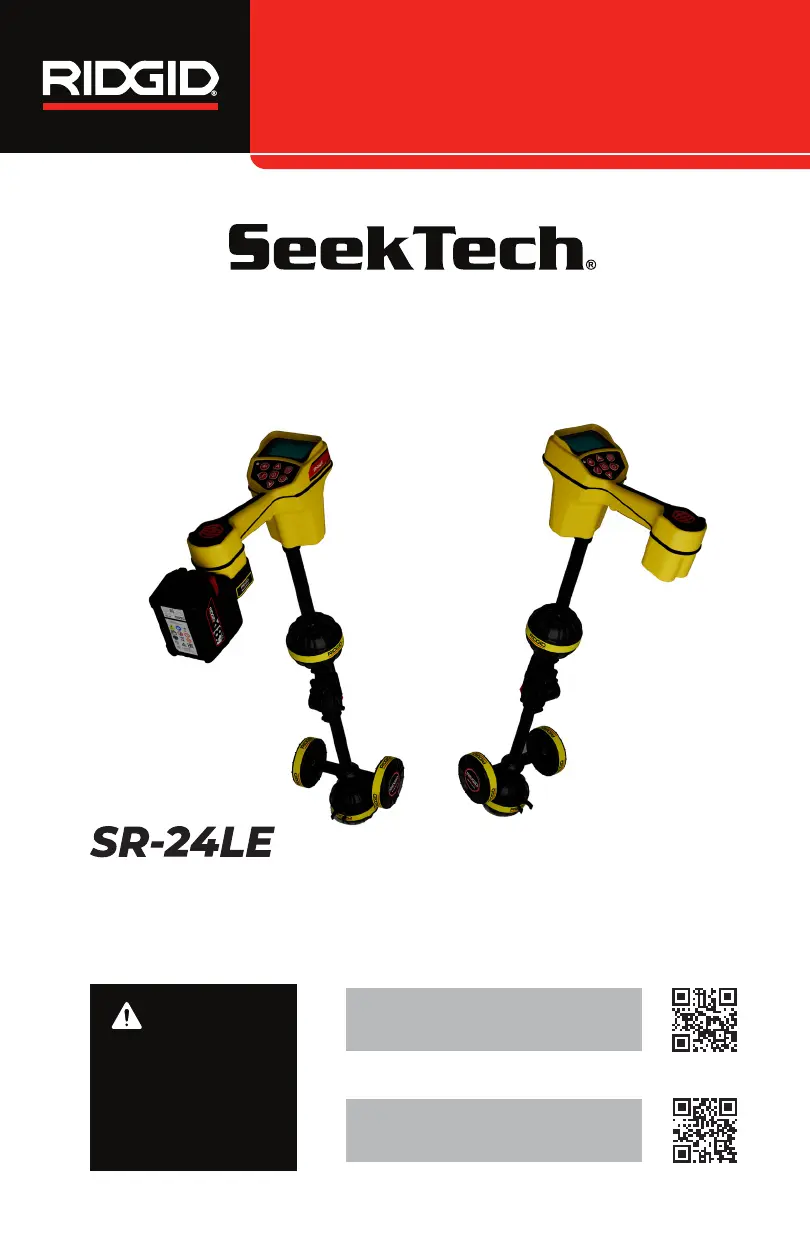
RIDGID SeekTech SR-24LE - User Manual

RIDGID SeekTech SR-24LE
20 pages
Print Icon
To Next Page IconTo Next Page
Loading...
WARNING!
Read this Operator’s Man-
ual carefully before using
this tool. Failure to under-
stand and follow the con-
tents of this manual may
result in electrical shock,
fire, and/or serious per-
sonal injury.
SR-20 online support:
support.seesnake.com/sr-20
Operator’s Manual
SR-20
SeekTech
SR
Locators
SR-24LE online support:
support.seesnake.com/sr-24le

Questions and Answers

Overview

The RIDGID SeekTech SR-24LE and SR-20 are advanced utility locators designed for professionals to confidently determine the position of underground utilities. The SR-24LE model includes integrated GPS and Bluetooth® Low Energy (BLE) technology, while the SR-20 is functionally identical but lacks these features.

Function Description:

The SR-24LE/SR-20 receivers utilize an omnidirectional antenna system to measure electromagnetic signals. This system calculates the signal's orientation, strength, depth, and degree of distortion or interference, providing a comprehensive understanding of the utility's location. The device offers both visual display and multi-dimensional audio cues to make the locating experience intuitive. A key feature is its continuous monitoring of the electromagnetic field for interference from conflicting signals that could distort its shape. When distortion is detected, the SR-24LE/SR-20 emits audio cues and displays on-screen guidance, helping operators take appropriate action to avoid mis-marking utility positions. The SR-24LE also integrates GNSS for precise positioning and BLE for connectivity with Bluetooth-enabled devices.

The locators operate in two primary modes: Line Trace Mode and Sonde Mode.

  • Line Trace Mode: This mode allows for both Active and Passive Line Tracing.
    • Active Line Tracing: Involves intentionally applying a signal onto the target line using a transmitter, either through metal-to-metal conduction or non-metal-to-metal induction. Active frequencies supported include 128 Hz, 1 kHz, 8 kHz, 33 kHz, and user-programmable frequencies from 10 Hz to 35 kHz.
    • Passive Line Tracing: Detects signal energy coupled onto metallic conductors from nearby energy sources like power lines. This includes Passive Power (detecting 50 Hz or 60 Hz signals, with variations like 50 Hzx5, 50 Hzx9, 60 Hzx5, 60 Hzx9, 100 Hz, 120 Hz, and < 4 kHz), Radio Frequency Broadband (searching 4 kHz – 15 kHz and > 15 kHz), and OmniSeek Broadband Modes (simultaneously searching < 4 kHz, 4 kHz – 15 kHz, and > 15 kHz). Broadband frequencies target any signal within a specified range, including active signals.
  • Sonde Mode: Used to locate a sonde placed inside a pipe, conduit, or tunnel. Default sonde frequency is 512 Hz, with preprogrammed options including 16 Hz, 640 Hz, 850 Hz, 8 kHz, 16 kHz, 33 kHz, and user-programmable frequencies from 10 Hz to 35 kHz.

Important Technical Specifications:

  • Dimensions:
    • Length: 316 mm [12.5 in]
    • Width: 190 mm [7.5 in]
    • Height: 785 mm [30.9 in]
  • Weight (without battery or adapter):
    • SR-24LE: 1.7 kg [3.8 lb]
    • SR-20: 1.4 kg [3 lb]
  • Power:
    • Power rating: 6V, 370 mA (SR-24LE); 6V, 300 mA (SR-20)
    • Battery type (without adapter): Four size C, 1.5 V alkaline (ANSI/NEDA 14 A, IEC LR14), or 1.2 V NiMH or Ni-Cad rechargeable batteries.
    • Battery type (with adapter): RIDGID or Makita rechargeable Li-Ion with max voltage 25 V.
    • Power consumption: 2.2 W (SR-24LE); 1.8 W (SR-20)
  • Ingress Protection: IPX4
  • Relative Humidity: 5 to 95 percent
  • Altitude: 4,000 m [13,123 ft]
  • Operating Temperature: -10°C to 50°C [14°F to 122°F]
  • Storage Temperature: -20°C to 60°C [-4°F to 140°F]
  • LCD:
    • Resolution: Monochrome 240 x 160 pixels
    • Display size: 58 mm x 38 mm [2.3 in x 1.5 in]
  • USB:
    • Cable: Mini-B, 1.8 m [6 ft]
    • Type: 2.0
  • SD Card: Micro 16 GB
  • Bluetooth 5.0 (SR-24LE only):
    • Module: BT840XE
    • Transmit power: 19.55 dBm
    • Receiver sensitivity: -96 dBm at 1Mbps
    • Antenna gain: 2 dBi
    • Operating range: Up to 4,500 m [14,764 ft] (effective distance may vary)
  • GPS (SR-24LE only):
    • Model: STA8090FG
    • Accuracy: 1 m [3.3 ft] (manufacturer states 4.6 cm [1.8 in], affected by environmental factors)
    • Tracking: -162 dBm

Usage Features:

  • Display Elements: The LCD screen provides comprehensive visual feedback, including:
    • Active Line Trace Icon: Indicates active line trace frequency.
    • Passive Power Line Trace Icon: Indicates passive power line trace frequency.
    • Passive Radio Frequency Broadband Line Trace Icon: Indicates passive radio frequency broadband line trace frequency.
    • Passive OmniSeek Line Trace Icon: Indicates passive OmniSeek line trace frequency range.
    • Proximity Number: Represents nearness to the target line; larger number means closer.
    • Current Measurement (mA): Appears when directly over the line.
    • Signal Strength: Indicates strength of signal detected by omnidirectional antennas; maximum strength indicates receiver is over the target line.
    • Signal Angle: Appears in place of Current Measurement when the detected signal is at an angle greater than 35°.
    • Measured Depth: Shows approximate depth in meters (m) or feet (ft).
    • Tracing Line: Indicates direction and offset of the target line; clear when undistorted, fuzzy with distortion.
    • Distortion Line: Represents signal from the Upper Antenna node, used to estimate distortion.
    • Guidance Arrows: Indicate when field strength is equal on both sides of the receiver.
    • Guidance Line: Shows alignment of the Tracing Line when the receiver is close to the utility's orientation.
    • Cross Hairs: Represent receiver's location at the center of the Active View Area.
    • Rotation Arrows: Indicate direction to turn receiver to realign with target line.
    • Sonde Mode Specifics: Sonde icon, signal strength, signal angle, measured depth, pole icon, cross hairs, pipe direction, sonde equator icons, equator line, and zoom ring.
    • Universal Elements: SD Card and Usage Bar Graph, GNSS icon, GNSS Estimated Positional Error, No GNSS Signal Lock, Battery Status, Backlight, and Bluetooth icon.
  • Keypad: Includes Power/Right Arrow, Frequency/Left Arrow, Menu, Up Arrow, Down Arrow, Volume, and Select keys for intuitive control.
  • Folding Antenna Mast: The antenna mast can be unfolded and locked into place for operation, then folded and secured for storage or transportation. Manual operation is required to prevent damage.
  • Depth Measurement: Calculates depth by comparing signal strength between upper and lower antennas. A Depth Verification Test is recommended to confirm accuracy.
  • Depth Average: Provides an average of real-time depth readings over 2 to 6 seconds, useful for variable readings.
  • Signal Accuracy Check: Operators are advised to check for aligned guidance arrows/line, minimal tracing line distortion, maximized proximity number/signal strength over the line, and appropriate depth increase during verification tests to ensure accuracy. Discrepancies indicate signal problems.

Maintenance Features:

  • Cleaning: Batteries must be removed before cleaning to prevent electrical shock. Do not use liquid or abrasive cleaners, solvents, or scraping tools. Do not immerse in water. Clean with a damp cloth and mild detergent. Only use approved cleaners for LCD screens.
  • Transportation and Storage:
    • Store in a locked area, out of reach of children.
    • Keep in a dry place to reduce electrical shock risk.
    • Store away from heat sources (radiators, stoves, amplifiers).
    • Storage temperature: -20°C to 60°C [-4°F to 140°F].
    • Avoid heavy shocks or impacts.
    • Remove batteries before shipping or extended storage.
  • Service and Repair: Improper service can make the device unsafe. Service and repair must be performed at a RIDGID Independent Authorized Service Center. Support information is available via local distributors, RIDGID.com, or by contacting the Ridge Tool Company Technical Service Department.
  • Disposal: The SR-24LE/SR-20 contains recyclable materials. Components should be disposed of in compliance with applicable regulations. For EC countries, electrical equipment should not be disposed of with household waste but collected separately according to European Guideline 2012/19/EU.

RIDGID SeekTech SR-24LE Specifications

General IconGeneral
BrandRIDGID
ModelSeekTech SR-24LE
CategorySecurity Sensors
LanguageEnglish

Related product manuals