CODE
MENU
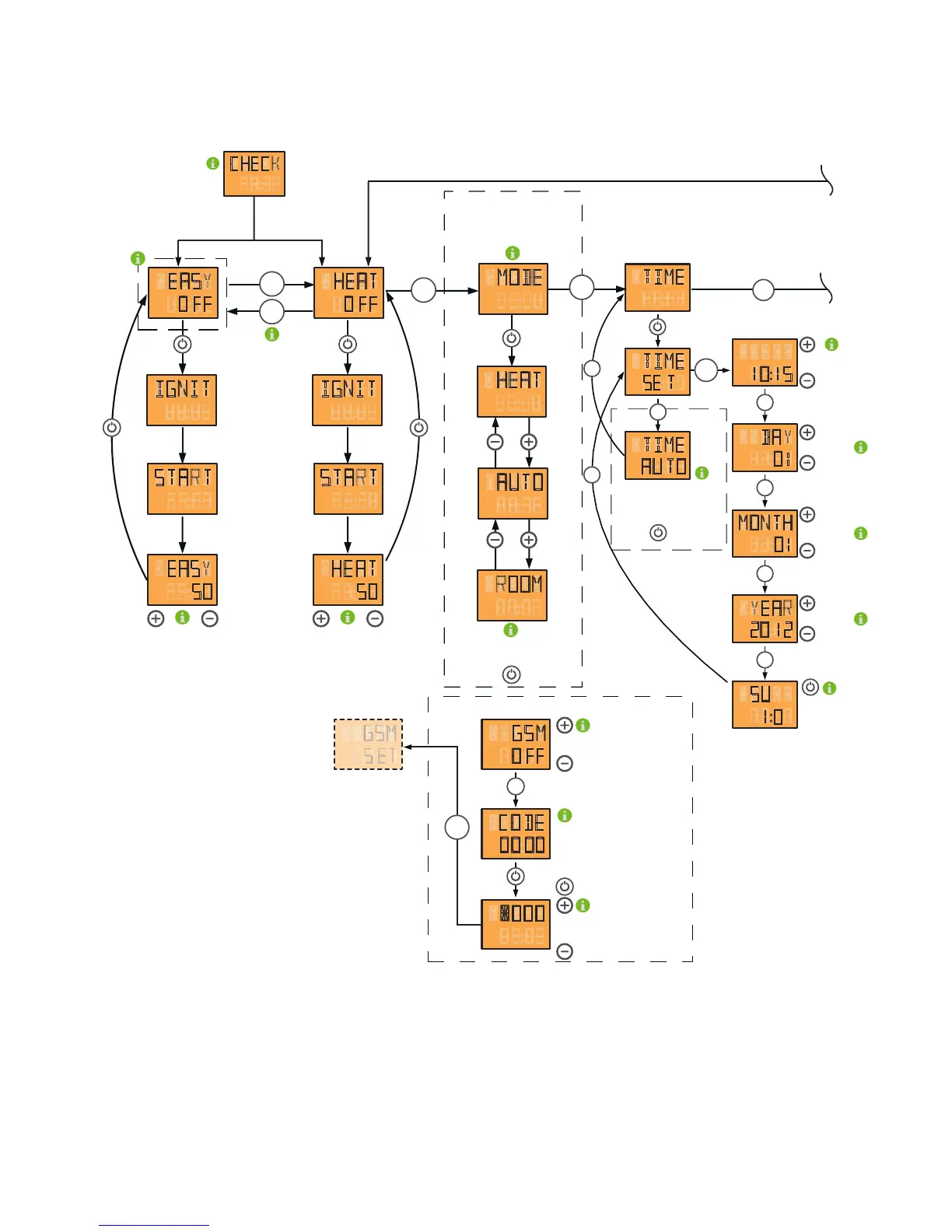
the G S M -option is ac tivated
or deac tivated using the „ + “ and „ -“ k ey
display of c ode c urrently set
the respec tive ac tive num b er is c hang ed
using the „ + “ and „ -“ k ey. T he num b er is
c onf irm ed and the nex t position is c hang ed to
b y pressing the I / O k ey.
MENU
GSM
O FF
OO OO
G S M- o p t i o n
the T I M E A U T O display b ox is only
visib le in c onnec tion with the R I KA room -
and/ or the R I KA wireless room sensor.
P ressing the I / o k ey tak es you to the
sub m enu of the heating tim e prog ram m ing
S et hours and m inutes
using the „ + “ and „ -“ k ey
S et day using the
„ + “ and „ -“ k ey
S et m onth using the
„ + “ and „ -“ k ey
S et year using the
„ + “ and „ -“ k ey
h e a t i n g
t i m e
W ith I / 0 , the date is
rec orded. T he tim e is
stored onc e set.
TIME
TIME
DAY
MONTH
YEAR
SU
TIME
AU TO
10 15
01
01
1220
1 0
SE T
MENU
MENU
MENU
MENU
MENU
MENU
MENU
MENU
c o m f o r t f u n c t i o n s
display panel
display of
respec tive operating status
S witc h b etween EA S Y and HEA T m odes
press m enu k ey f or at least 5 sec onds
selec tion of c om f ort f unc tion
req uired HEA T / A U T O / R O O M
b y pressing the I / O k ey
MENU
MENU
HEAT
ROOM
EASY
5050
MENU
c hang e heat output b y
pressing the „ + “ or „ -“ k ey
( c hang e in 5 % inc rem ents)
c hang e heat output b y
pressing the „ + “ or „ -“ k ey
( c hang e in 5 % inc rem ents)
m enu item m ode only ac tive
in c onnec tion with the R I KA room sensor
or the R I KA wireless room sensor
HEAT
O FF
EASY
O FF
IGNIT
START
MODE
HEAT
AUTO
IGNIT
START
"CHECK" appears in the display whenever
the stove ist re-supplied with power.
CHECK
MENU
MENU
10. MENU OVERVIEW V1.40


 To Next Page