EasyManua.ls Logo

Rikon Power Tools 31-200 - User Manual

Rikon Power Tools 31-200
16 pages
Print Icon
To Next Page IconTo Next Page
Loading...
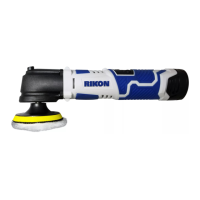
12V Cordless Sander/Polisher
31-200
www.rikontools.com
31-200M1
Operators Manual
Date of purchase: ______________________
For technical support or parts questions, email techsupport@rikontools.com
or call toll free at (877)884-5167

Questions and Answers

  • W
    wagnerchristopherJul 28, 2025
    Why does my Rikon Power Tools 31-200 Sander battery have low capacity?
    • N
      Nicholas StarkJul 28, 2025
      The battery may not be fully charged. Ensure you do not remove the battery from the charger until the green LED is illuminated. Alternatively, the battery may be at the end of its duty cycle, having exceeded 100 charging cycles.
  • S
    susancolemanAug 12, 2025
    What to do if red and green LEDs don't light up on my Rikon Power Tools 31-200 Sander battery charger?
    • R
      Richard MooreAug 12, 2025
      If the red and green LEDs on the battery charger do not illuminate, the battery may not be correctly installed in the charger. Remove the battery and reinstall it until you hear a 'click'. Also, ensure that the charger is properly plugged in.

Summary

Safety Instructions

General Safety

Covers general safety precautions for operating the tool.

Before Using Cordless Tools

Essential checks and preparations before operating the cordless tool.

Specific Safety for Cordless Tools

Detailed safety guidelines specific to cordless tool operation.

Personal Safety

Focuses on user safety, including protective equipment and body posture.

Specifications

Instructions

Troubleshooting

Warranty

Rikon Power Tools 31-200 Specifications

General IconGeneral
BrandRikon Power Tools
Model31-200
CategorySander
LanguageEnglish

Related product manuals