Chapter 7 Setting the Operation Conditions
141
7
Registering Frequently Used
Functions in the [Selections] Tab
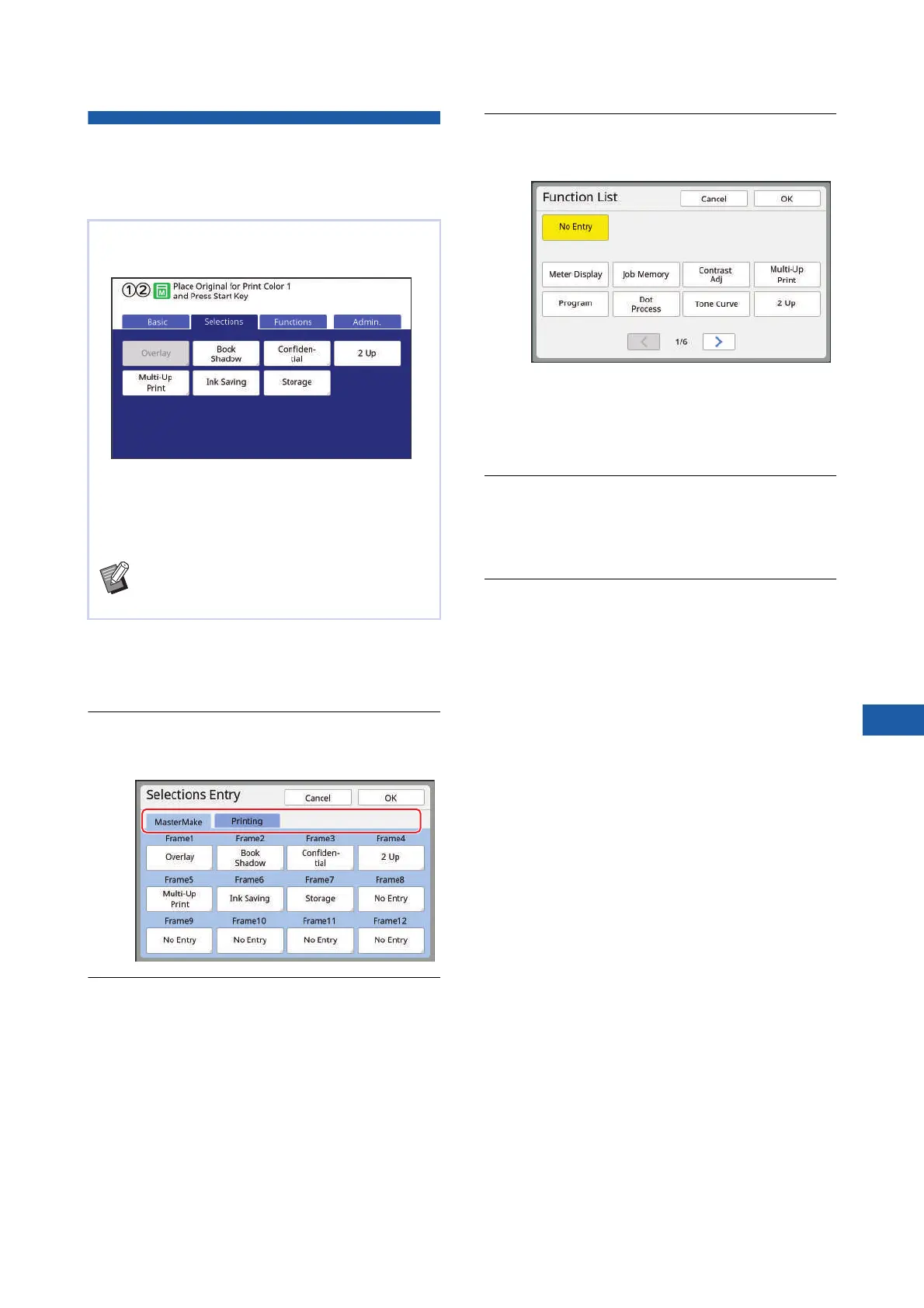
Screen [Selections Entry]
1
Touch [Selections Entry] in the
[Admin.] screen.
The [Selections Entry] screen is displayed.
2
Touch the mode tab in which you
want to register a function.
3
Touch the function button that you
want to register.
You can also touch the button for which a func-
tion has already been registered to change to
another function.
4
Touch the function name to be reg-
istered.
• Touch [E] or [D] to change the display.
• If you do not want to register any function,
touch [No Entry].
• You cannot touch a function name that has
already been registered.
5
Touch [OK].
The [Selections Entry] screen is displayed.
When you want to register another function but-
ton, repeat steps 3 to 5.
6
Touch [OK].
The [Admin.] screen is displayed.
You can register frequently used functions in the
[Selections] tab screen.
You can register the functions in the [Selections] tab
screen for each of the following modes.
• Master making mode
• Printing process mode
BWhen an optional device is connected,
some functions are automatically regis-
tered in [Selections].



 To Next Page