Installation and Operation
UPS-Manual
15
EN
must be completely restarted to get
back to Normal Mode.
drawing H
4.4.3. Check Measured Values &
Figures detected by UPS
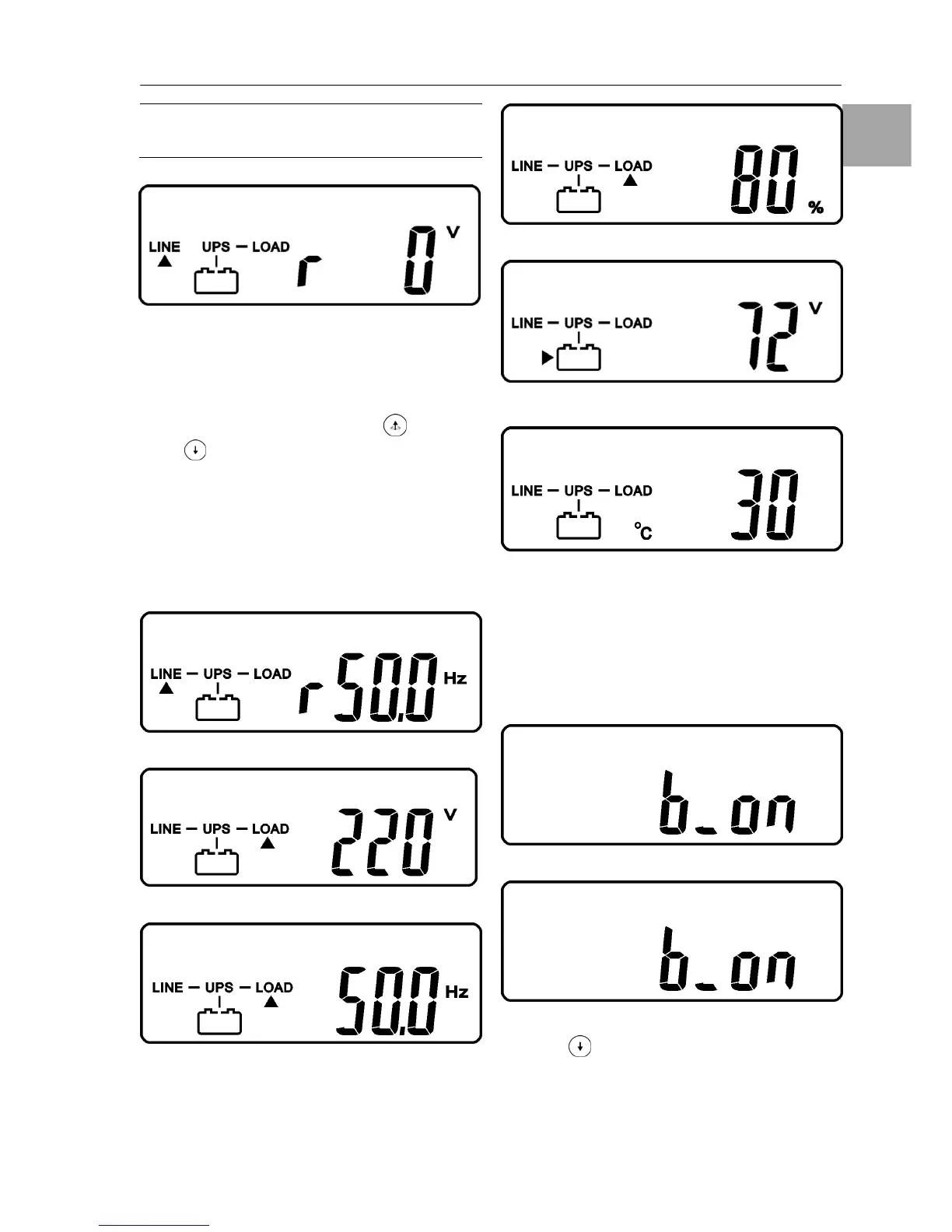
If you would like to check the measured values
& messages, please use scroll up
and scroll
down
key pads. When you use scroll down
key pad, the LCD display will illustrate in se-
quence from drawing E(Input Voltage)
Æ
drawing J(Input Frequency)
Æ drawing K(UPS
Output Voltage)
Æ drawing L(UPS Output Fre-
quency)
Æ drawing M(UPS Output Load per-
centage)
Æ drawing N(UPS Battery Voltage)
Ædrawing O(UPS inner temperature).
drawing J
drawing K
drawing L
drawing M
drawing N
drawing O
4.4.4. UPS Default Data and Special
Function Execution
1. After UPS is turned on successfully, use
key 9 (Chapter 3.1) pad to change the LCD
Display screen to drawing P1.
drawing P1
drawing P2
2. Press key pad to scroll down the LCD
screen, then check the UPS settings. The
LCD display will show in sequence: drawing
P1(buzzer)
Ædrawing Q1(self test)Ædrawing
R1(Bypass Voltage)
Ædrawing S (Output


 To Next Page