UPS Functional Descriptions
UPS-Manual
6
EN
3. UPS Functional Descriptions
3.1. UPS Front Panel Display
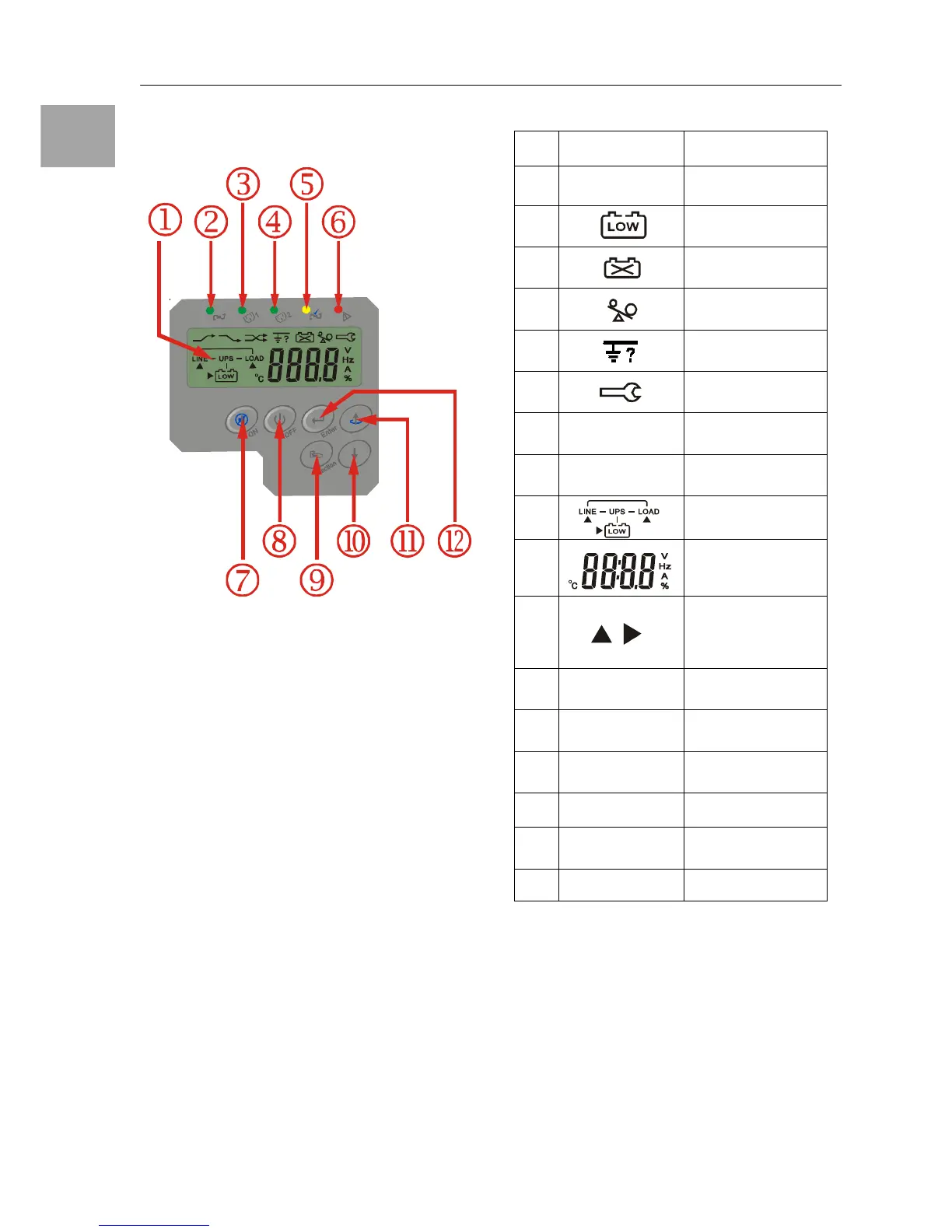
① LCD Display
② Green LED steadily lights up to indicate that
the Utility input voltage is within the window
(160Vac~288Vac).
③, ④Green LED lights up to indicate there is
an output available at the Programmable
Outlet 1 & Programmable Outlet 2.
⑤ Amber LED lights up to indicate the Bypass
Input is normal.
⑥ General Fault LED
⑦ UPS On/Alarm Silence
⑧ UPS OFF Switch
⑨ Special functions log in/out
⑩ Go to next page
⑪ Go to previous page or change the setting
of the UPS.
⑫ To re-confirm the change of UPS Setting
3.1.1. Symbols on the LCD Display Panel
Item Symbol Description
1
LINE
Utility or Bypass
Source
2
Battery Low
3
Battery Abnormal
4 UPS Overloading
5
Site Wiring Fault
6
UPS Working in
Service Mode
7
OFF
UPS Shutoff
8
FAIL
UPS Abnormal
Lock
9 UPS Flow Chart
10
4 Digits
Measurement
Display
11
Indicate the item
desired
to be measured
12
Er05
Battery Weak or
Dead
13
Er06
Output Short
Circuit
14
Er10
Inverter Over-
current
15
Er11
UPS Overheat
16
Er12
UPS Output
Overloading
17
Er**
Other Error Code


 To Next Page