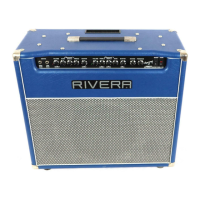
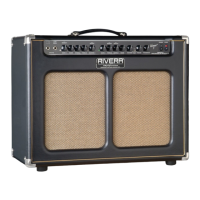
Need help?
Do you have a question about the Rivera R30-112 and is the answer not in the manual?
Explains the importance of a Rivera amp as a core component of a guitarist's sound and tone.
Highlights Rivera's dedication to using high-quality components and uncompromising construction for reliable performance.
Instructions for inspecting the amp upon arrival and instructions to save original packing materials for future use.
Details important safety symbols and warnings regarding hazardous voltages, moisture, and user-serviceable parts.
Guides users through essential visual checks of the amp's tubes, power cord, and front panel controls before plugging in.
Step-by-step instructions for plugging in the amp, guitar, and turning on the power and standby switches.
Explains the Volume knob's function in Channel 1, including its role in distortion and channel switching.
Details how the Bass, Middle, and Treble controls affect the tone shaping for Channel 1.
Describes the Master control's function for Channel 1, including the Pull Boost feature for added harmonics.
Introduces Channel 2 and explains the function of its Volume knob, similar to Channel 1.
Explains the Treble control for Channel 2, noting its 'Pull Bright' feature on specific models.
Details the Middle control with a notch switch and the Bass control for Channel 2.
Explains the Master control for Channel 2, including its Ninja Boost feature for increased sustain and power.
Describes the function of the Reverb and Presence controls, affecting overall tone and brightness.
Explains the operation of the Standby switch for tube warm-up and the main Power switch.
Details the Mains Input connector and the Mains Fuse specifications for the R30-112 and Chubster 40 models.
Provides Mains Fuse specifications for R55-112, Chubster 55, and R100-212 models, including replacement notes.
Details the High Tension (HT) Fuse specifications for various R Series models and replacement guidelines.
Guides connection of extension cabinets to the R30-112 and Chubster 40, specifying impedance and wattage.
Details connecting extension cabinets to Chubster 55, Suprema, and R55-112, specifying impedance and wattage.
Instructions for connecting extension cabinets to the R100-212, specifying impedance and wattage requirements.
Explains how to use the Line Out for connecting to other amplifiers, recorders, or mixers.
Describes the function of the Footswitch jack for controlling channels and boosts with the FS-7 footswitch.
Details how to use the Patch section for driving slave amps or accepting signals from other preamps.
Provides guidance on setting input and output levels for external signal processors connected to the amp.
Explains how to connect external effects processors using the amp's Effects Loop Send and Return jacks.
Guides users on adjusting Send and Return levels for optimal signal-to-noise ratio and tone with effects.
Provides details on the specific Celestion speakers used in various R Series amp models.
General advice on connecting the Rivera amp to other amplifiers, cabinets, and P.A. systems.
Instructions for connecting extension cabinets to Chubster 40 and R30-112, specifying impedance and power handling.
Instructions for connecting extension cabinets to Chubster 55, Suprema, and R55-112, specifying impedance and power handling.
Guides connection of a single extension cabinet to the R100-212, specifying impedance and power handling.
Details connecting two extension cabinets to the R100-212, specifying impedance and power handling.
Explains how to connect two amps in parallel without a Y-cord for simultaneous use.
Describes how to slave Chubster 55, Suprema, and R55-112 amps using the Line Out and Effects Loop Return.
Instructions for slaving Chubster 40 and R30-112 amps using the Patch section's Line Out or Effects Loop Return.
Details slaving Suprema, Chubster 55, and R55-112 amps via Line Out or Effects Loop Send/Return.
Explains routing signal processors through the Patch section's Preamp Out and Power Amp In.
Guides routing signal processors through the Effects Loop Send and Return jacks for Suprema/Chubster 55 models.
Instructions for sending the amp's signal directly to a mixer, recorder, or P.A. system via the Line Out.
Provides guidance on checking tubes for tightness, microphonics, and proper seating.
Emphasizes secure power cord connections and the benefit of letting the amp idle before playing.
Offers advice on cleaning the amp's exterior and preventing damage during transport or storage.
Troubleshooting steps for when the amplifier does not turn on, checking power sources and fuses.
Steps to diagnose and resolve issues where no sound is produced by the amplifier, checking cables and controls.
Guidance on diagnosing unexpected amp shutdowns, often related to overheating or internal fuses.
Identifies potential causes for unwanted distortion, including speaker issues, cables, and tubes.
Explains the role and location of preamp tubes (V1-V5) in the Chubster 40/R30-112.
Provides a detailed chart showing the location and type of tubes used in the Chubster 40 and R30-112 models.
Lists the location and type of tubes for Chubster 55, Suprema, and R55-112 amplifiers.
Discusses common tube types like EL-34 and 12AX7A, including manufacturers and grade selection.
Details the location and type of all tubes (preamp and power amp) used in the R100-212 model.
Briefly describes the specific role of each tube (V1-V9) within the R100-212 amplifier.
Explains how to identify and test for microphonic tubes, a common cause of ringing sounds.
Provides a step-by-step method for diagnosing and replacing problematic preamp tubes.
Guides on troubleshooting power tubes in Chubster 40 and R30-112, including fuse checks and replacement.
Troubleshooting power tubes for Suprema and Chubster 55 models, focusing on HT fuse and tube replacement.
Instructions for troubleshooting power tubes in the R100-212, including fuse checks and identifying faulty tubes.
Details the duration of the warranty for the amplifier, tubes, and loudspeaker drivers.
Outlines the user's responsibilities for warranty service, including proof of purchase and transportation.
Lists conditions and circumstances not covered by the warranty, such as misuse or unauthorized service.
 General
| Power Output | 30 Watts |
|---|---|
| Speaker Configuration | 1x12" |
| Channels | 2 |
| Effects | Reverb |
| EQ | 3-band EQ |
| Inputs | 1 x 1/4" |
| Outputs | Speaker Output |

 To Next Page