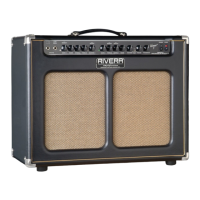
Need help?
Do you have a question about the Rivera Sedona and is the answer not in the manual?
Inspect for damage upon receipt and save packing materials for future shipping.
Warnings about dangerous voltages and no user-serviceable parts inside.
Avoid moisture, chassis removal, ensure correct voltage and connections.
Use correct fuse types and line cords for safe operation.
One-year warranty on defects, with exceptions for tubes and drivers.
Excludes damage from misuse, accidents, and cosmetic issues.
Excludes abuse, acts of God, and international terms may vary.
Check tube seating, speaker connections, and power cord before use.
Set controls low, engage power and standby switches correctly for first use.
Balanced/unbalanced input for mics, guitars, or instruments with balanced outputs.
Standard non-balanced input for electric and acoustic guitars.
Adjusts volume and adds gain; higher settings increase overdrive.
Controls treble frequencies and adds brightness when pulled.
Adjusts midrange and provides feedback reduction for acoustics.
Adjusts bass frequencies, impacting the tone's low-end foundation.
Adjusts volume and adds gain; higher settings increase overdrive.
Controls treble frequencies and adds brightness when pulled.
Adjusts midrange and provides feedback reduction for acoustics.
Adjusts bass frequencies, impacting the tone's low-end foundation.
Controls the spring reverb effect for both preamp channels.
Acts as a final brightness control for the overall tone.
Reduces resonant feedback on acoustic instruments by dipping frequencies.
Adjusts cut level and sweeps center frequencies to eliminate feedback.
Step-by-step guide to identifying and eliminating feedback frequencies.
Utilize the equalizer for additional tonal shaping and midrange adjustments.
Connects power cord; Mains Fuse protects against shorts and surges.
HT Fuse protects output tubes; Speaker 1 & Tweeter outputs for connecting speakers.
Allows connection of external signal processors for tone modification.
Guide to connecting and setting levels for external effects processors.
Provides a direct box output for recording or PA systems.
Two-way system with 12" driver and dome tweeter, 4kHz crossover.
Connecting to extension cabinets and slaving a second Sedona amplifier.
Connecting Sedona to another amp or power amp via Effects Loop Send.
Connecting external processors between Send and Return jacks for tone shaping.
Sending the Direct Output signal to mixers or recording gear.
Connecting two Sedonas for stereo operation with a signal processor.
Keep amp dry, handle with care, check tubes, ensure power cord is secure.
Clean exterior, allow amp to idle before playing, avoid storage on cabinet.
Checks for power connection, fuses, and power source issues.
Troubleshooting steps for no audio output, including cables and controls.
Checks for effects loop, speaker connections, and blown fuses.
Addresses thermal protection and overheating issues.
Identifies causes of distortion like speaker, cables, or tubes.
Warning about high-voltage hazard; procedure is for qualified personnel only.
Steps to measure DC idle current for EL-34 output tubes.
Adjusts bias potentiometer for correct idle current (75-90mA) for EL-34s.
Lists tube types and locations; how to identify microphonic tubes by tapping.
Procedure to find faulty preamp tubes by tapping and replacing.
Correct tube orientation, power tube replacement in pairs, and HT fuse check.
Gently tap tubes to identify ringing and wiggle to check socket connection.
Optional extension cabinet to enhance bass and volume.
High-quality, tested tubes for optimal amplifier performance.
Optional cable to extend footswitch reach.
Output impedance, power, voltage, speaker system details, crossover.
Dimensions, weight, cabinet thickness, covering, and cleaning advice.

 To Next Page
 General